
Bok's Banging Butterflies
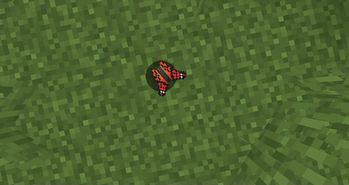
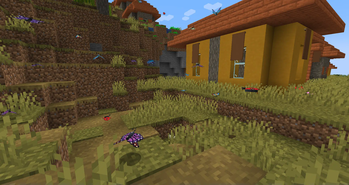
This mod adds butterflies with a full life cycle to the world of Minecraft. Butterflies can be caught or released using a butterfly net. Once caught, they can be bottled and placed in the world as decorative objects.
Screenshots
Über diese Mod
Bok's Banging Butterflies
This mod adds butterflies with a full life cycle to the world of Minecraft. It
features several butterfly species as well as several moth species. Most are
based on real-life butterflies but a few are pure fantasy creatures.
Features
Butterflies and Moths
There are several species of butterfly and moths in the mod, each with their
own design and behaviour. Some will be larger, some will move faster, some will
live longer than others. Some are dimorphic, some love apples, some will live
in wood or fruit.
Butterflies can be caught or released using a butterfly net. Once caught, they
can be bottled and placed in the world as decorative objects. They can also be
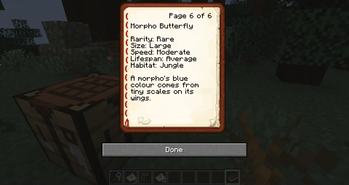
stored in a butterfly book where you can learn more about them.
Eggs
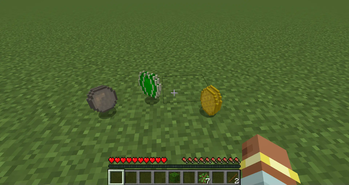
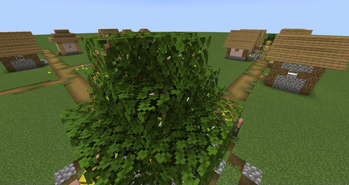
Butterflies will lay eggs in leaves if they get close to them. The eggs will
eventually hatch into caterpillars. If a player breaks the eggs, they will
drop. Players can then replant these eggs on other leaves.
Caterpillars
After living on the leaves for a short time, a caterpillar will eventually
build a chrysalis. If the caterpillars end up on any other block, they will
instead starve to death.
Players can pick up caterpillars and move them to other leaf blocks if they
wish.
Chrysalises
Built by caterpillars, these will eventually hatch into new butterflies within
the world. These cannot be moved by players and will be destroyed if they
attempt to do so.
Silk
Some moth cocoons will drop silk, which can be crafted into string or paper.
Unfortunately, this kills the moth.
Scrolls, Microscopes, and Books
Scrolls can be examined using the butterfly microscope, so you can learn more
about the various species. You can also use the microscope to place the scrolls
in a book, allowing the player to collect all the information in one place.
Jars
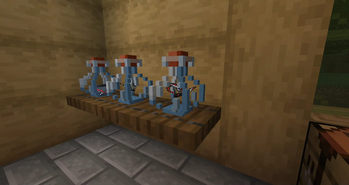
Butterflies and caterpillars can be placed into jars. These are decorative
items that can be placed in the world. Butterflies and caterpillars placed
this way will not die, lay eggs or create chrysalises.
If you want to get the butterfly or caterpillar back, they can be released by
using the bottle while not highlighting a block.
Flower Pollination
Butterflies will occasionally fly toward and pollinate flowers. This will spawn
flower buds that will eventually bloom into full flowers.
Breeding
Butterflies can be bred by players feeding them their favourite flower (or
other plant). You will need to learn what their favourite food is by studying
the butterfly book.
Server Config
There are now server config options to help manage butterfly growth. You can
find them in your world folder, under /serverconfig/butterflies-server.toml.
The available options are:
double_egg_chance: Defines the chance a butterfly has double the eggs
(default: 0.0625).
egg_limit: Defines how many eggs each butterfly can lay (default: 1).
max_density: Defines how many butterflies can be in a 32x32x32 region
before breeding is disabled. If set to zero, this is ignored (default: 16).
enable_lifespan: If set to TRUE butterflies will die naturally
(default: true).
enable_pollination: If set to TRUE butterflies will pollinate flowers and
cause them to spread (default: true)
Development Diary
Source Code
Verfügbare Versionen
Bok's Banging Butterflies auf dem Server installieren
Server bestellen
Bestelle einen Minecraft Java Server mit mindestens 3 GB RAM (4 GB empfohlen).
forge Loader setzen
Wähle im Panel unter "Egg" den forge-Loader und die passende Minecraft-Version (1.21.4).
Mod installieren
Öffne den Mod-Browser im Dashboard und suche nach "Bok's Banging Butterflies". Klicke "Installieren" – fertig! Alternativ: Lade die .jar via SFTP in den /mods Ordner.
Kompatibilität
Mod-Loader
Minecraft-Versionen
1.21.4, 1.21.1, 1.20.4 (+4 weitere)
Server-seitig
✓ ErforderlichEmpfohlener RAM
4 GB(min. 3 GB)Häufige Fragen
Bok's Banging Butterflies Server crasht beim Start – was tun?
Häufigste Ursache: falsche forge-Version oder zu wenig RAM. Prüfe im Server-Log (latest.log), ob ein "OutOfMemoryError" oder "Mixin"-Fehler auftritt. Bei Mado Hosting: Stelle sicher, dass mindestens 3 GB RAM zugewiesen sind und der Loader zur Mod-Version passt (1.21.4). Über das Panel kannst du den Loader mit einem Klick wechseln.
Ist Bok's Banging Butterflies mit forge und neoforge kompatibel?
Bok's Banging Butterflies unterstützt offiziell forge, neoforge für Minecraft 1.21.4, 1.21.1, 1.20.4. Im Mado Dashboard werden inkompatible Loader-Kombinationen automatisch erkannt.
Server laggt mit Bok's Banging Butterflies – wie optimiere ich die Performance?
Empfohlener RAM: 4 GB (+1 GB pro 8 Spieler). Prüfe mit /spark profiler, ob Bok's Banging Butterflies den meisten Tick-Time verbraucht. Häufige Fixes: Server-View-Distance auf 8-10 reduzieren, bei Forge "performant" oder "starlight" als Zusatz-Mod installieren. Bei Mado Hosting läuft dein Server auf NVMe-SSDs mit dedizierten CPU-Kernen für minimale Latenz.
Ähnliche Mods

![[ETF] Entity Texture Features](https://cdn.modrinth.com/data/BVzZfTc1/af683d206d50b05258d865b0d6e4aa2f2cee12f2_96.webp)
![[EMF] Entity Model Features](https://cdn.modrinth.com/data/4I1XuqiY/6e5bbd0d06b1741bfdab6c0cfab6de8fdaf0064c_96.webp)



Modded Server mieten
Installiere Bok's Banging Butterflies mit nur einem Klick auf deinem Server.