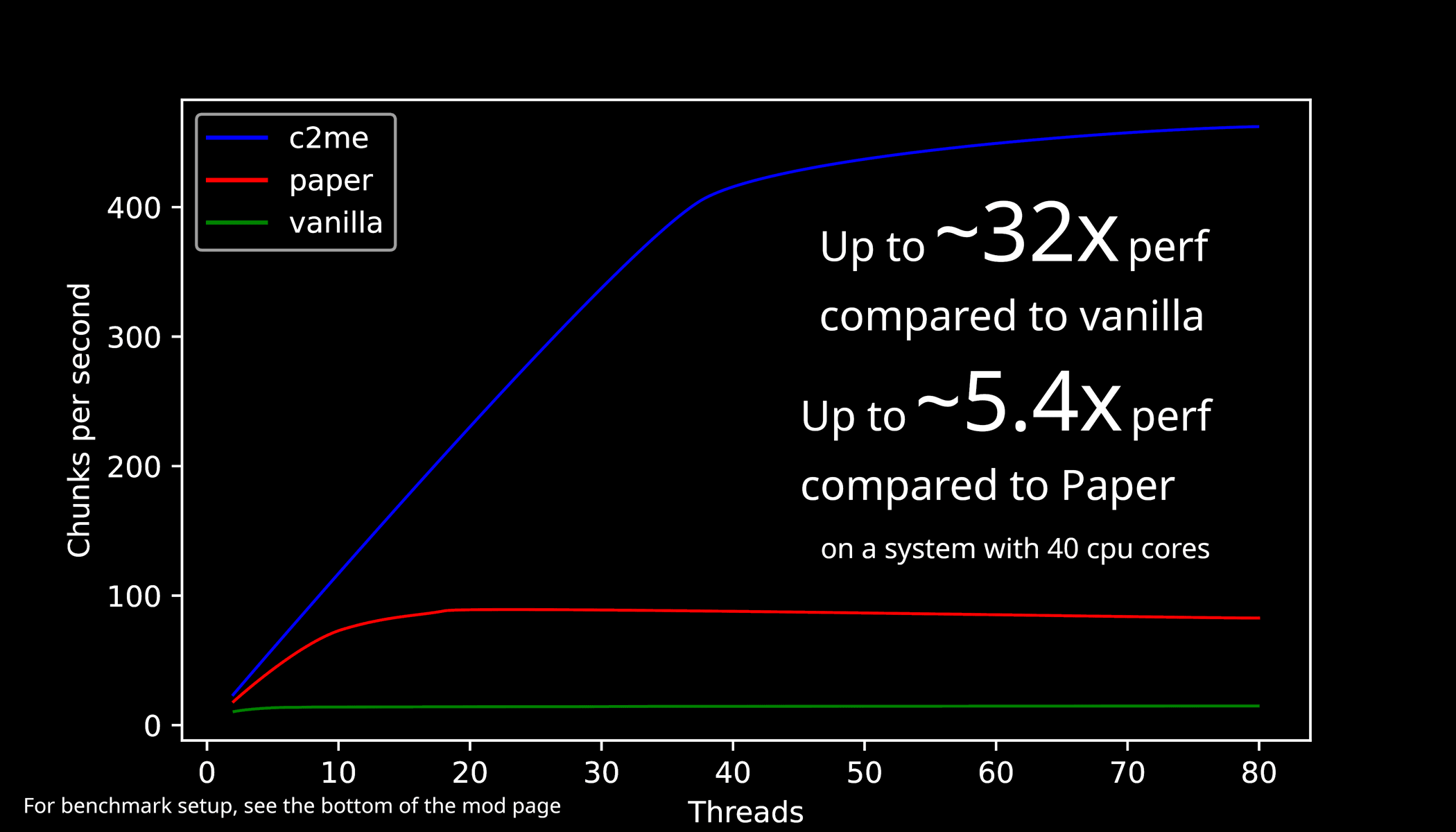

Modrinth · Fabric
Concurrent Chunk Management Engine (Fabric) auf deinem Minecraft Server
Concurrent Chunk Management Engine (Fabric) läuft auf Minecraft Servern mit Fabric. Bestell deinen Server, stell den Loader im Panel ein und installiere die Mod mit einem Klick im Mod-Browser.
A Fabric mod designed to improve the chunk performance of Minecraft.
- Downloads
- 42.3M
- Autor
- ishland
- Loader
- Fabric
- Minecraft
- 1.17.1 – 26.3
- Aktualisiert
- –
Screenshots
So sieht Concurrent Chunk Management Engine (Fabric) aus
Bilder: Concurrent Chunk Management Engine (Fabric) auf Modrinth, vom Projektteam veröffentlicht.
Einrichtung
Concurrent Chunk Management Engine (Fabric) auf dem Server installieren
Server und Spieler brauchen denselben Loader und dieselbe Minecraft-Version. Sichere die Welt, bevor du Mods hinzufügst oder aktualisierst.
- 01
Konfigurieren
4 GB RAM sind vorausgewählt. Laufzeit und Add-ons wählst du selbst, bezahlt wird per Kreditkarte oder PayPal.
- 02
Loader einstellen
Stell im Panel die Serversoftware auf Fabric und wähl die passende Minecraft-Version, zum Beispiel 26w14a.
- 03
Mod installieren
Such im Mod-Browser nach „Concurrent Chunk Management Engine (Fabric)“ und installiere die Version für deinen Loader. Alternativ lädst du die .jar per SFTP in den Ordner mods. Erforderliche Abhängigkeiten stehen auf der Projektseite.
- 04
Verbinden
Concurrent Chunk Management Engine (Fabric) ist auf dem Client optional. Spieler verbinden sich über die Serveradresse aus dem Panel.
- Auf dem Server
- Erforderlich
- Auf dem Client
- Optional
- Loader
- Fabric
- Minecraft
- 26w14a, 26.4-snapshot-9, 26.4-snapshot-8 +268 weitere
- Lizenz
- GNU Lesser General Public License v3.0 only
Das Panel
Mods installieren, Fehler finden.
Echte Screenshots aus dem Mado Panel. Beides ist bei jedem Minecraft Server enthalten.
Mod-Browser
Modrinth und CurseForge direkt im Panel.
Der Browser filtert nach deiner Minecraft-Version. Mods installierst du mit einem Klick, ohne .jar-Dateien hochzuladen.

KI-Crash-Analyse
Wenn ein Mod crasht, liest die Analyse das Log.
Mods scheitern oft an einer falschen Loader-Version, Java-Version oder fehlenden Abhängigkeit. Die Analyse nennt eine wahrscheinliche Ursache und einen Lösungsvorschlag.

Versionen
Veröffentlichte Versionen
Nimm die Datei, die zu Loader und Minecraft-Version deines Servers passt. Server und Spieler brauchen dieselbe Version.
Concurrent Chunk Management Engine (Fabric) · ModrinthOriginalbeschreibung des Projektautors
Concurrent Chunk Management Engine (Fabric)
A Fabric mod designed to improve the chunk performance of Minecraft.
Looking for NeoForge versions?
Looking for experimental hardware-accelerated world generation as well?
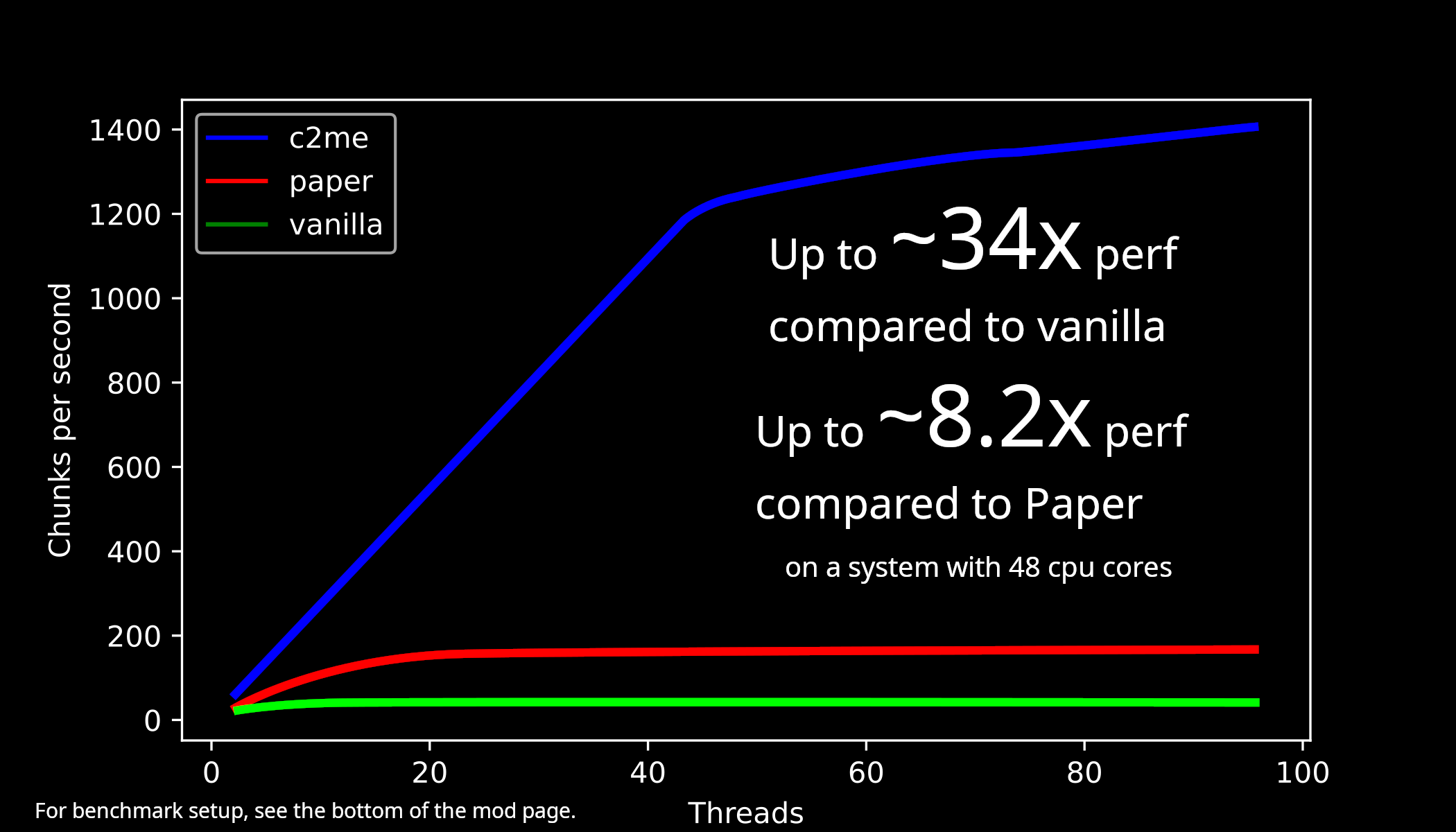
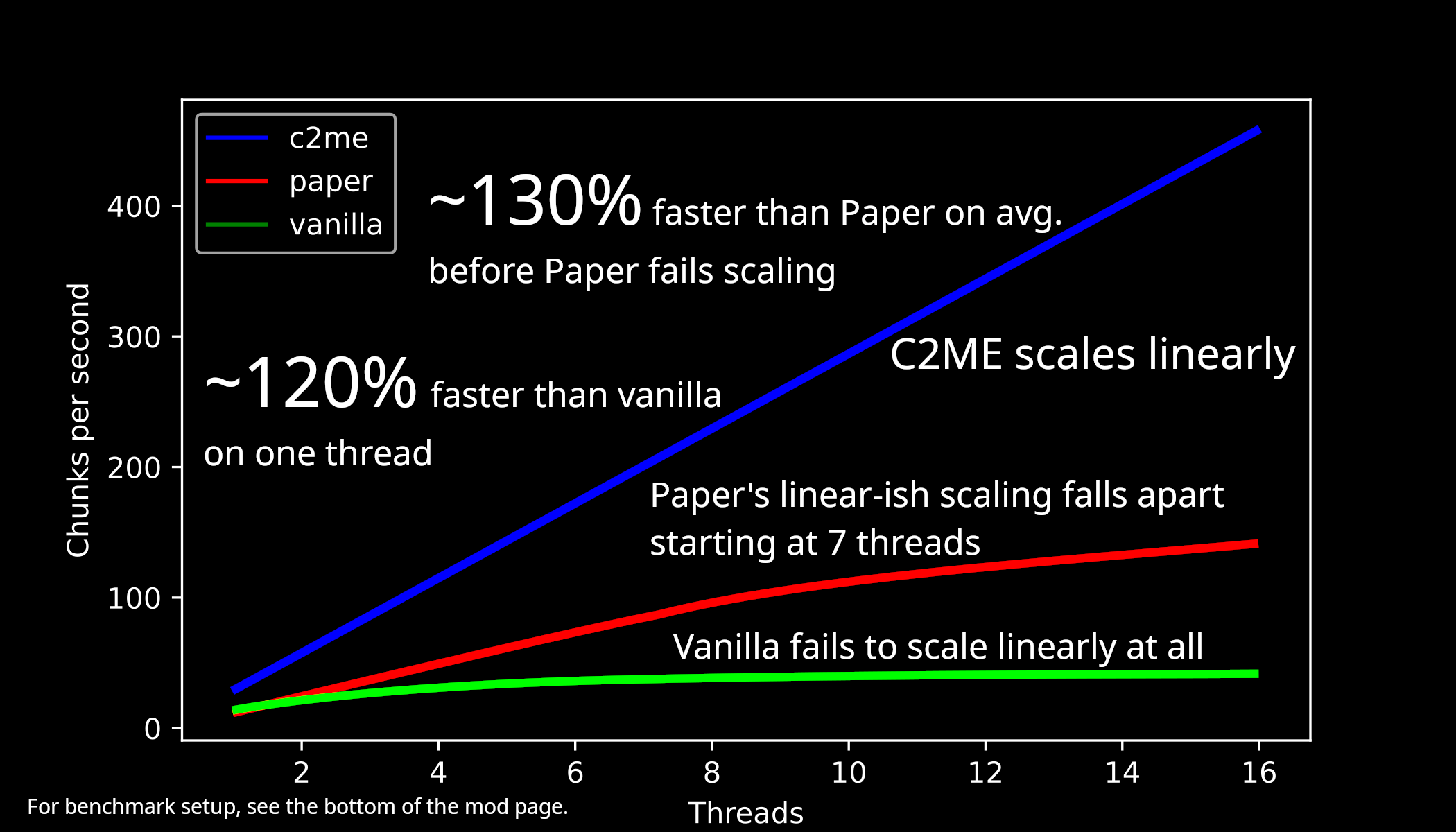
Benchmarks for 26.2 w/ Terratonic + Terralith (Aug 14th, 2026)
| 2t-96t | 1t-16t |
|---|---|
 |
 |
So what is C2ME?
C^2M-Engine, or C2ME for short, is a Fabric mod designed to improve the performance of chunk generation, I/O, and loading. This is done by taking advantage of multiple CPU cores in parallel. For the best performance it is recommended to use C2ME with Lithium and ScalableLux.
What does C2ME stand for?
Concurrent chunk management engine, it's about making the game better threaded and more scalable in regard to world gen and chunk io performance.
Vanilla parity
C2ME does not sacrifice vanilla functionality or behavior, or alter the vanilla world generation in the name of raw speed by default.
However, due to the non-determinism of vanilla world generation, worlds will vary
significantly run-to-run even with the same seed. This is not a bug on our side.
While we carefully check that we do not modify any vanilla behavior, bugs are unavoidable after all.
So, if you do encounter an issue where C2ME deviates from the intended vanilla behavior, don't hesitate to open an issue.
Mod and Datapack compatibility
World generation datapacks that can run on vanilla Minecraft are fully supported.
Custom world generators implemented in mods usually runs well, but may cause compatibility issues due to certain
design assumption used by mod authors being broken for further speedups of world generation.
As a world generation mod author, if you find your mod broken, don't hesitate to look for help in our discord server (linked below).
We are willing to help mod authors to embrace scalable world generation.
Undefined behavior sanitization
C2ME includes CheckedThreadLocalRandom for world random (included in UWRAD) plus a few others.
These detections exist to prevent mods from screwing up Minecraft internals and causing undebuggable problems.
The detection should almost never produce false positives, and should be taken seriously and reported
to corresponding mod authors instead.
Usage notice
Backup your worlds and practice good game modding skills.
Support status for Minecraft versions
Only the latest Minecraft release and the latest Minecraft snapshot are fully supported.
Older Minecraft releases are in long-term support and will receive critical bug fixes.
Older Minecraft snapshots are not supported.
Support
Our issue tracker: link
Our discord server: link
More information
Check out the README.md here: https://github.com/RelativityMC/C2ME-fabric
Previous benchmarks
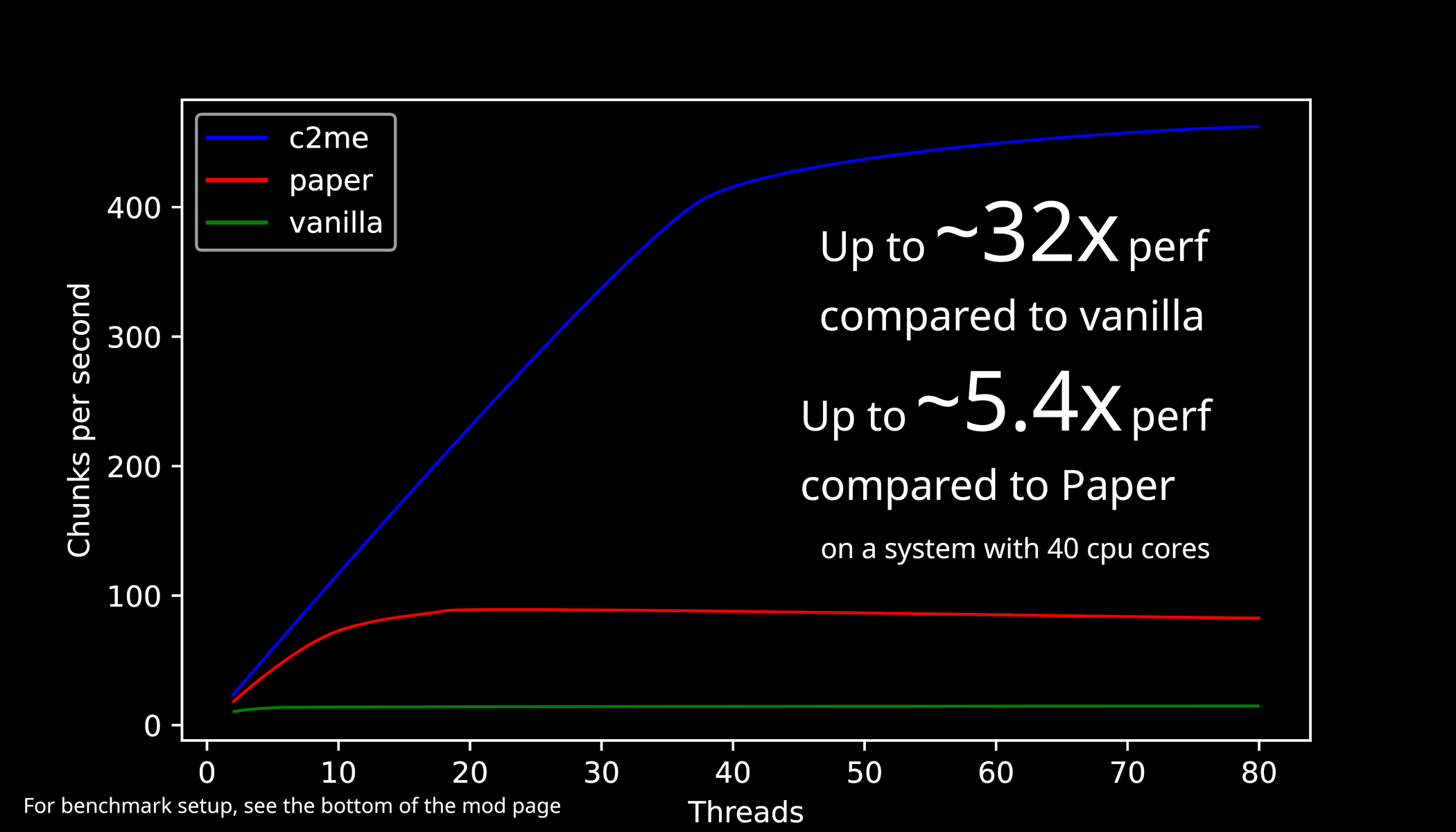
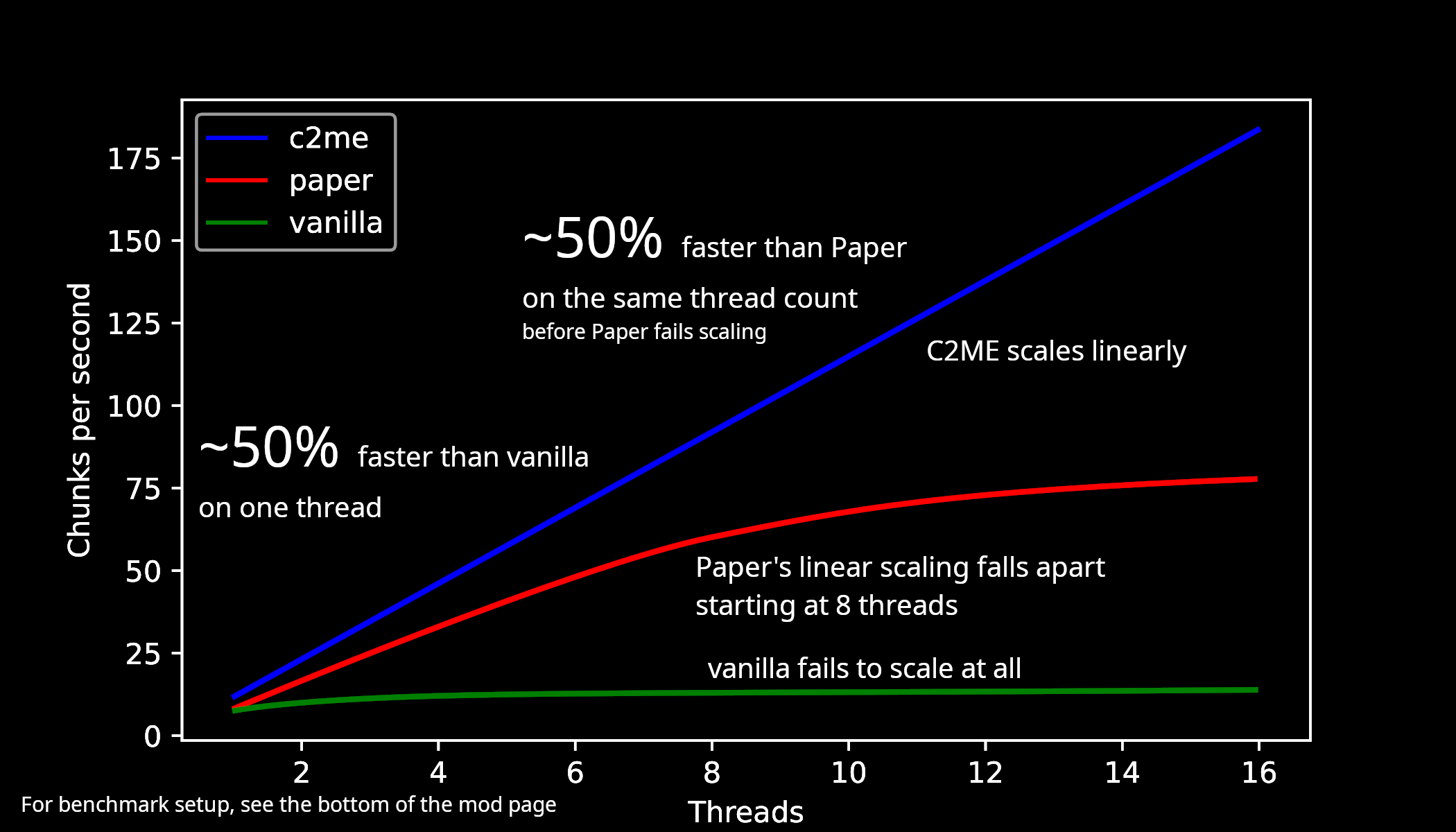
Benchmarks for 1.21.10 w/ Terralith (Nov 21, 2025)
| 2t-80t | 1t-16t |
|---|---|
 |
 |
Footnotes: https://gist.github.com/ishland/6eb0dd0af4216ffffd340ea994dc5796
Benchmarks for 1.21.3 (Nov 24, 2024)
| 2t-80t | 1t-10t |
|---|---|
 |
 |
Footnotes: https://gist.github.com/ishland/9601a033afad4be5b17ffaed859577fd
Footnotes
Footnotes for benchmarks
Benchmark setup
All benchmark done with single-socket Intel(R) Xeon(R) Platinum 8558P limited to 3.2GHz max, on Debian 13.
openjdk version "26.0.2" 2026-07-21
OpenJDK Runtime Environment Temurin-26.0.2+10 (build 26.0.2+10)
OpenJDK 64-Bit Server VM Temurin-26.0.2+10 (build 26.0.2+10, mixed mode)
Datapack used:terratonic-3.0.27.zip,Terralith_26.2_v2.6.4.zip
C2ME benchmark
Fabric mods used for C2ME benchmark:
c2me-fabric-mc26.2-0.4.2-alpha.0.41.jar
Chunky-Fabric-1.5.3.jar
fabric-api-0.157.0+26.2.jar
lithium-fabric-0.25.3+mc26.2.jar
ScalableLux-fabric-0.3.0-alpha.0.3-all.jar
spark-1.10.173-fabric.jar
vmp-fabric-mc26.2-0.2.0+beta.7.236-all.jar
zfastnoise-1.0.40+26.2.jar
Changed settings (c2me.toml):
globalExecutorParallelismset to thread count
Paper benchmark
Paper used: paper-26.2-112.jar
Paper plugin used: Chunky-Bukkit-1.5.3.jar
Changed settings (paper-global.yml):
worker-pool.io-threads = 4worker-pool.worker-threadsset to thread count
Vanilla benchmark
Fabric mods used for vanilla benchmark:
Chunky-Fabric-1.5.3.jar
fabric-api-0.157.0+26.2.jar
spark-1.10.173-fabric.jar
Vanilla test uses a patched Chunky to force chunks to unload in order to avoid crashes during benchmark.
Extra JVM flags: -Dmax.bg.threads= set to thread count
All benchmarks are run on tmpfs, on overworld, with world folder emptied before each JVM execution.
Seed: 114862964781274189force-load-existing-chunks is turned on in Chunky config.
2-96 threads benchmark
JVM flags: -Xmx32G -Xms32G -Xss4m -Xshare:off -XX:+DisableExplicitGC -XX:+UseNUMA -XX:+UseZGC -XX:-ZUncommit -XX:+UseLargePages -XX:+UseTransparentHugePages -XX:+UseCompactObjectHeaders -XX:+UnlockExperimentalVMOptions -XX:-OmitStackTraceInFastThrow -XX:+AlwaysPreTouch -XX:+UnlockDiagnosticVMOptions -XX:+DebugNonSafepoints -XX:+ExitOnOutOfMemoryError -Dchunky.maxWorkingCount=256
Warmup phase: 2048 block radius with 0 0 as center (data discarded)
Measurement phase: 6144 block radius with 1000000 1000000 as center (591361 chunks in total)
| Thread count | C2ME cps | Paper cps | Vanilla cps |
|---|---|---|---|
| 2 | 55.11 | 24.22 | 20.43 |
| 4 | 110.41 | 49.28 | 29.35 |
| 6 | 166.07 | 71.66 | 33.39 |
| 8 | 219.92 | 92.86 | 36.80 |
| 10 | 274.67 | 110.43 | 37.15 |
| 12 | 329.63 | 125.05 | 39.65 |
| 14 | 384.75 | 133.76 | 39.82 |
| 16 | 436.43 | 144.52 | 39.98 |
| 18 | 490.76 | 149.11 | |
| 20 | 546.04 | 154.36 | |
| 22 | 601.59 | 151.71 | |
| 24 | 658.53 | 155.99 | |
| 26 | 710.77 | 158.12 | |
| 28 | 756.22 | 162.46 | |
| 30 | 812.31 | 169.11 | |
| 32 | 867.10 | 169.11 | |
| 34 | 914.00 | 165.42 | |
| 36 | 975.84 | 160.83 | |
| 38 | 1037.48 | 161.13 | |
| 40 | 1099.18 | 153.36 | |
| 42 | 1130.71 | 156.98 | |
| 44 | 1143.83 | 164.72 | |
| 46 | 1199.52 | 162.77 | |
| 48 | 1244.97 | 157.65 | |
| 50 | 1258.21 | 161.27 | |
| 52 | 1260.90 | 160.96 | |
| 54 | 1274.48 | 158.80 | |
| 56 | 1288.37 | 157.99 | |
| 58 | 1294.01 | 155.91 | |
| 60 | 1294.01 | 161.53 | |
| 62 | 1308.32 | 159.18 | |
| 64 | 1320.00 | 163.22 | |
| 66 | 1334.90 | 161.57 | |
| 68 | 1337.92 | 164.04 | |
| 70 | 1334.90 | 169.64 | |
| 72 | 1365.73 | 169.69 | |
| 74 | 1344.00 | 168.96 | |
| 76 | 1347.06 | 169.98 | |
| 78 | 1384.92 | 165.83 | |
| 80 | 1368.89 | 163.86 | |
| 82 | 1398.02 | 163.54 | |
| 84 | 1401.33 | 167.86 | |
| 86 | 1381.68 | 168.91 | |
| 88 | 1375.26 | 167.48 | |
| 90 | 1394.72 | 169.06 | |
| 92 | 1398.02 | 169.98 | |
| 94 | 1375.26 | 168.38 | |
| 96 | 1381.68 | 166.58 | 41.99 |
1-16 threads benchmark
JVM flags: -Xmx16G -Xms16G -Xss4m -Xshare:off -XX:+DisableExplicitGC -XX:+UseNUMA -XX:+UseZGC -XX:-ZUncommit -XX:+UseLargePages -XX:+UseTransparentHugePages -XX:+UseCompactObjectHeaders -XX:+UnlockExperimentalVMOptions -XX:-OmitStackTraceInFastThrow -XX:+AlwaysPreTouch -XX:+UnlockDiagnosticVMOptions -XX:+DebugNonSafepoints -XX:+ExitOnOutOfMemoryError -Dchunky.maxWorkingCount=256
Warmup phase: 1536 block radius with 0 0 as center (data discarded)
Measurement phase: 3072 block radius with 1000000 1000000 as center (148225 chunks in total)
| Thread count | C2ME cps | Paper cps | Vanilla cps |
|---|---|---|---|
| 1 | 29.06 | 12.82 | 13.22 |
| 2 | 57.25 | 25.77 | 21.57 |
| 3 | 85.68 | 38.29 | 26.98 |
| 4 | 115.08 | 50.55 | 30.12 |
| 5 | 144.05 | 61.73 | 33.73 |
| 6 | 172.56 | 74.15 | 35.53 |
| 7 | 203.05 | 84.65 | 37.17 |
| 8 | 228.74 | 93.52 | 38.88 |
| 9 | 257.78 | 103.44 | 39.82 |
| 10 | 287.26 | 111.95 | 39.02 |
| 11 | 316.04 | 118.39 | 39.04 |
| 12 | 344.71 | 123.73 | 38.72 |
| 13 | 373.36 | 130.59 | 40.16 |
| 14 | 404.99 | 134.14 | 40.52 |
| 15 | 430.89 | 133.54 | 40.60 |
| 16 | 458.90 | 142.25 | 41.98 |
Concurrent Chunk Management Engine (Fabric) Server crasht beim Start – was tun?
Häufige Ursachen: Loader- oder Minecraft-Version passen nicht zur Mod-Datei, eine Abhängigkeit fehlt oder der RAM reicht nicht. Such im Log (latest.log) nach „OutOfMemoryError“, „Mixin“ oder fehlenden Mods. Bei Mado wertet die KI-Crash-Analyse das Log aus und schlägt eine Ursache vor. Loader und Version änderst du im Panel.
Mit welchem Loader läuft Concurrent Chunk Management Engine (Fabric)?
Laut Modrinth unterstützt Concurrent Chunk Management Engine (Fabric) Fabric für Minecraft 26w14a, 26.4-snapshot-9, 26.4-snapshot-8.
Wie viel RAM braucht ein Server mit Concurrent Chunk Management Engine (Fabric)?
Als Orientierung 3–4 GB für einen Server mit dieser Mod. Das ist eine Schätzung, keine gemessene Mindestanforderung. Weitere Mods, viele Spieler und große Sichtweiten brauchen mehr. Ob eine Mod die Tick-Zeit belastet, siehst du mit dem spark-Profiler.
Ähnliche Mods
Beliebte Mods aus derselben Kategorie
 Nur Client

Sodium
von jellysquid3
A high-performance rendering engine replacement for Minecraft, which greatly improves frame rates and reduces micro-stutter.
 Nur Client

Iris Shaders
von coderbot
A modern shader pack loader for Minecraft intended to be compatible with existing OptiFine shader packs
 Nur Client

Entity Culling
von tr7zw
Using async path-tracing to hide Block-/Entities that are not visible
 Server-fähig

FerriteCore
von malte0811
Memory usage optimizations
Bereit für deinen Server mit Concurrent Chunk Management Engine (Fabric)?
4 GB RAM ab 8,00 € im Monat. 35 % auf den 1. Monat mit MADO35.