
Caelum - ArdaCraft Edition
More realistic celestial bodies movement and stars ported to Fabric for ArdaCraft
Screenshots


Über diese Mod
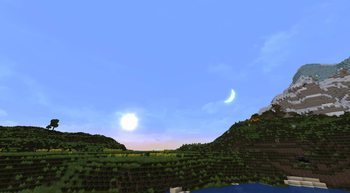
Caelum changes the look and position of stars and celestial bodies in Minecraft.
The original mod was made by Nuparu00 and can be found here. The original source code and full feature list can be found there as well.
This version of the mod is ported to work with Minecraft version 1.19.2 and is based on the Fabric port by jmb05 which can be found here for newer versions of Minecraft.
Caelum - ArdaCraft Edition maintains the spirit of the original mod while adjusting some key features for use on ArdaCraft. The full list of changes are as follows:
- Star rendering adjusted to use a texture and more realistic colors (caelum:skybox/stars.png).
- The position of stars has been re-calculated from the original stellar data to take into account each star's proper motion so they appear in the night sky approximately as they would in the time period of Arda.
- The position of the Sun is now approximated for both player latitude and the axial tilt of the Earth for solstices and equinoxes and adjusted for precession of the Earths axis based on this model.
- Added extra layers to the skybox render, allowing for clouds and other overlays (caelum:skybox/clouds.png).
- Added conditional skybox and fog rendering for Moria on ArdaCraft.
This mod depends on FabricSkyBoxes and Iris Shaders. Some shaders support the custom Sun and Moon positions if they use the proper methods provided by Iris; however, each shader implementation is different, so your mileage may vary.
Verfügbare Versionen
Caelum - ArdaCraft Edition auf deinem Client installieren
Mod-Loader lokal installieren
Installiere fabric für deine lokale Minecraft-Version.
Passende Datei herunterladen
Wähle die Caelum - ArdaCraft Edition-Datei für fabric und Minecraft 1.20.1.
Mod installieren
Lege die .jar-Datei in deinem lokalen .minecraft/mods-Ordner ab und starte Minecraft neu. Eine Installation auf dem Server ist nicht nötig.
Kompatibilität
Mod-Loader
Minecraft-Versionen
1.20.1, 1.19.2
Server-seitig
✗ Nicht unterstütztEmpfohlener RAM
4 GB(min. 3 GB)Häufige Fragen
Muss Caelum - ArdaCraft Edition auf dem Minecraft Server installiert werden?
Nein. Modrinth kennzeichnet Caelum - ArdaCraft Edition serverseitig als nicht unterstützt. Installiere die Mod nur im lokalen Minecraft-Mods-Ordner. Dein Server kann unverändert bleiben, sofern die Mod-Seite keine zusätzliche Abhängigkeit nennt.
Welche Version und welchen Loader braucht Caelum - ArdaCraft Edition?
Nutze eine Datei für fabric und exakt deine Minecraft-Version. Unterstützte Versionen sind unter anderem 1.20.1, 1.19.2. Loader-Dateien sind nicht untereinander austauschbar.
Caelum - ArdaCraft Edition funktioniert nicht – was kann ich prüfen?
Prüfe zuerst Minecraft-Version, Loader-Version und erforderliche Abhängigkeiten. Lege die .jar-Datei im lokalen .minecraft/mods-Ordner ab und entferne ältere Duplikate. Da die Mod clientseitig ist, löst mehr Server-RAM dieses Problem nicht.
Ähnliche Mods





Minecraft Server für deine Gruppe
Caelum - ArdaCraft Edition bleibt auf deinem Client. Hoste dazu eine kompatible Welt für deine Mitspieler.