
Caelum - ArdaCraft Edition
More realistic celestial bodies movement and stars ported to Fabric for ArdaCraft
Screenshots


About this Mod
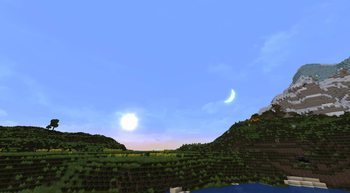
Caelum changes the look and position of stars and celestial bodies in Minecraft.
The original mod was made by Nuparu00 and can be found here. The original source code and full feature list can be found there as well.
This version of the mod is ported to work with Minecraft version 1.19.2 and is based on the Fabric port by jmb05 which can be found here for newer versions of Minecraft.
Caelum - ArdaCraft Edition maintains the spirit of the original mod while adjusting some key features for use on ArdaCraft. The full list of changes are as follows:
- Star rendering adjusted to use a texture and more realistic colors (caelum:skybox/stars.png).
- The position of stars has been re-calculated from the original stellar data to take into account each star's proper motion so they appear in the night sky approximately as they would in the time period of Arda.
- The position of the Sun is now approximated for both player latitude and the axial tilt of the Earth for solstices and equinoxes and adjusted for precession of the Earths axis based on this model.
- Added extra layers to the skybox render, allowing for clouds and other overlays (caelum:skybox/clouds.png).
- Added conditional skybox and fog rendering for Moria on ArdaCraft.
This mod depends on FabricSkyBoxes and Iris Shaders. Some shaders support the custom Sun and Moon positions if they use the proper methods provided by Iris; however, each shader implementation is different, so your mileage may vary.
Available Versions
How to Install Caelum - ArdaCraft Edition on Your Client
Install the Mod Loader Locally
Install fabric for your local Minecraft version.
Download the Matching File
Choose the Caelum - ArdaCraft Edition file for fabric and Minecraft 1.20.1.
Install Mod
Place the .jar file in your local .minecraft/mods folder and restart Minecraft. No server-side installation is required.
Compatibility
Mod Loaders
Minecraft Versions
1.20.1, 1.19.2
Server-side
✗ UnsupportedRecommended RAM
4 GB(min. 3 GB)Frequently Asked Questions
Does Caelum - ArdaCraft Edition need to be installed on the Minecraft server?
No. Modrinth marks Caelum - ArdaCraft Edition as unsupported on the server side. Install it only in your local Minecraft mods folder. Your server can remain unchanged unless the mod page lists an additional dependency.
Which version and loader does Caelum - ArdaCraft Edition require?
Use a file for fabric and your exact Minecraft version. Supported versions include 1.20.1, 1.19.2. Files for different loaders are not interchangeable.
Caelum - ArdaCraft Edition is not working – what should I check?
First check the Minecraft version, loader version and required dependencies. Put the .jar file in your local .minecraft/mods folder and remove older duplicates. Because this mod is client-side, adding server RAM will not fix it.
Similar Mods





Minecraft Server for Your Group
Caelum - ArdaCraft Edition stays on your client. Host a compatible world for your group.