Chest Colorizer
Color-code your chests to easily distinguish between different types of items stored in them
Screenshots
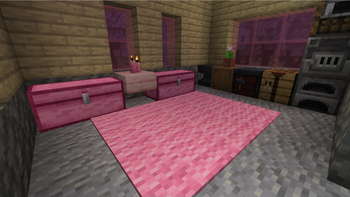
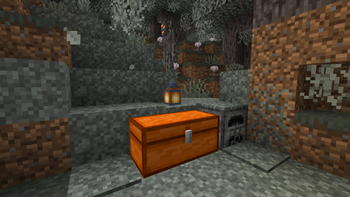
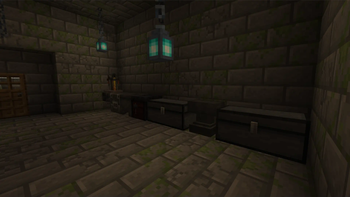
Über diese Mod
Chest Colorizer


Color-code your chests and barrels to easily distinguish between different types of items stored in them. With this mod, you can use a variety of dyes to assign a specific color to a chest, making it easy to identify what's inside with just a quick glance. Works on all servers!
📁 Installation
- Download and install Fabric for Minecraft 26.2.
- Download Chest Colorizer mods.
- Place the downloaded mod file in the "mods" folder located in your Minecraft game directory.
- Launch Minecraft with the Fabric mod loader and enjoy the mod!
⚙️ Usage
- Place a chest in the game world.
- Right-click the chest with a dye to color-code the chest. The color of the dye will be applied to the chest.
- To clear the color of a chest, right-click the chest with paper.
Note: Chest colors are saved on the client-side and will not be visible to other players.
✉️ Feedback and Support

If you encounter any issues while using the BindCommands mod or have any suggestions for improvement, please feel free to open an issue on the mod's GitHub page or visit our Discord. We appreciate any and all feedback!
🔧 Compatibility
Chest Colorizer has been tested to work with Sodium. However, it is not compatible with Enhanced Block Entities, and users have reported issues when trying to use these mods together. If you experience any compatibility problems with other mods, please open an issue on our GitHub page.
Verfügbare Versionen
Chest Colorizer auf deinem Client installieren
Mod-Loader lokal installieren
Installiere fabric für deine lokale Minecraft-Version.
Passende Datei herunterladen
Wähle die Chest Colorizer-Datei für fabric und Minecraft 26.2.
Mod installieren
Lege die .jar-Datei in deinem lokalen .minecraft/mods-Ordner ab und starte Minecraft neu. Eine Installation auf dem Server ist nicht nötig.
Kompatibilität
Mod-Loader
Minecraft-Versionen
26.2, 26.1.2, 26.1.1 (+26 weitere)
Server-seitig
✗ Nicht unterstütztEmpfohlener RAM
4 GB(min. 3 GB)Häufige Fragen
Muss Chest Colorizer auf dem Minecraft Server installiert werden?
Nein. Modrinth kennzeichnet Chest Colorizer serverseitig als nicht unterstützt. Installiere die Mod nur im lokalen Minecraft-Mods-Ordner. Dein Server kann unverändert bleiben, sofern die Mod-Seite keine zusätzliche Abhängigkeit nennt.
Welche Version und welchen Loader braucht Chest Colorizer?
Nutze eine Datei für fabric und exakt deine Minecraft-Version. Unterstützte Versionen sind unter anderem 26.2, 26.1.2, 26.1.1. Loader-Dateien sind nicht untereinander austauschbar.
Chest Colorizer funktioniert nicht – was kann ich prüfen?
Prüfe zuerst Minecraft-Version, Loader-Version und erforderliche Abhängigkeiten. Lege die .jar-Datei im lokalen .minecraft/mods-Ordner ab und entferne ältere Duplikate. Da die Mod clientseitig ist, löst mehr Server-RAM dieses Problem nicht.
Ähnliche Mods

![[ETF] Entity Texture Features](https://cdn.modrinth.com/data/BVzZfTc1/af683d206d50b05258d865b0d6e4aa2f2cee12f2_96.webp)
![[EMF] Entity Model Features](https://cdn.modrinth.com/data/4I1XuqiY/6e5bbd0d06b1741bfdab6c0cfab6de8fdaf0064c_96.webp)



Minecraft Server für deine Gruppe
Chest Colorizer bleibt auf deinem Client. Hoste dazu eine kompatible Welt für deine Mitspieler.