
Chestpack Backpacks
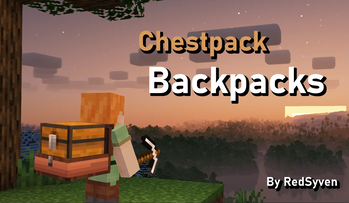
Simple, vanilla friendly backpacks. Pick up and carry chests!
Screenshots
Über diese Mod
Chestpack Backpacks
This project adds simple, vanilla friendly backpacks to Minecraft.
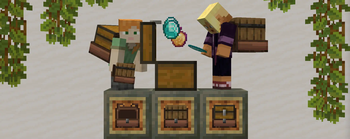
These backpacks, also known as Chestpacks, lets players pick up and carry chests!
Chestpacks offer an intuitive storage solution with early-midgame accessibility.
OVERVIEW
• Recipe: 1 Leather + 1 String + 1 Saddle + 1 Plank
----
• Left-Click a chest with an empty Chestpack to pick it up. Right-Click the ground to place the chest back down.
• The Chestpack can pick up the following containers: trapped chests, barrels, and chests.
• Chest slot full? Don't worry - the Chestpack's still got your back! Since it's an offhand equipment, there's no need to sacrifice protection.
• Built to last - Chestpacks are fireproof!
Burden Mechanic
• Holding more than one loaded chestpack will burden players with their weight!
---- ### Why a Datapack?
This project uses a datapack to ensure:
• No Mods Required ✅: Works on vanilla servers! Friends can join hassle-free. Once the datapack/mod is installed by the host, no client installations are needed.
• Compatability ✅: Will work with practically any mod!
• Lightweight ✅: Minimal performance impact compared to mods.
However, due to limitations of datapacks, there are a couple constraints:
• Creative Mode Pickup ⛔: Chest pickup does not work in Creative Mode. Players have to be in Survival.
• Model Alignment ⛔: Datapacks can’t fully customize entity models. Chestpack models are anchored to the arm; This means it won't align to the player's back during fast movement.
Verfügbare Versionen
Chestpack Backpacks auf dem Server installieren
Server bestellen
Bestelle einen Minecraft Java Server mit mindestens 3 GB RAM (4 GB empfohlen).
datapack Loader setzen
Wähle im Panel unter "Egg" den datapack-Loader und die passende Minecraft-Version (1.21.5).
Mod installieren
Öffne den Mod-Browser im Dashboard und suche nach "Chestpack Backpacks". Klicke "Installieren" – fertig! Alternativ: Lade die .jar via SFTP in den /mods Ordner.
Kompatibilität
Mod-Loader
Minecraft-Versionen
1.21.5, 1.21.4, 1.21.1 (+1 weitere)
Server-seitig
✓ ErforderlichEmpfohlener RAM
4 GB(min. 3 GB)Häufige Fragen
Chestpack Backpacks Server crasht beim Start – was tun?
Häufigste Ursache: falsche datapack-Version oder zu wenig RAM. Prüfe im Server-Log (latest.log), ob ein "OutOfMemoryError" oder "Mixin"-Fehler auftritt. Bei Mado Hosting: Stelle sicher, dass mindestens 3 GB RAM zugewiesen sind und der Loader zur Mod-Version passt (1.21.5). Über das Panel kannst du den Loader mit einem Klick wechseln.
Ist Chestpack Backpacks mit datapack und fabric und forge und neoforge und quilt kompatibel?
Chestpack Backpacks unterstützt offiziell datapack, fabric, forge, neoforge, quilt für Minecraft 1.21.5, 1.21.4, 1.21.1. Achtung: Forge- und Fabric-Mods sind NICHT untereinander kompatibel – wähle einen Loader und bleibe dabei. Im Mado Dashboard werden inkompatible Loader-Kombinationen automatisch erkannt.
Server laggt mit Chestpack Backpacks – wie optimiere ich die Performance?
Empfohlener RAM: 4 GB (+1 GB pro 8 Spieler). Prüfe mit /spark profiler, ob Chestpack Backpacks den meisten Tick-Time verbraucht. Häufige Fixes: Server-View-Distance auf 8-10 reduzieren, bei Forge "performant" oder "starlight" als Zusatz-Mod installieren. Bei Mado Hosting läuft dein Server auf NVMe-SSDs mit dedizierten CPU-Kernen für minimale Latenz.
Ähnliche Mods




Modded Server mieten
Installiere Chestpack Backpacks mit nur einem Klick auf deinem Server.