Click Mobs
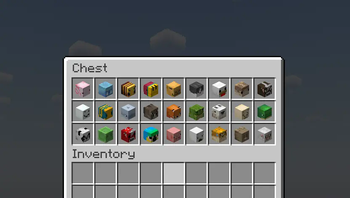
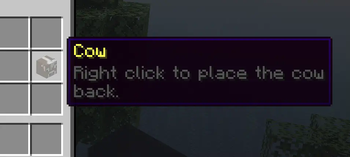
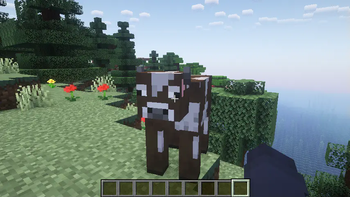
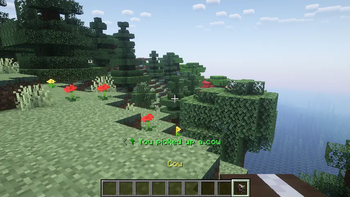
Click to pick up any mob into your inventory and carry them around!
Screenshots
Über diese Mod


ClickMobs
ClickMobs is a simple quality of life mod/plugin that allows you to pick up any mob into your inventory and carry
them around.



Features
- Pick mobs up into your inventory by shift + right clicking them.
- Place them back by placing the mob head.
- Place the mobs directly into boats, minecarts, etc.
- Use dispensers to spawn the mobs back automatically.
- Clean messages, sound effects and particle effects.
- Blacklist/whitelist any mob you want using tags!
- Language support: German & English (Paper/Spigot only)
Blacklisting & Whitelisting Mobs
- Blacklist/whitelist any mob you want using tags.
- You can use and combine tags like
?hostile,?nametagged(...),?baby, etc.
to select multiple mobs based on their properties. - For more information, read the wiki: Wiki/Tags
- You can use and combine tags like
- You can also blacklist/whitelist individual mobs.
- You can manage the blacklist/whitelist in the "config.yml" file.
Configuration
- For Paper/Spigot, you will find the configuration file at "plugins/ClickMobs/config.yml".
- For Fabric, you will find the configuration file at ".minecraft/config/ClickMobs/config.yml".
- WARNING: If you are using another client (i.E. Modrinth App), the config file will be located at the installation
directory instead.
- WARNING: If you are using another client (i.E. Modrinth App), the config file will be located at the installation
- Make sure you save the config file after making changes and do the following:
- For Paper/Spigot, reload/restart your server or use the command "/clickvillagers reload".
- For Fabric, restart your game or server fully.
Compatibility
- ClickMobs is fully compatible with ClickVillagers!
Licensing
- This project is licensed under the GPLv3 license.
- Refer to LICENSE.md for more information.
Verfügbare Versionen
Click Mobs auf dem Server installieren
Server bestellen
Bestelle einen Minecraft Java Server mit mindestens 3 GB RAM (4 GB empfohlen).
bukkit Loader setzen
Wähle im Panel unter "Egg" den bukkit-Loader und die passende Minecraft-Version (26.3).
Mod installieren
Öffne den Mod-Browser im Dashboard und suche nach "Click Mobs". Klicke "Installieren" – fertig! Alternativ: Lade die .jar via SFTP in den /mods Ordner.
Kompatibilität
Mod-Loader
Minecraft-Versionen
26.3, 26.2, 26.1.2 (+21 weitere)
Server-seitig
✓ ErforderlichEmpfohlener RAM
4 GB(min. 3 GB)Häufige Fragen
Click Mobs Server crasht beim Start – was tun?
Häufigste Ursache: falsche bukkit-Version oder zu wenig RAM. Prüfe im Server-Log (latest.log), ob ein "OutOfMemoryError" oder "Mixin"-Fehler auftritt. Bei Mado Hosting: Stelle sicher, dass mindestens 3 GB RAM zugewiesen sind und der Loader zur Mod-Version passt (26.3). Über das Panel kannst du den Loader mit einem Klick wechseln.
Ist Click Mobs mit bukkit und fabric und neoforge und paper und purpur und spigot kompatibel?
Click Mobs unterstützt offiziell bukkit, fabric, neoforge, paper, purpur, spigot für Minecraft 26.3, 26.2, 26.1.2. Im Mado Dashboard werden inkompatible Loader-Kombinationen automatisch erkannt.
Server laggt mit Click Mobs – wie optimiere ich die Performance?
Empfohlener RAM: 4 GB (+1 GB pro 8 Spieler). Prüfe mit /spark profiler, ob Click Mobs den meisten Tick-Time verbraucht. Häufige Fixes: Server-View-Distance auf 8-10 reduzieren, bei Forge "performant" oder "starlight" als Zusatz-Mod installieren. Bei Mado Hosting läuft dein Server auf NVMe-SSDs mit dedizierten CPU-Kernen für minimale Latenz.
Ähnliche Mods
![[EMF] Entity Model Features](https://cdn.modrinth.com/data/4I1XuqiY/6e5bbd0d06b1741bfdab6c0cfab6de8fdaf0064c_96.webp)


Modded Server mieten
Installiere Click Mobs mit nur einem Klick auf deinem Server.