
Modrinth · Fabric
Cobblemon additions auf deinem Minecraft Server
Cobblemon additions läuft auf Minecraft Servern mit Fabric. Bestell deinen Server, stell den Loader im Panel ein und installiere die Mod mit einem Klick im Mod-Browser.
A Mod that adds villages with Pokemon Village/City variants - Originally made for the Brocraft server. This will spawn in a variety of structures within the villages as well. We are planning on adding rare structures!
- Downloads
- 10.6M
- Autor
- strikebyte
- Loader
- Fabric
- Minecraft
- 1.20.1 – 1.21.9
- Aktualisiert
- –
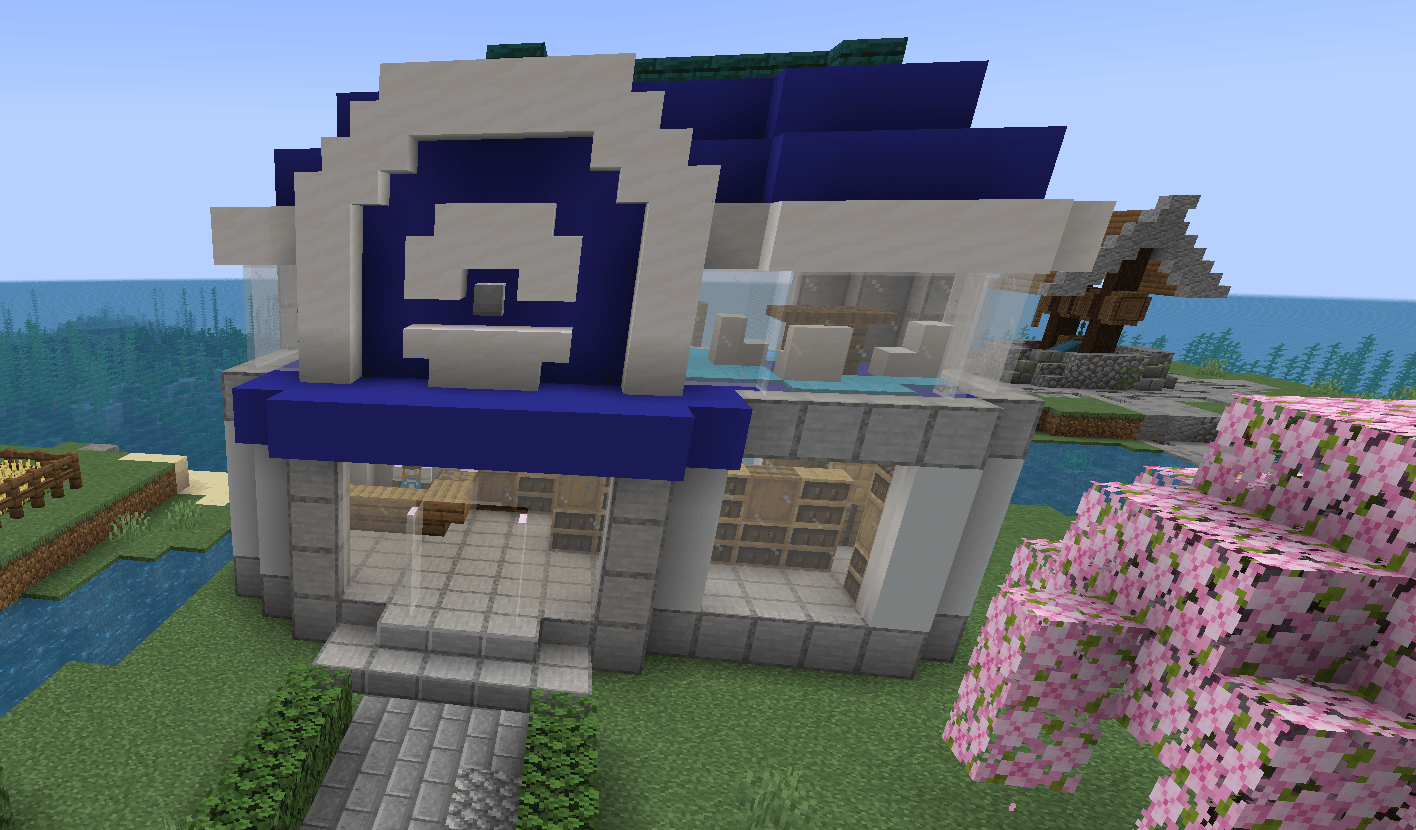
Screenshots
So sieht Cobblemon additions aus


Bilder: Cobblemon additions auf Modrinth, vom Projektteam veröffentlicht.
Einrichtung
Cobblemon additions auf dem Server installieren
Server und Spieler brauchen denselben Loader und dieselbe Minecraft-Version. Sichere die Welt, bevor du Mods hinzufügst oder aktualisierst.
- 01
Konfigurieren
6 GB RAM sind vorausgewählt. Laufzeit und Add-ons wählst du selbst, bezahlt wird per Kreditkarte oder PayPal.
- 02
Loader einstellen
Stell im Panel die Serversoftware auf Fabric und wähl die passende Minecraft-Version, zum Beispiel 1.21.9.
- 03
Mod installieren
Such im Mod-Browser nach „Cobblemon additions“ und installiere die Version für deinen Loader. Alternativ lädst du die .jar per SFTP in den Ordner mods. Erforderliche Abhängigkeiten stehen auf der Projektseite.
- 04
Verbinden
Cobblemon additions ist auf dem Client optional. Spieler verbinden sich über die Serveradresse aus dem Panel.
- Auf dem Server
- Erforderlich
- Auf dem Client
- Optional
- Loader
- Fabric
- Minecraft
- 1.21.9, 1.21.8, 1.21.7 +9 weitere
- Lizenz
- LicenseRef-All-Rights-Reserved
Das Panel
Mods installieren, Fehler finden.
Echte Screenshots aus dem Mado Panel. Beides ist bei jedem Minecraft Server enthalten.
Mod-Browser
Modrinth und CurseForge direkt im Panel.
Der Browser filtert nach deiner Minecraft-Version. Mods installierst du mit einem Klick, ohne .jar-Dateien hochzuladen.

KI-Crash-Analyse
Wenn ein Mod crasht, liest die Analyse das Log.
Mods scheitern oft an einer falschen Loader-Version, Java-Version oder fehlenden Abhängigkeit. Die Analyse nennt eine wahrscheinliche Ursache und einen Lösungsvorschlag.

Versionen
Veröffentlichte Versionen
Nimm die Datei, die zu Loader und Minecraft-Version deines Servers passt. Server und Spieler brauchen dieselbe Version.
Cobblemon additions · Modrinth- The Entrance of the Academy21. September 2025Minecraft 1.21.1 · Fabric
- Cobblemon additions 3.9.22. August 2025Minecraft 1.21.1 · Fabric
- General 3.8 Update1. Juli 2025Minecraft 1.21.1 · datapack
- 3.6 Lootpool update! time to celebrate!7. April 2025Minecraft 1.21.1 · datapack
- 3.5 another bug fix update!3. März 2025Minecraft 1.21.1 · datapack
Originalbeschreibung des Projektautors
Brocraft Cobblemon Additions
Overview
Brocraft Cobblemon Additions is a Minecraft Mod that enhances your gameplay experience by replacing the traditional village structures with unique, custom-built structures inspired by the Cobblemon universe. This mod is designed to integrate seamlessly with existing Cobblemon features, providing a fresh take on village exploration.
SUPPORT AND COMMUNITY DISCORD: Feel free to join our discord!
Annoucements and details for the mod will be posted in our discord!
Support the Development on Patreon!
If you enjoy this project and want to help support its development, consider becoming a patron! By joining my Patreon, you’ll get access to exclusive content, early releases, and be part of a growing community of dedicated players.
Here is a quick glimpse into Cobblemon Additions
I hope you enjoy what you find in your adventures!
Features
- Custom Structures: Replaces vanilla villages with a variety of custom-designed structures, each contributing to a vibrant game world.
- Unique Town Centers: Enjoy specially crafted town centers that serve as focal points for villages, including the Battlepad and The Department store. (more to come)
- Diverse Environment: Explore different themed buildings, including cozy cottages, bustling PokéMarts, and serene retreats.
- Varied Pathways: Navigate the world with unique pathways that enhance the aesthetic appeal and functionality of your villages.
- Dynamic Villager Interaction: Integrate Cobblemon mechanics with villagers, offering unique interactions and services.
Installation (For the old datapack versions only)
- Ensure you have Minecraft with Fabric installed.
- Download the latest release of Brocraft Cobblemon Additions from the releases section.
- Place the downloaded
.zipfile into theDatapacksfolder of your Minecraft installation/world. - Launch Minecraft and enjoy!
Dependencies
Cobblemon version 1.6.1
Waystones
Sophisticated Backpacks (Optional)
Traveler's backpack (Optional)
Cobblenav (optional)
[EMF] Entity Model Features version 2.2.6(optional - only needed if you use the cobblefolk datapack)
[ETF] Entity Texture Features version 6.2.5(optional - only needed if you use the cobblefolk datapack)
it is also recommended that you use the cobblefolk datapack that comes with the cobbletowns mod for the best immersion (Look on the cobblemon discord in the cobbletowns support channel for the current functioning version)
Structure Pools
This mod features multiple structure pools, including:
- Centers: Custom town center structures.
- General Structures: A variety of themed homes and buildings.
- Paths: Unique pathways for enhanced navigation.
- Store Workers: Villager NPCs for shops and services.
- General Decor: Decorative items to enhance the village aesthetics.
- Lamp Posts: Functional light sources for your villages.
- Berries: Custom berry structures to enrich the environment.
License
This mod is licensed under the ARR License.
Do not re-upload this mod
Acknowledgements
- Special thanks to the creators of Cobblemon and the Minecraft community for their inspiration and support.
Cobblemon additions Server crasht beim Start – was tun?
Häufige Ursachen: Loader- oder Minecraft-Version passen nicht zur Mod-Datei, eine Abhängigkeit fehlt oder der RAM reicht nicht. Such im Log (latest.log) nach „OutOfMemoryError“, „Mixin“ oder fehlenden Mods. Bei Mado wertet die KI-Crash-Analyse das Log aus und schlägt eine Ursache vor. Loader und Version änderst du im Panel.
Mit welchem Loader läuft Cobblemon additions?
Laut Modrinth unterstützt Cobblemon additions Fabric für Minecraft 1.21.9, 1.21.8, 1.21.7.
Wie viel RAM braucht ein Server mit Cobblemon additions?
Als Orientierung 4–6 GB für einen Server mit dieser Mod. Das ist eine Schätzung, keine gemessene Mindestanforderung. Weitere Mods, viele Spieler und große Sichtweiten brauchen mehr. Ob eine Mod die Tick-Zeit belastet, siehst du mit dem spark-Profiler.
Ähnliche Mods
Beliebte Mods aus derselben Kategorie
 Server-fähig

Xaero's Minimap
von thexaero
Displays a map of the nearby world terrain, players, mobs, entities in the corner of your screen. Lets you create waypoints which help you find the locations you've marked.
 Server-fähig

Xaero's World Map
von thexaero
Adds a full screen world map which shows you what you have explored in the world. Works great together with Xaero's Minimap.
 Nur Client

Not Enough Animations
von tr7zw
Bringing first-person animations to the third-person
 Nur Client

3D Skin Layers
von tr7zw
Render the player skin layer in 3d!
Bereit für deinen Server mit Cobblemon additions?
6 GB RAM ab 12,00 € im Monat. 35 % auf den 1. Monat mit MADO35.