Cobblemon FC Gym Badges
Gym Badges for Cobblemon Servers
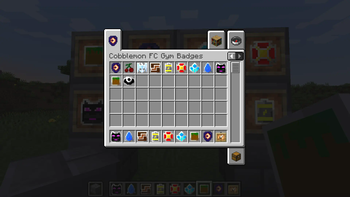
Screenshots


Über diese Mod
README
Features
- Support for LuckPerms
!!! IMPORTANT !!!
Starting from 1.8.0, configuration and commands are removed.
Gym Leader appointed players can no longer obtain Gym Badges by commands. Instead, they now have permission to unlock Locked Gym Badges to corresponding Gym Badges.
Items in this mod do not have recipes. Server admins will have to provide them using data packs.
Items
Gym Badges
Gym Badges are mere symbols for beating Gym Leaders.
Locked Gym Badges
There won't be acquisition method for Locked Gym Badges unless server admins add recipes for them.
Locked Gym Badges can be used as stakes for challenging Gym Leaders. If players win, Gym Leaders return the Gym Badges after unlocking them. If Gym Leaders win, they can keep it and possibly make profit out of it.
Gym Badge Unlocker
Gym Badge Unlocker can be used by those with sufficient permission.
For example, in order to unlock Locked Fire Badge (or convert to Fire Badge), the Gym Leader should either have:
fcgymbadges.firebadge.unlockLuckPerms Permission- Permission Level of 2 at Minimum
Gym Leaders use (right-click) Gym Badge Unlocker while holding Locked Gym Badges in the other hand.
Credit
Translation
- Voldir (French)
Verfügbare Versionen
Cobblemon FC Gym Badges auf dem Server installieren
Server bestellen
Bestelle einen Minecraft Java Server mit mindestens 3 GB RAM (4 GB empfohlen).
fabric Loader setzen
Wähle im Panel unter "Egg" den fabric-Loader und die passende Minecraft-Version (1.21.10).
Mod installieren
Öffne den Mod-Browser im Dashboard und suche nach "Cobblemon FC Gym Badges". Klicke "Installieren" – fertig! Alternativ: Lade die .jar via SFTP in den /mods Ordner.
Kompatibilität
Mod-Loader
Minecraft-Versionen
1.21.10, 1.21.9, 1.21.8 (+13 weitere)
Server-seitig
✓ ErforderlichEmpfohlener RAM
4 GB(min. 3 GB)Häufige Fragen
Cobblemon FC Gym Badges Server crasht beim Start – was tun?
Häufigste Ursache: falsche fabric-Version oder zu wenig RAM. Prüfe im Server-Log (latest.log), ob ein "OutOfMemoryError" oder "Mixin"-Fehler auftritt. Bei Mado Hosting: Stelle sicher, dass mindestens 3 GB RAM zugewiesen sind und der Loader zur Mod-Version passt (1.21.10). Über das Panel kannst du den Loader mit einem Klick wechseln.
Ist Cobblemon FC Gym Badges mit fabric kompatibel?
Cobblemon FC Gym Badges unterstützt offiziell fabric für Minecraft 1.21.10, 1.21.9, 1.21.8. Im Mado Dashboard werden inkompatible Loader-Kombinationen automatisch erkannt.
Server laggt mit Cobblemon FC Gym Badges – wie optimiere ich die Performance?
Empfohlener RAM: 4 GB (+1 GB pro 8 Spieler). Prüfe mit /spark profiler, ob Cobblemon FC Gym Badges den meisten Tick-Time verbraucht. Häufige Fixes: Server-View-Distance auf 8-10 reduzieren, bei Forge "performant" oder "starlight" als Zusatz-Mod installieren. Bei Mado Hosting läuft dein Server auf NVMe-SSDs mit dedizierten CPU-Kernen für minimale Latenz.
Ähnliche Mods

![[ETF] Entity Texture Features](https://cdn.modrinth.com/data/BVzZfTc1/af683d206d50b05258d865b0d6e4aa2f2cee12f2_96.webp)
![[EMF] Entity Model Features](https://cdn.modrinth.com/data/4I1XuqiY/6e5bbd0d06b1741bfdab6c0cfab6de8fdaf0064c_96.webp)



Modded Server mieten
Installiere Cobblemon FC Gym Badges mit nur einem Klick auf deinem Server.