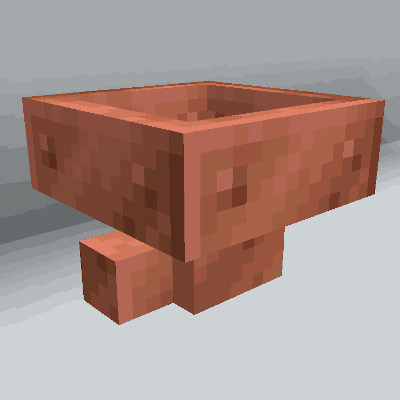
Copper Hopper
Hopper that acts as a simple item filter.
Über diese Mod
Copper Hopper
Copper Hopper adds a new kind of Hopper that filters the items to get pulled and pushed. They
save you the tedium of building gigantic item sorters while retaining a Vanilla Minecraft spirit.
Features
- Filter up to 5 items per Copper Hopper
- Filter both stackable and unstackable items
- Uses the Fabric modloader
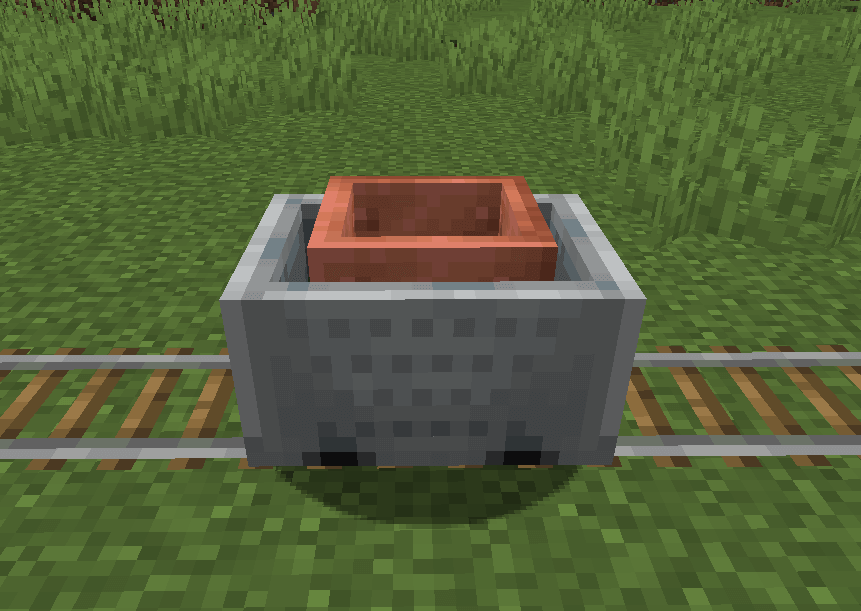
- Make Copper Hopper Minecarts!
- Made of copper!
Recipes
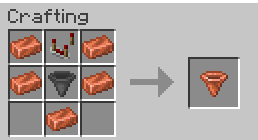
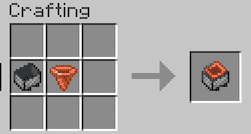
Setting Filters
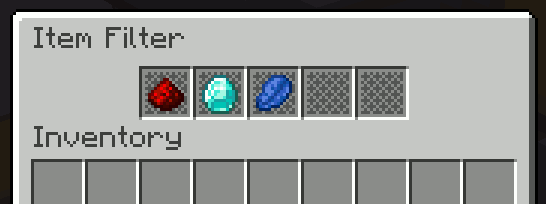
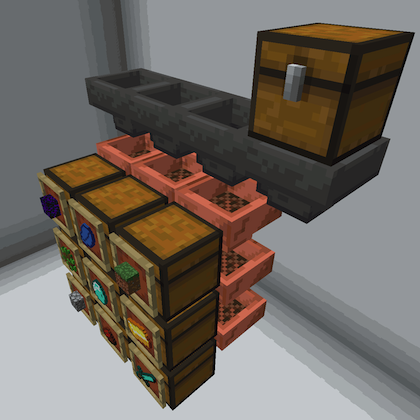
Make sorting systems like this!
How do use it?
Just put an item in one of the regular hopper slots to "set" a filter. That item will never be pulled or
pushed out of the hopper. And the hopper will now only accept items of that type.
You can do this up to five times (once per slot).
How does it work exactly?
A Copper Hopper works just like a regular hopper except:
- They never accept an item of a type that is not already held in the hopper.
- They always keep the last item of a type that is held in the hopper.
- If one Copper Hopper is below another, it will always pull matching items before the upper hopper pushes them.
- This allows you to create hopper columns that filter items into vertically-stacked chests.
Does it work with unstackable items?
Yes! But if you filter on unstackable items, be sure to keep one of the hopper slots empty or
the filtering won't work correctly.
Notes
- The item texture for Copper Hopper was contributed by Pablo Henrique. (Thanks!)
- Copper Hopper was inspired by Mr. Crayfish's excellent Golden Hopper forge mod.
- I will not be doing a Forge port of Copper Hopper. (sorry)
Legal
This mod is published under the MIT License.
You're free to include this mod in your modpack provided you attribute it to pcal.net.
Questions?
If you have questions about this mod, please join the Discord server:
Verfügbare Versionen
Copper Hopper auf dem Server installieren
Server bestellen
Bestelle einen Minecraft Java Server mit mindestens 3 GB RAM (4 GB empfohlen).
fabric Loader setzen
Wähle im Panel unter "Egg" den fabric-Loader und die passende Minecraft-Version (26.3).
Mod installieren
Öffne den Mod-Browser im Dashboard und suche nach "Copper Hopper". Klicke "Installieren" – fertig! Alternativ: Lade die .jar via SFTP in den /mods Ordner.
Kompatibilität
Mod-Loader
Minecraft-Versionen
26.3, 26.2, 26.1.2 (+23 weitere)
Server-seitig
✓ ErforderlichEmpfohlener RAM
4 GB(min. 3 GB)Häufige Fragen
Copper Hopper Server crasht beim Start – was tun?
Häufigste Ursache: falsche fabric-Version oder zu wenig RAM. Prüfe im Server-Log (latest.log), ob ein "OutOfMemoryError" oder "Mixin"-Fehler auftritt. Bei Mado Hosting: Stelle sicher, dass mindestens 3 GB RAM zugewiesen sind und der Loader zur Mod-Version passt (26.3). Über das Panel kannst du den Loader mit einem Klick wechseln.
Ist Copper Hopper mit fabric und neoforge kompatibel?
Copper Hopper unterstützt offiziell fabric, neoforge für Minecraft 26.3, 26.2, 26.1.2. Im Mado Dashboard werden inkompatible Loader-Kombinationen automatisch erkannt.
Server laggt mit Copper Hopper – wie optimiere ich die Performance?
Empfohlener RAM: 4 GB (+1 GB pro 8 Spieler). Prüfe mit /spark profiler, ob Copper Hopper den meisten Tick-Time verbraucht. Häufige Fixes: Server-View-Distance auf 8-10 reduzieren, bei Forge "performant" oder "starlight" als Zusatz-Mod installieren. Bei Mado Hosting läuft dein Server auf NVMe-SSDs mit dedizierten CPU-Kernen für minimale Latenz.
Ähnliche Mods


Modded Server mieten
Installiere Copper Hopper mit nur einem Klick auf deinem Server.