
Core Utilities
A futuristic tech-meets-automation mod for Minecraft, designed to expand the game’s core functionality with high-efficiency tools, modular machines, and directional logic systems.
Screenshots
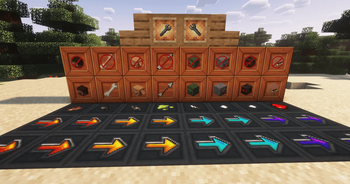

Über diese Mod



Core Utilities is a futuristic, tech-driven utility mod inspired by Extra Utilities and Dark Utilities. It expands Minecraft's automation, energy, logistics, storage, and mob-handling systems with functional machines, configurable blocks, and a clean Minecraft-faithful design.






Features
| Feature | Description |
|---|---|
| Vector Plates | Move entities with configurable speed and direction |
| Multiple Plate Speeds | Medium, fast, and very fast movement variants |
| Effect Plates | Apply effects such as regeneration, speed, poison, and more on contact |
| Filter Blocks | Control which filtered types are allowed to pass |
| Reversible Filters | Right-click with the Configuration Wrench to reverse filter behavior |
| Floating Block | Can be placed anywhere |
| Backpacks | Three portable storage tiers with 27, 54, and 100 slots |
| Mob Net | Catch and release mobs |
| Configuration Wrench | Configure supported machines and blocks |
| Solar Panel | Generates FE based on daylight |
| Energy Cables | Transfer FE energy at 64 FE/tick |
Video
Vector Plates
Vector Plates automatically move entities across their surface, making them useful for mob farms, transportation systems, automation setups, and custom machinery.
Available speed variants:
- Medium
- Fast
- Very Fast
Effect Plates
Effect Plates affect mobs and players when they come into contact with them.
Effects can include:
- Regeneration
- Speed
- Poison
- Other supported effects
Filter Blocks
Filter Blocks control which filtered types can pass through them.
Right-click a Filter Block with the Configuration Wrench to reverse its behavior.
Floating Block
The Floating Block can be placed anywhere, providing additional freedom for building utility and automation systems.
Backpacks
Core Utilities adds three backpack tiers:
| Tier | Storage |
|---|---|
| Backpack I | 27 slots |
| Backpack II | 54 slots |
| Backpack III | 100 slots |
Mob Net
The Mob Net lets players catch mobs and release them elsewhere, making entity relocation easier for farms, bases, and automation.
Configuration Wrench
The Configuration Wrench is used to configure supported machines and utility blocks, including reversing Filter Blocks.
Energy
Solar Panel
The Solar Panel generates FE based on daylight, providing a renewable energy source for compatible systems.
Cables
Core Utilities cables transfer:
64 FE/tick
They provide a straightforward way to connect energy generation and compatible machines.
Automation
Core Utilities provides modular systems that can be combined into larger automation builds:
- Vector Plates for entity movement
- Filter Blocks for routing
- Effect Plates for automatic effects
- Mob Nets for entity relocation
- Solar Panels for energy generation
- Cables for FE transfer
- Backpacks for portable storage
- Configuration Wrench for machine configuration
Why Choose Core Utilities?
- Automation Focused — Practical utilities for movement, filtering, energy, and entity handling.
- Modular Design — Use utilities independently or combine them into larger systems.
- Entity Logistics — Vector Plates and Filter Blocks provide more control over mob movement.
- Portable Storage — Three backpack tiers with up to 100 slots.
- Mob Handling — Catch and relocate mobs with the Mob Net.
- FE Energy — Generate energy with Solar Panels and transfer it through cables.
- Minecraft-Friendly Style — Functional technology with a clean, Minecraft-faithful aesthetic.
- Broad Version Support — Supports Minecraft 1.16.5 through 1.21.8.
Compatibility
Minecraft 1.16.5 → 1.21.8
Supported loaders:
- NeoForge
- Forge
Requirements
Core Utilities requires:
- A supported NeoForge or Forge installation
- JAUMl Library
Installation
- Install the supported NeoForge or Forge loader.
- Install JAUMl Library.
- Download the matching Core Utilities version.
- Place the required
.jarfiles inside yourmods/folder. - Start Minecraft.
Community & Support
- Discord: https://discord.gg/TJc3CxR4jK
- GitHub: https://github.com/MeherBenSalem
- Website: https://nightbeam.dev
- Store: https://nightbeam.dev/store
- CurseForge: https://www.curseforge.com/members/nightbeamstudio/projects
- Modrinth: https://modrinth.com/organization/nightbeam
- Documentation: https://nightbeam.gitbook.io/core-utils/
If you encounter a bug or have a feature request, please join the Discord community or report it through the appropriate project page.

Core Utilities auf dem Server installieren
Server bestellen
Bestelle einen Minecraft Java Server mit mindestens 3 GB RAM (4 GB empfohlen).
fabric Loader setzen
Wähle im Panel unter "Egg" den fabric-Loader und die passende Minecraft-Version (26.2).
Mod installieren
Öffne den Mod-Browser im Dashboard und suche nach "Core Utilities". Klicke "Installieren" – fertig! Alternativ: Lade die .jar via SFTP in den /mods Ordner.
Kompatibilität
Mod-Loader
Minecraft-Versionen
26.2, 1.21.8, 1.21.5 (+5 weitere)
Server-seitig
✓ ErforderlichEmpfohlener RAM
4 GB(min. 3 GB)Häufige Fragen
Core Utilities Server crasht beim Start – was tun?
Häufigste Ursache: falsche fabric-Version oder zu wenig RAM. Prüfe im Server-Log (latest.log), ob ein "OutOfMemoryError" oder "Mixin"-Fehler auftritt. Bei Mado Hosting: Stelle sicher, dass mindestens 3 GB RAM zugewiesen sind und der Loader zur Mod-Version passt (26.2). Über das Panel kannst du den Loader mit einem Klick wechseln.
Ist Core Utilities mit fabric und forge und neoforge kompatibel?
Core Utilities unterstützt offiziell fabric, forge, neoforge für Minecraft 26.2, 1.21.8, 1.21.5. Achtung: Forge- und Fabric-Mods sind NICHT untereinander kompatibel – wähle einen Loader und bleibe dabei. Im Mado Dashboard werden inkompatible Loader-Kombinationen automatisch erkannt.
Server laggt mit Core Utilities – wie optimiere ich die Performance?
Empfohlener RAM: 4 GB (+1 GB pro 8 Spieler). Prüfe mit /spark profiler, ob Core Utilities den meisten Tick-Time verbraucht. Häufige Fixes: Server-View-Distance auf 8-10 reduzieren, bei Forge "performant" oder "starlight" als Zusatz-Mod installieren. Bei Mado Hosting läuft dein Server auf NVMe-SSDs mit dedizierten CPU-Kernen für minimale Latenz.
Ähnliche Mods






Modded Server mieten
Installiere Core Utilities mit nur einem Klick auf deinem Server.