
Core Utilities
A futuristic tech-meets-automation mod for Minecraft, designed to expand the game’s core functionality with high-efficiency tools, modular machines, and directional logic systems.
Screenshots
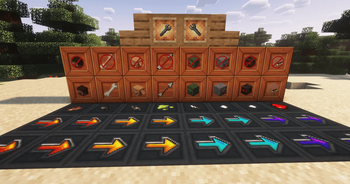

About this Mod



Core Utilities is a futuristic, tech-driven utility mod inspired by Extra Utilities and Dark Utilities. It expands Minecraft's automation, energy, logistics, storage, and mob-handling systems with functional machines, configurable blocks, and a clean Minecraft-faithful design.






Features
| Feature | Description |
|---|---|
| Vector Plates | Move entities with configurable speed and direction |
| Multiple Plate Speeds | Medium, fast, and very fast movement variants |
| Effect Plates | Apply effects such as regeneration, speed, poison, and more on contact |
| Filter Blocks | Control which filtered types are allowed to pass |
| Reversible Filters | Right-click with the Configuration Wrench to reverse filter behavior |
| Floating Block | Can be placed anywhere |
| Backpacks | Three portable storage tiers with 27, 54, and 100 slots |
| Mob Net | Catch and release mobs |
| Configuration Wrench | Configure supported machines and blocks |
| Solar Panel | Generates FE based on daylight |
| Energy Cables | Transfer FE energy at 64 FE/tick |
Video
Vector Plates
Vector Plates automatically move entities across their surface, making them useful for mob farms, transportation systems, automation setups, and custom machinery.
Available speed variants:
- Medium
- Fast
- Very Fast
Effect Plates
Effect Plates affect mobs and players when they come into contact with them.
Effects can include:
- Regeneration
- Speed
- Poison
- Other supported effects
Filter Blocks
Filter Blocks control which filtered types can pass through them.
Right-click a Filter Block with the Configuration Wrench to reverse its behavior.
Floating Block
The Floating Block can be placed anywhere, providing additional freedom for building utility and automation systems.
Backpacks
Core Utilities adds three backpack tiers:
| Tier | Storage |
|---|---|
| Backpack I | 27 slots |
| Backpack II | 54 slots |
| Backpack III | 100 slots |
Mob Net
The Mob Net lets players catch mobs and release them elsewhere, making entity relocation easier for farms, bases, and automation.
Configuration Wrench
The Configuration Wrench is used to configure supported machines and utility blocks, including reversing Filter Blocks.
Energy
Solar Panel
The Solar Panel generates FE based on daylight, providing a renewable energy source for compatible systems.
Cables
Core Utilities cables transfer:
64 FE/tick
They provide a straightforward way to connect energy generation and compatible machines.
Automation
Core Utilities provides modular systems that can be combined into larger automation builds:
- Vector Plates for entity movement
- Filter Blocks for routing
- Effect Plates for automatic effects
- Mob Nets for entity relocation
- Solar Panels for energy generation
- Cables for FE transfer
- Backpacks for portable storage
- Configuration Wrench for machine configuration
Why Choose Core Utilities?
- Automation Focused — Practical utilities for movement, filtering, energy, and entity handling.
- Modular Design — Use utilities independently or combine them into larger systems.
- Entity Logistics — Vector Plates and Filter Blocks provide more control over mob movement.
- Portable Storage — Three backpack tiers with up to 100 slots.
- Mob Handling — Catch and relocate mobs with the Mob Net.
- FE Energy — Generate energy with Solar Panels and transfer it through cables.
- Minecraft-Friendly Style — Functional technology with a clean, Minecraft-faithful aesthetic.
- Broad Version Support — Supports Minecraft 1.16.5 through 1.21.8.
Compatibility
Minecraft 1.16.5 → 1.21.8
Supported loaders:
- NeoForge
- Forge
Requirements
Core Utilities requires:
- A supported NeoForge or Forge installation
- JAUMl Library
Installation
- Install the supported NeoForge or Forge loader.
- Install JAUMl Library.
- Download the matching Core Utilities version.
- Place the required
.jarfiles inside yourmods/folder. - Start Minecraft.
Community & Support
- Discord: https://discord.gg/TJc3CxR4jK
- GitHub: https://github.com/MeherBenSalem
- Website: https://nightbeam.dev
- Store: https://nightbeam.dev/store
- CurseForge: https://www.curseforge.com/members/nightbeamstudio/projects
- Modrinth: https://modrinth.com/organization/nightbeam
- Documentation: https://nightbeam.gitbook.io/core-utils/
If you encounter a bug or have a feature request, please join the Discord community or report it through the appropriate project page.

Available Versions
How to Install Core Utilities on Your Server
Order Server
Order a Minecraft Java server with at least 3 GB RAM (4 GB recommended).
Set fabric Loader
In the panel under "Egg", select the fabric loader and matching Minecraft version (26.2).
Install Mod
Open the mod browser in the dashboard and search for "Core Utilities". Click "Install" – done! Alternatively, upload the .jar via SFTP to the /mods folder.
Compatibility
Mod Loaders
Minecraft Versions
26.2, 1.21.8, 1.21.5 (+5 more)
Server-side
✓ RequiredRecommended RAM
4 GB(min. 3 GB)Frequently Asked Questions
Core Utilities server crashes on startup – what to do?
Most common cause: wrong fabric version or insufficient RAM. Check the server log (latest.log) for "OutOfMemoryError" or "Mixin" errors. With Mado Hosting: ensure at least 3 GB RAM is allocated and the loader matches the mod version (26.2). You can switch loaders with one click in the panel.
Is Core Utilities compatible with fabric and forge and neoforge?
Core Utilities officially supports fabric, forge, neoforge for Minecraft 26.2, 1.21.8, 1.21.5. Note: Forge and Fabric mods are NOT cross-compatible – pick one loader and stick with it. The Mado dashboard automatically detects incompatible loader combinations.
Server lagging with Core Utilities – how to optimize performance?
Recommended RAM: 4 GB (per 8 players). Use /spark profiler to check if Core Utilities consumes the most tick time. Common fixes: reduce server view-distance to 8-10, install "performant" or "starlight" as supplementary mods on Forge. With Mado Hosting, your server runs on NVMe SSDs with dedicated CPU cores for minimal latency.
Similar Mods






Rent Modded Server
Install Core Utilities with just one click on your server.