
Modrinth · Fabric, Forge, NeoForge, Quilt
Crafting+ auf deinem Minecraft Server
Crafting+ läuft auf Minecraft Servern mit Fabric oder Forge oder NeoForge oder Quilt. Bestell deinen Server, stell den Loader im Panel ein und installiere die Mod mit einem Klick im Mod-Browser.
319 Quick and Enhanced Crafting Recipes
- Downloads
- 116.9K
- Autor
- Kxffie
- Loader
- Fabric, Forge, NeoForge, Quilt
- Minecraft
- 1.0 – 26.3
- Aktualisiert
- –
Screenshots
So sieht Crafting+ aus


Bilder: Crafting+ auf Modrinth, vom Projektteam veröffentlicht.
Einrichtung
Crafting+ auf dem Server installieren
Server und Spieler brauchen denselben Loader und dieselbe Minecraft-Version. Sichere die Welt, bevor du Mods hinzufügst oder aktualisierst.
- 01
Konfigurieren
4 GB RAM sind vorausgewählt. Laufzeit und Add-ons wählst du selbst, bezahlt wird per Kreditkarte oder PayPal.
- 02
Loader einstellen
Stell im Panel die Serversoftware auf Fabric oder Forge oder NeoForge oder Quilt und wähl die passende Minecraft-Version, zum Beispiel rd-20090515.
- 03
Mod installieren
Such im Mod-Browser nach „Crafting+“ und installiere die Version für deinen Loader. Alternativ lädst du die .jar per SFTP in den Ordner mods. Erforderliche Abhängigkeiten stehen auf der Projektseite.
- 04
Verbinden
Crafting+ ist auf dem Client optional. Spieler verbinden sich über die Serveradresse aus dem Panel.
- Auf dem Server
- Erforderlich
- Auf dem Client
- Optional
- Loader
- Fabric, Forge, NeoForge, Quilt
- Minecraft
- rd-20090515, rd-161348, rd-160052 +916 weitere
- Lizenz
- MIT License
Das Panel
Mods installieren, Fehler finden.
Echte Screenshots aus dem Mado Panel. Beides ist bei jedem Minecraft Server enthalten.
Mod-Browser
Modrinth und CurseForge direkt im Panel.
Der Browser filtert nach deiner Minecraft-Version. Mods installierst du mit einem Klick, ohne .jar-Dateien hochzuladen.

KI-Crash-Analyse
Wenn ein Mod crasht, liest die Analyse das Log.
Mods scheitern oft an einer falschen Loader-Version, Java-Version oder fehlenden Abhängigkeit. Die Analyse nennt eine wahrscheinliche Ursache und einen Lösungsvorschlag.

Versionen
Veröffentlichte Versionen
Nimm die Datei, die zu Loader und Minecraft-Version deines Servers passt. Server und Spieler brauchen dieselbe Version.
Crafting+ · Modrinth- Crafting+ 1.21.5 FIXED17. Juni 2025Minecraft 1.21.5 · Fabric, Forge, NeoForge, Quilt
- Crafting+ 1.21.5 FIXED17. Juni 2025Minecraft 1.21.5 · datapack
Originalbeschreibung des Projektautors


Hey! I'm Kxffie!
Currently being worked on, will add whatever I feel is an upgrade.
You can find this datapack at https://modrinth.com/datapack/crafting+
Features 319 Recipes (v1.21.8)
All features
Recipes
Blocks
Bulk
Blasting - Blast Furnace Recipes
- Raw Copper Block to Copper Block
- Raw Gold Block to Gold Block
- Raw Iron Block to Iron Block
Smelting - Furnace Recipes
- Raw Copper Block to Copper Block
- Raw Gold Block to Gold Block
- Raw Iron Block to Iron Block
Blocks - Random Bulk Recipes
- Cauldron with Iron Blocks
- Chains with Iron Blocks and Ingots
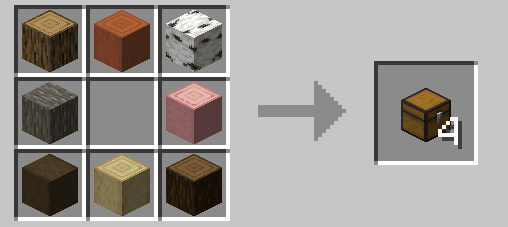
- Chests with Logs
- Ladders with Logs
- Light & Heavy Weighted Pressure Plates with Gold/Iron Blocks
Items - Random Bulk Items
- Bowl with Logs
- Bread with Haybales
- Ender Eyes with Ender Pearls and Blaze Rods
- Sticks with Logs
Buttons
- Using 1 material that can create a button and recieve 4 in return
Convert
- Convert Glowberries to Glowstone
- Convert Dead Bushes to Sticks
Custom Crafts
- Bookshelves using any book types
- Red Mushroom blocks from Red Mushrooms
- Brown Mushroom blocks from Brown Mushrooms
- Crimson Nylium/Warped Nylium
- Netherwart Block from Crimson Fungus
- Warped block from Warped Fungus
- Twisting Vines
- Weeping Vines
- Enchanted Golden Apples
- Webs
- Grass Blocks
- Rooted Dirt
- Sculk
- Sculk Shrieker
- Sculk Sensor
- Sculk Catalyst
- Shroomlights
- Nametags
Flowers - Duplicate with Bonemeal in Crafting Table/Grid
Flower
- Any flower with Bonemeal
Leaves
- Duplicate Cherry Leaves, Flowering Azalea Leaves, Flowering Azalea, and Mangrove Propagule
- Duplicate Firefly Bush
Plants
- Carrots
- Potatos
- Beetroot
- Cactus
- Bamboo
- Sugarcane
- Lily Pads
- Sea Pickle
- Sweet Berries
- Glow Berries
- Chorus Fruit
Misc
- Cactus Flower
- Chorus Flower
- Pink Petals
- Pitcher Plant
- Spore Blossom
- Wildflowers
- Big Dripleaf
- Small Dripleaf
Ores
Stone
- Craft all stone ore blocks with 5 stone and 4 ores/ingots
Deepslate
- Craft all deepslate ore blocks with 5 deepslate and 4 ores/ingots
Nether
- Craft all nether ore blocks with 5 netherrack and 4 ores/ingots
Slabs back to Blocks
- Turn your stacks of slabs back into their block for by putting them left/right of eachother in a crafting grid.
Color Variants
Beds
- Recolor any bed by just putting it next to another dye in a crafting grid.
Carpets
- Use any 8 carpets and surround by a dye to redye those carpets into the new dye color.
Shulkers
- Why craft your shulker box and then dye it? Just add the dye while crafting the shulker box!
Wool
- Redye any wool by just putting it next to another dye in a crafting grid.
Dyes - New Dye Mixes
- Smelt Coal to recieve Black dye
- Mix Orange and Black dye to get 2 Brown dye
- Alternitavely, you can mix 2 Red dye, 1 Yellow dye, and 1 Blue dye to create 4 Brown Dye
- Put Dried Kelp in a crafting grid to recieve Green dye
- Smelt a Moss block to recieve Green dye
- Put a Flowering Azalea or Flowering Azalea Leaves in a crafting grid to get Magenta Dye
- Put a Popped Chorus Fruit in a crafting grid to recieve Magenta Dye
- Use a Spore Blossom in a crafting grid to get Pink dye
- Whats that? Another crafting grid recipe? Yup, just put an Amethyst Shard in a crafting grid to get Purple dye
- Finally, something new, smelt Sweet Berries to get Red dye
- Use black dye in place of an ink sac in the Book and Quill recipe
Functional
- Use any stone-type slabs in place of the slabs in the Armor Stand and Grindstone recipes
- Mix and match all obsidian and glass types in the Beacon recipe
- Mix any obsidian type in the enchant table recipe!
- Use any cobblestone-related blocks in place of the Brewing Stand recipe
- Use any cobblestone-related blocks in place of the Dispenser, Dropper, Brewing Stand, Furnace, Lever, Observer, Piston, Repeater and Comparator recipes!
Smelting
- Smelt all slabs and stair types that their full block counterpart can smelt into, such as cobblestone to stone, sandstone to smooth sandstone etc
Special
- Put a tnt, furnace, hopper, or chest inside a minecart recipe to precraft into its respectable counterpart.
Tools
- Craft all stone tools with all cobblestone-related blocks.
- Craft Spectral Arrows using more glowing related items!
Uncrafting
Blocks
- Amethyst to Shards
- Blue ice to Packed ice
- Brown Mushroom block to Brown Mushroom
- Red Mushroom block to Red Mushroom
- Calibrated Sensor to Sculk Sensor
- Clay block to Clay
- Cobweb to String
- Dripstone block to Pointed Dripstone
- 3 Gravel to 1 Flint
- 1 Honey block around 4 empty bottles to make 4 Honey Bottles
- Honeycomb Block to 4 honeycomb
- Magma Block to 4 Magma Cream
- Melon Block to 9 Melons
- Nether Brick Block to 4 Nether Bricks
- Nether Wart Block to 9 Nether Wart
- Warped Wart Block to 4 Warped Fungus
- Packed Ice to Ice
- Quartz Block to Quartz
- Sandstone to Sand
- Snow Block to Snowballs
- Wool to String
Tags
Item (What are Tags?)
Tags are a way of telling a recipe to allow more than one type of item. For example, for stone tools, I gave it my custom "Stone" tag, which means you can make a Stone Sword out of anything from the Stone list down below.
- Books (book, enchanted book, writable book, written book)
- Dirt (dirt, coarse dirt, rooted dirt, mud)
- Glass (all glass block colors)
- Glowing (glowstone dust, glow berries, glow ink sac, glow lichen)
- Grass (tall grass, short grass, tall dry grass, short dry grass, moss carpet, fern, seagrass)
- Mushroom (red & brown mushroom block, mushroom stem)
- Obsidian (obsidian and crying obsidian)
- Stone Slabs (all non-wooden slabs)
- Stone (stone, cobblestone, granite, andesite, diorite, tuff, cobbled deepslate, endstone, blackstone, netherrack, mossy cobblestone)
Checkout my other work!
Crafting+ Server crasht beim Start – was tun?
Häufige Ursachen: Loader- oder Minecraft-Version passen nicht zur Mod-Datei, eine Abhängigkeit fehlt oder der RAM reicht nicht. Such im Log (latest.log) nach „OutOfMemoryError“, „Mixin“ oder fehlenden Mods. Bei Mado wertet die KI-Crash-Analyse das Log aus und schlägt eine Ursache vor. Loader und Version änderst du im Panel.
Mit welchem Loader läuft Crafting+?
Laut Modrinth unterstützt Crafting+ Fabric, Forge, NeoForge, Quilt für Minecraft rd-20090515, rd-161348, rd-160052. Forge- und Fabric-Dateien sind nicht untereinander austauschbar: Wähl einen Loader für Server und Clients.
Wie viel RAM braucht ein Server mit Crafting+?
Als Orientierung 3–4 GB für einen Server mit dieser Mod. Das ist eine Schätzung, keine gemessene Mindestanforderung. Weitere Mods, viele Spieler und große Sichtweiten brauchen mehr. Ob eine Mod die Tick-Zeit belastet, siehst du mit dem spark-Profiler.
Ähnliche Mods
Beliebte Mods aus derselben Kategorie
 Server-fähig

Xaero's Minimap
von thexaero
Displays a map of the nearby world terrain, players, mobs, entities in the corner of your screen. Lets you create waypoints which help you find the locations you've marked.
 Server-fähig

Xaero's World Map
von thexaero
Adds a full screen world map which shows you what you have explored in the world. Works great together with Xaero's Minimap.
 Nur Client

Not Enough Animations
von tr7zw
Bringing first-person animations to the third-person
 Nur Client

3D Skin Layers
von tr7zw
Render the player skin layer in 3d!
Bereit für deinen Server mit Crafting+?
4 GB RAM ab 8,00 € im Monat. 35 % auf den 1. Monat mit MADO35.