
Modrinth · Fabric, Forge, NeoForge, Quilt
Crafting+ on your Minecraft server
Crafting+ runs on Minecraft servers with Fabric or Forge or NeoForge or Quilt. Order your server, set the loader in the panel and install the mod with one click in the mod browser.
319 Quick and Enhanced Crafting Recipes
- Downloads
- 116.9K
- Author
- Kxffie
- Loader
- Fabric, Forge, NeoForge, Quilt
- Minecraft
- 1.0 – 26.3
- Updated
- –
Screenshots
What Crafting+ looks like


Images: Crafting+ on Modrinth, published by the project team.
Setup
Install Crafting+ on your server
The server and players need the same loader and Minecraft version. Back up the world before adding or updating mods.
- 01
Configure
4 GB of RAM is preselected. You choose the term and add-ons and pay by credit card or PayPal.
- 02
Set the loader
In the panel, set the server software to Fabric or Forge or NeoForge or Quilt and choose the matching Minecraft version, for example rd-20090515.
- 03
Install the mod
Search the mod browser for “Crafting+” and install the release for your loader. Alternatively, upload the .jar to the mods folder via SFTP. Required dependencies are listed on the project page.
- 04
Connect
Crafting+ is optional on the client. Players connect using the server address from the panel.
- On the server
- Required
- On the client
- Optional
- Loader
- Fabric, Forge, NeoForge, Quilt
- Minecraft
- rd-20090515, rd-161348, rd-160052 +916 more
- License
- MIT License
The panel
Install mods, find errors.
Real screenshots from the Mado panel. Both come with every Minecraft server.
Mod browser
Modrinth and CurseForge, right in the panel.
The browser filters by your Minecraft version. Install mods with one click, without uploading .jar files.

AI crash analysis
When a mod crashes, the analyzer reads the log.
Mods often fail on a wrong loader version, Java version or missing dependency. The analyzer names a likely cause and suggests a fix.

Releases
Published releases
Pick the file that matches your server’s loader and Minecraft version. The server and players need the same release.
Crafting+ · Modrinth- Crafting+ 1.21.5 FIXEDJune 17, 2025Minecraft 1.21.5 · Fabric, Forge, NeoForge, Quilt
- Crafting+ 1.21.5 FIXEDJune 17, 2025Minecraft 1.21.5 · datapack
Original description by the project author


Hey! I'm Kxffie!
Currently being worked on, will add whatever I feel is an upgrade.
You can find this datapack at https://modrinth.com/datapack/crafting+
Features 319 Recipes (v1.21.8)
All features
Recipes
Blocks
Bulk
Blasting - Blast Furnace Recipes
- Raw Copper Block to Copper Block
- Raw Gold Block to Gold Block
- Raw Iron Block to Iron Block
Smelting - Furnace Recipes
- Raw Copper Block to Copper Block
- Raw Gold Block to Gold Block
- Raw Iron Block to Iron Block
Blocks - Random Bulk Recipes
- Cauldron with Iron Blocks
- Chains with Iron Blocks and Ingots
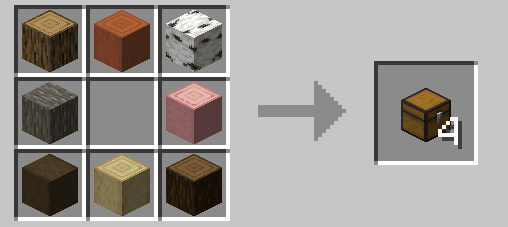
- Chests with Logs
- Ladders with Logs
- Light & Heavy Weighted Pressure Plates with Gold/Iron Blocks
Items - Random Bulk Items
- Bowl with Logs
- Bread with Haybales
- Ender Eyes with Ender Pearls and Blaze Rods
- Sticks with Logs
Buttons
- Using 1 material that can create a button and recieve 4 in return
Convert
- Convert Glowberries to Glowstone
- Convert Dead Bushes to Sticks
Custom Crafts
- Bookshelves using any book types
- Red Mushroom blocks from Red Mushrooms
- Brown Mushroom blocks from Brown Mushrooms
- Crimson Nylium/Warped Nylium
- Netherwart Block from Crimson Fungus
- Warped block from Warped Fungus
- Twisting Vines
- Weeping Vines
- Enchanted Golden Apples
- Webs
- Grass Blocks
- Rooted Dirt
- Sculk
- Sculk Shrieker
- Sculk Sensor
- Sculk Catalyst
- Shroomlights
- Nametags
Flowers - Duplicate with Bonemeal in Crafting Table/Grid
Flower
- Any flower with Bonemeal
Leaves
- Duplicate Cherry Leaves, Flowering Azalea Leaves, Flowering Azalea, and Mangrove Propagule
- Duplicate Firefly Bush
Plants
- Carrots
- Potatos
- Beetroot
- Cactus
- Bamboo
- Sugarcane
- Lily Pads
- Sea Pickle
- Sweet Berries
- Glow Berries
- Chorus Fruit
Misc
- Cactus Flower
- Chorus Flower
- Pink Petals
- Pitcher Plant
- Spore Blossom
- Wildflowers
- Big Dripleaf
- Small Dripleaf
Ores
Stone
- Craft all stone ore blocks with 5 stone and 4 ores/ingots
Deepslate
- Craft all deepslate ore blocks with 5 deepslate and 4 ores/ingots
Nether
- Craft all nether ore blocks with 5 netherrack and 4 ores/ingots
Slabs back to Blocks
- Turn your stacks of slabs back into their block for by putting them left/right of eachother in a crafting grid.
Color Variants
Beds
- Recolor any bed by just putting it next to another dye in a crafting grid.
Carpets
- Use any 8 carpets and surround by a dye to redye those carpets into the new dye color.
Shulkers
- Why craft your shulker box and then dye it? Just add the dye while crafting the shulker box!
Wool
- Redye any wool by just putting it next to another dye in a crafting grid.
Dyes - New Dye Mixes
- Smelt Coal to recieve Black dye
- Mix Orange and Black dye to get 2 Brown dye
- Alternitavely, you can mix 2 Red dye, 1 Yellow dye, and 1 Blue dye to create 4 Brown Dye
- Put Dried Kelp in a crafting grid to recieve Green dye
- Smelt a Moss block to recieve Green dye
- Put a Flowering Azalea or Flowering Azalea Leaves in a crafting grid to get Magenta Dye
- Put a Popped Chorus Fruit in a crafting grid to recieve Magenta Dye
- Use a Spore Blossom in a crafting grid to get Pink dye
- Whats that? Another crafting grid recipe? Yup, just put an Amethyst Shard in a crafting grid to get Purple dye
- Finally, something new, smelt Sweet Berries to get Red dye
- Use black dye in place of an ink sac in the Book and Quill recipe
Functional
- Use any stone-type slabs in place of the slabs in the Armor Stand and Grindstone recipes
- Mix and match all obsidian and glass types in the Beacon recipe
- Mix any obsidian type in the enchant table recipe!
- Use any cobblestone-related blocks in place of the Brewing Stand recipe
- Use any cobblestone-related blocks in place of the Dispenser, Dropper, Brewing Stand, Furnace, Lever, Observer, Piston, Repeater and Comparator recipes!
Smelting
- Smelt all slabs and stair types that their full block counterpart can smelt into, such as cobblestone to stone, sandstone to smooth sandstone etc
Special
- Put a tnt, furnace, hopper, or chest inside a minecart recipe to precraft into its respectable counterpart.
Tools
- Craft all stone tools with all cobblestone-related blocks.
- Craft Spectral Arrows using more glowing related items!
Uncrafting
Blocks
- Amethyst to Shards
- Blue ice to Packed ice
- Brown Mushroom block to Brown Mushroom
- Red Mushroom block to Red Mushroom
- Calibrated Sensor to Sculk Sensor
- Clay block to Clay
- Cobweb to String
- Dripstone block to Pointed Dripstone
- 3 Gravel to 1 Flint
- 1 Honey block around 4 empty bottles to make 4 Honey Bottles
- Honeycomb Block to 4 honeycomb
- Magma Block to 4 Magma Cream
- Melon Block to 9 Melons
- Nether Brick Block to 4 Nether Bricks
- Nether Wart Block to 9 Nether Wart
- Warped Wart Block to 4 Warped Fungus
- Packed Ice to Ice
- Quartz Block to Quartz
- Sandstone to Sand
- Snow Block to Snowballs
- Wool to String
Tags
Item (What are Tags?)
Tags are a way of telling a recipe to allow more than one type of item. For example, for stone tools, I gave it my custom "Stone" tag, which means you can make a Stone Sword out of anything from the Stone list down below.
- Books (book, enchanted book, writable book, written book)
- Dirt (dirt, coarse dirt, rooted dirt, mud)
- Glass (all glass block colors)
- Glowing (glowstone dust, glow berries, glow ink sac, glow lichen)
- Grass (tall grass, short grass, tall dry grass, short dry grass, moss carpet, fern, seagrass)
- Mushroom (red & brown mushroom block, mushroom stem)
- Obsidian (obsidian and crying obsidian)
- Stone Slabs (all non-wooden slabs)
- Stone (stone, cobblestone, granite, andesite, diorite, tuff, cobbled deepslate, endstone, blackstone, netherrack, mossy cobblestone)
Checkout my other work!
Crafting+ server crashes on startup – what to do?
Common causes: the loader or Minecraft version does not match the mod file, a dependency is missing, or RAM is too low. Check the log (latest.log) for “OutOfMemoryError”, “Mixin” or missing mods. At Mado, the AI crash analysis reads the log and suggests a cause. You can change the loader and version in the panel.
Which loader does Crafting+ run on?
According to Modrinth, Crafting+ supports Fabric, Forge, NeoForge, Quilt for Minecraft rd-20090515, rd-161348, rd-160052. Forge and Fabric files are not interchangeable: pick one loader for the server and clients.
How much RAM does a server with Crafting+ need?
As guidance, 3–4 GB for a server with this mod. This is an estimate, not a measured minimum. More mods, many players and long view distances need more. The spark profiler shows whether a mod is costing tick time.
Similar mods
Popular mods in the same category
 Server-ready

Xaero's Minimap
by thexaero
Displays a map of the nearby world terrain, players, mobs, entities in the corner of your screen. Lets you create waypoints which help you find the locations you've marked.
 Server-ready

Xaero's World Map
by thexaero
Adds a full screen world map which shows you what you have explored in the world. Works great together with Xaero's Minimap.
 Client only

Not Enough Animations
by tr7zw
Bringing first-person animations to the third-person
 Client only

3D Skin Layers
by tr7zw
Render the player skin layer in 3d!
Ready for your server with Crafting+?
4 GB of RAM from €8.00 per month. 35% off your first month with MADO35.