
Create: Designed Decor
**Designed Decor** is a lightweight Create mod add-on focused on decorative industrial-style blocks and items like cardboard sheets, safety gear, and sawdust crafting, made to fit seamlessly into Create 0.5-based modpacks.
Screenshots
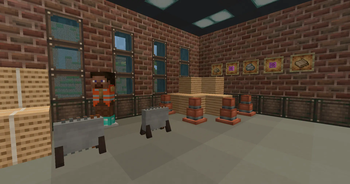
Über diese Mod
Thank you wonderful people who made this dream of being a modder a reality
Designed Decor is a feature-focused add-on for the Create mod, built specifically for players and modpack makers who want rich decorative content without jumping to Create 0.6. This mod expands the creative possibilities of your factory and industrial builds by introducing a curated selection of themed blocks, items, and recipes that fit naturally into the Create 0.5.x ecosystem.
With Designed Decor, you can craft immersive industrial environments using new materials like cardboard sheets made from wood pulp, which in turn can be processed through Create’s machinery. Add realism to your factories with sawdust produced via milling logs, and use it in custom crafting chains. Want to add some safety aesthetics? Equip your workers with a bright orange safety vest—a purely cosmetic armor item that sells the look of a fully operational facility.
All new content is designed to integrate seamlessly with Create’s systems. Recipes use Create’s mechanics like milling and blasting, and each item is balanced to feel like it belongs in a survival playthrough—not just creative mode. Whether you’re running a logistics empire, building a warehouse, or creating an immersive modpack experience, Designed Decor fills in the stylistic and functional gaps with a lightweight, lore-friendly touch.
This mod was built with MCreator, but designed with care—not bloated, not overpowered, and fully compatible with most Create add-ons that stick to the 0.5 range. If you’re not ready to leap into Create 6.0 but still want something fresh, functional, and decorative—Designed Decor delivers.
https://www.youtube.com/watch?v=LVIy5-lBYvY
Features
Decorative & Thematic Blocks
Weathered Iron Block
Weathered Iron Window
Road Barrier
Traffic Cone
Spindle Crate
Blueprint Table
Tool Cabinet
Tool Rack
Wrenchly Box
Blueprint Pile
Blue Post Box
Blue Table Cloth
Crafting Materials & Processing Items
Cardboard
Bound Cardboard
Cardboard Sheet
Sawdust
Pulp
Orange Fabric
Packing Tape
Cardboard Roll
Blueprint
That Looks Familiar
This Again
Cleaking Helper
Wearables & Safety Gear
Safety Vest
Blue Hard Hat
White Hard Hat
Yellow Hard Hat
Red Hard Hat
Orange Hard Hat
Machines & Tools
Miter Saw
Floor Miter Saw
Saw Blade
SOUND CREDITS:
Cardboard Paper Tension by syenasweta -- https://freesound.org/s/686733/ -- License: Attribution 4.0
Powerful Ripping Of Cardboard by Entagon -- https://freesound.org/s/615501/ -- License: Attribution 4.0
Dropping a Cardboard Box and Rubbing It by fordps3 -- https://freesound.org/s/729285/ -- License: Attribution 4.0
Verfügbare Versionen
Create: Designed Decor auf dem Server installieren
Server bestellen
Bestelle einen Minecraft Java Server mit mindestens 4 GB RAM (6 GB empfohlen).
forge Loader setzen
Wähle im Panel unter "Egg" den forge-Loader und die passende Minecraft-Version (1.21.11).
Mod installieren
Öffne den Mod-Browser im Dashboard und suche nach "Create: Designed Decor". Klicke "Installieren" – fertig! Alternativ: Lade die .jar via SFTP in den /mods Ordner.
Kompatibilität
Mod-Loader
Minecraft-Versionen
1.21.11, 1.21.10, 1.21.9 (+9 weitere)
Server-seitig
✓ ErforderlichEmpfohlener RAM
6 GB(min. 4 GB)Häufige Fragen
Create: Designed Decor Server crasht beim Start – was tun?
Häufigste Ursache: falsche forge-Version oder zu wenig RAM. Prüfe im Server-Log (latest.log), ob ein "OutOfMemoryError" oder "Mixin"-Fehler auftritt. Bei Mado Hosting: Stelle sicher, dass mindestens 4 GB RAM zugewiesen sind und der Loader zur Mod-Version passt (1.21.11). Über das Panel kannst du den Loader mit einem Klick wechseln.
Ist Create: Designed Decor mit forge und neoforge kompatibel?
Create: Designed Decor unterstützt offiziell forge, neoforge für Minecraft 1.21.11, 1.21.10, 1.21.9. Im Mado Dashboard werden inkompatible Loader-Kombinationen automatisch erkannt.
Server laggt mit Create: Designed Decor – wie optimiere ich die Performance?
Empfohlener RAM: 6 GB (+1 GB pro 5 Spieler). Prüfe mit /spark profiler, ob Create: Designed Decor den meisten Tick-Time verbraucht. Häufige Fixes: Server-View-Distance auf 8-10 reduzieren, bei Forge "performant" oder "starlight" als Zusatz-Mod installieren. Bei Mado Hosting läuft dein Server auf NVMe-SSDs mit dedizierten CPU-Kernen für minimale Latenz.
Ähnliche Mods

![[ETF] Entity Texture Features](https://cdn.modrinth.com/data/BVzZfTc1/af683d206d50b05258d865b0d6e4aa2f2cee12f2_96.webp)
![[EMF] Entity Model Features](https://cdn.modrinth.com/data/4I1XuqiY/6e5bbd0d06b1741bfdab6c0cfab6de8fdaf0064c_96.webp)



Modded Server mieten
Installiere Create: Designed Decor mit nur einem Klick auf deinem Server.