
Create: Improved Display Link Experience
Sprucing up the functionality of Display Links from Create mod
Screenshots


Über diese Mod

Create: Improved Display Link Experience





Please downgrade your NeoForge to 21.1.233 if you are experiencing crashes on startup. Due to technical reasons I, as of now, sadly cannot finish and release the update that includes a fix of said issue. Apologies for the inconvenience.
The project description is not up to date at the moment. While it's going through total rework, check out the Modrinth Changelog or the GitHub Changelog for details about latest additions.
Create: Improved Display Link Experience (C: IDLX) is a little Quality-of-Life add-on for Create mod aimed at sprucing up some of Display Link features, mainly the underrated Attached Label option.
Features
Placeholders for the Attached Label
The way Create mod currently handles displaying information (let's call one an input string) with the attached label is by simply concatenating both with a space in between -
it's a simple way, but thus, in terms of customization, a severely limiting one:
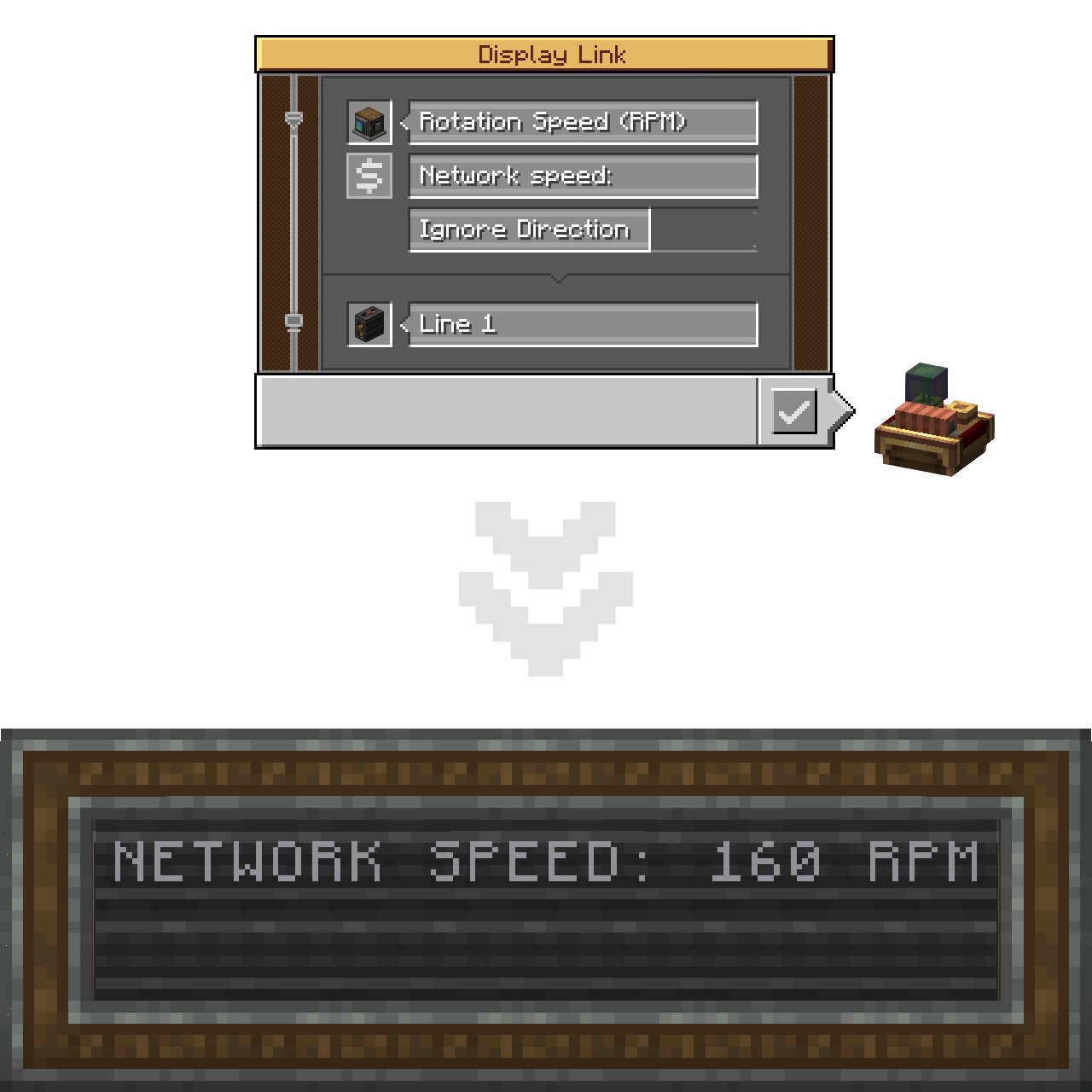
This add-on pushes the boundaries apart by introducing the $ and {} placeholders.
Placing one (or more) marks the place where the input string should be inserted.
In short, the Attached Label can now act like a formatted string!
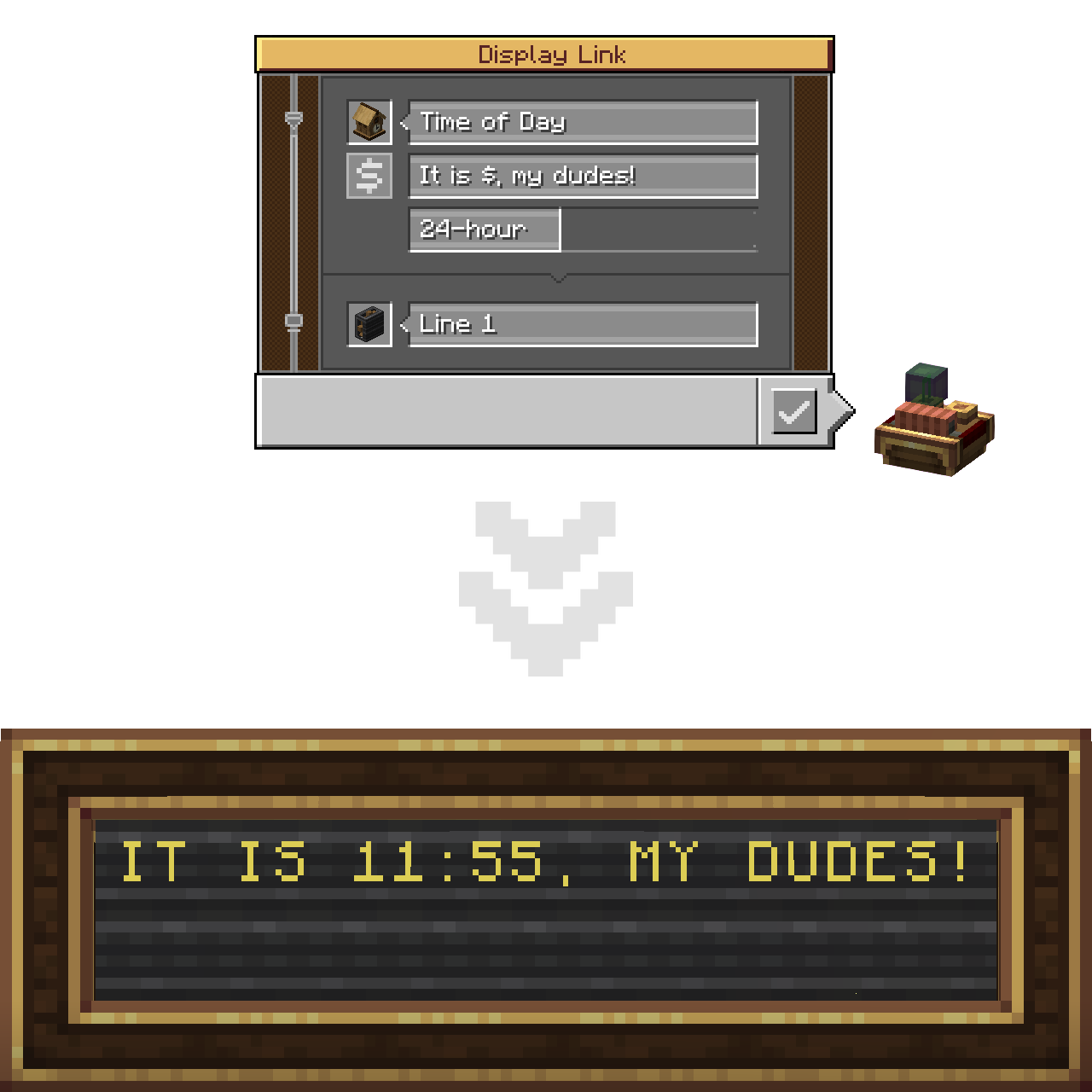
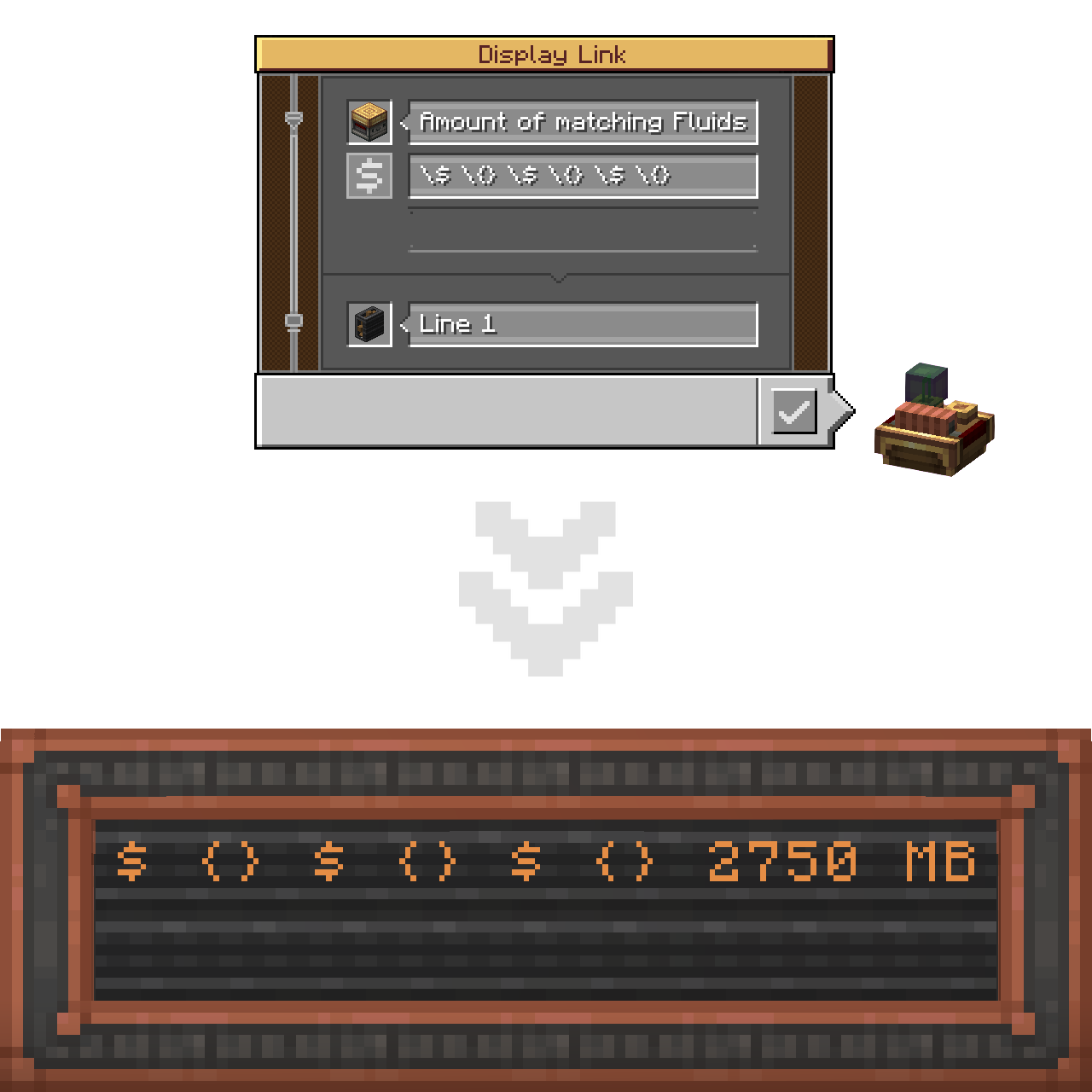
You can utilize as many placeholders as you want in one string. Mixing both types of them doesn't cause any issues as well!
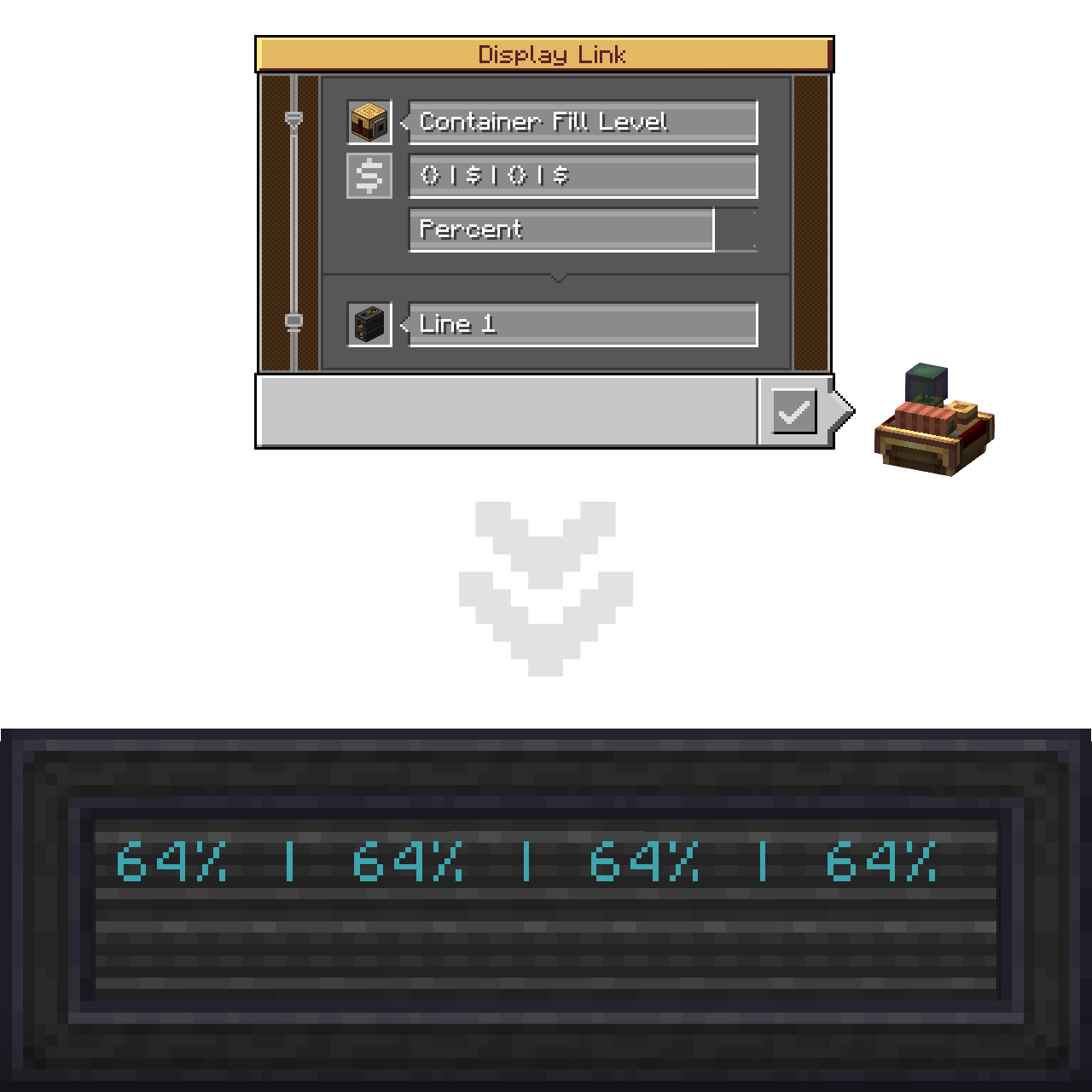
If you need to insert a $ character literally (same applies to {}), without it turning into a placeholder, use backslash-escaping on it.
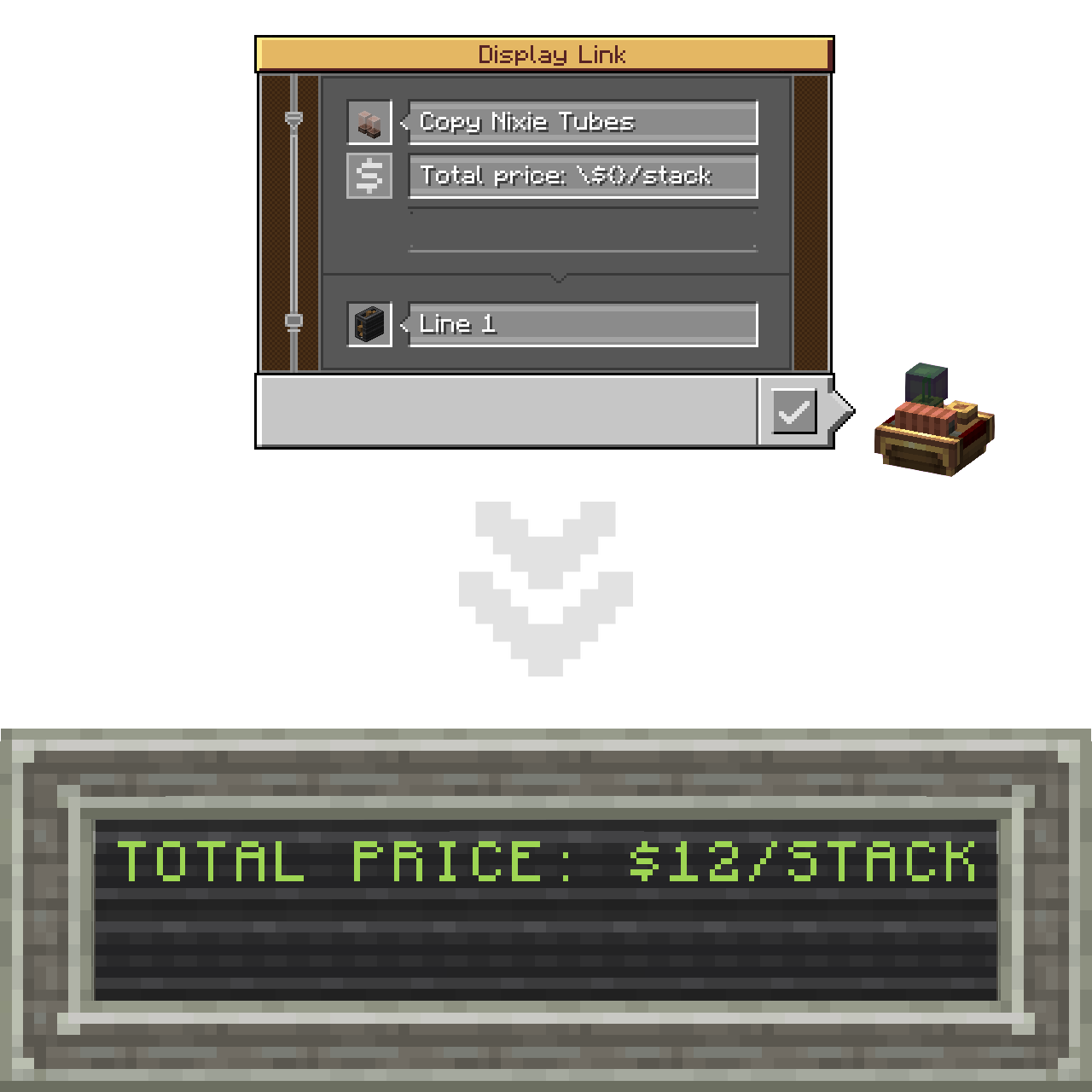
In case of no unescaped placeholders present in the label altogether, default (base Create's) concatenation will be applied.

Lastly, there's a new hover-on button that displays a Placeholders Usage Guide tooltip containing all the abovementioned.
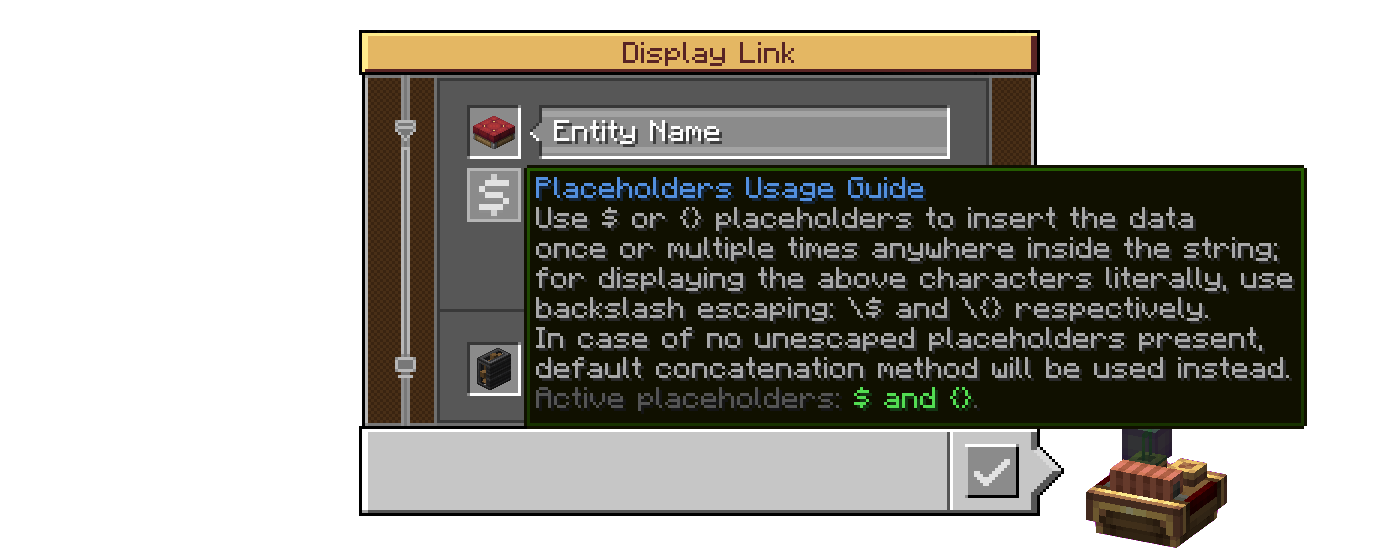
Its last string displays which placeholders are active (available to use in this world/server, which is specified by the server config of the mod).

(A .webp version if the one above doesn't play properly)
Config
C: IDLX has a proper Create-styled config for both the client (visuals) and the server (per-world).
Client settings
Enable Guide Buttons: toggling that off will hide the abovementioned hover-on button in the Display Link interface.- Tooltip Customization:
Enable (Active Placeholders / Progress Bar Support) Tooltip: those two add their additional strings into the Placeholders Usage Guide tooltip, that change the text, reflecting the states of their respective config options in Server settings.
Server settings
Hide Escaping Of Disabled Placeholders: by default, when a disabled placeholder is escaped, the backslash stays visible as if placed before a regular character; enable to make it get hidden like if it did its job;Enable Crude Progress Bar Support: currently the progress bar characters are being rendered incorrectly (appear squashed together) if used with placeholders, so the support for this display format is disabled altogether by default (see Known Issues).- Placeholders Availability:
Enable (Dollar Sign / Curly Brackets) Placeholder: with those two it is possible to limit the placeholder functionality to only one option - the Dollar Sign or the Curly Brackets respectively - or disable the feature altogether by ticking both as off (affects the last string of the Placeholders Usage Guide tooltip);
Known Issues
Essentially C: IDLX provides a single flap display section with default formatting options,
unlike Create that makes two for the label (default formatting) and the value (formatting specific to its display format) respectively.
The consequence of the first method is that the progress bar characters are being rendered as literal characters (non-wide), and thus appear squashed together.
Fixing that would involve rewriting the code to instead generate an array of sections. I started working on it but didn't have time to finish after running into numerous issues,
and decided to postpone it for when I get more time on my hands. Currently, placeholders support for the progress bar is put behind config (off by default).
If anybody has the will to help me with this issue, I would appreciate the contribution very much.
Porting Plans
C: IDLX is planned to be backported to Forge 1.20.1. However I currently can not say exactly when that will happen.
Credits
Mod Development
- @LIUKRAST and @salem-5 for valuable Mixin advices at the early stage of C: IDLX development;
- @realRobotix for help with making my mod config always open through Catnip (be Create-styled);
- GG_Gnom (
gg_gnomon Discord) for testing the mod (literally the only case of testing this mod I know).
Mod Page Decoration
- Devin's Badges for most badges used in this README;
- @flikrheist for the NeoForge badge specifically;
- FOR THE BADGE for the "Available For: 1.21.1" and "License: MIT" badges.
Translation
- @KEricMinecraft for Chinese Simplified (
zh_cn).
My first Minecraft mod, by the way!
Verfügbare Versionen
Create: Improved Display Link Experience auf dem Server installieren
Server bestellen
Bestelle einen Minecraft Java Server mit mindestens 4 GB RAM (6 GB empfohlen).
forge Loader setzen
Wähle im Panel unter "Egg" den forge-Loader und die passende Minecraft-Version (1.21.1).
Mod installieren
Öffne den Mod-Browser im Dashboard und suche nach "Create: Improved Display Link Experience". Klicke "Installieren" – fertig! Alternativ: Lade die .jar via SFTP in den /mods Ordner.
Kompatibilität
Mod-Loader
Minecraft-Versionen
1.21.1, 1.20.1
Server-seitig
✓ ErforderlichEmpfohlener RAM
6 GB(min. 4 GB)Häufige Fragen
Create: Improved Display Link Experience Server crasht beim Start – was tun?
Häufigste Ursache: falsche forge-Version oder zu wenig RAM. Prüfe im Server-Log (latest.log), ob ein "OutOfMemoryError" oder "Mixin"-Fehler auftritt. Bei Mado Hosting: Stelle sicher, dass mindestens 4 GB RAM zugewiesen sind und der Loader zur Mod-Version passt (1.21.1). Über das Panel kannst du den Loader mit einem Klick wechseln.
Ist Create: Improved Display Link Experience mit forge und neoforge kompatibel?
Create: Improved Display Link Experience unterstützt offiziell forge, neoforge für Minecraft 1.21.1, 1.20.1. Im Mado Dashboard werden inkompatible Loader-Kombinationen automatisch erkannt.
Server laggt mit Create: Improved Display Link Experience – wie optimiere ich die Performance?
Empfohlener RAM: 6 GB (+1 GB pro 5 Spieler). Prüfe mit /spark profiler, ob Create: Improved Display Link Experience den meisten Tick-Time verbraucht. Häufige Fixes: Server-View-Distance auf 8-10 reduzieren, bei Forge "performant" oder "starlight" als Zusatz-Mod installieren. Bei Mado Hosting läuft dein Server auf NVMe-SSDs mit dedizierten CPU-Kernen für minimale Latenz.
Ähnliche Mods

![[ETF] Entity Texture Features](https://cdn.modrinth.com/data/BVzZfTc1/af683d206d50b05258d865b0d6e4aa2f2cee12f2_96.webp)
![[EMF] Entity Model Features](https://cdn.modrinth.com/data/4I1XuqiY/6e5bbd0d06b1741bfdab6c0cfab6de8fdaf0064c_96.webp)



Modded Server mieten
Installiere Create: Improved Display Link Experience mit nur einem Klick auf deinem Server.