
Create: Pantographs & Wires
A mod with catenary wires, pantographs and more for electric modern trains in Create.
Screenshots
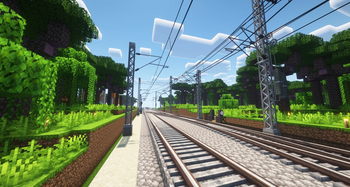

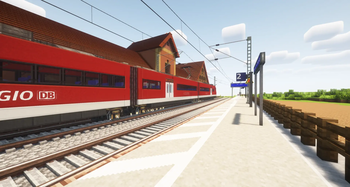
Über diese Mod
⚡ Create: Pantographs & Wires
A mod which adds catenary wires, pantographs and more for electric modern trains in Create!
This mod breaks the rule of classic Create addons with its more realistic style and focuses on the part of the Create community that uses this mod to build impressive modern trains and railway networks. With the design and implementation inspired by Immersive Engineering, here is a overview about the features in this mod.



🧩 Dependencies


- This mod requires Create or Create Fabric.
- Versions with
C6are compatible with Create 6, versions without this suffix are compatible with Create 5 (unless Create 6 is the only version available for that Minecraft version) - Version
>= 0.2.0require DragonLib to be installed! Older versions<= 0.1.2do NOT require DragonLib! Delete it from your mods folder. Please read this post to see which versions of my other mods are compatible with each other.
✅ Features
- Various masts that can be placed in any size and rotated at an angle of 22.5 degrees (approximately)
- Cantilevers with different sizes and insulator types
- Catenary Wire and Power lines
- Pantograph that automatically adjusts to the height of the catenary wire
🤝 Contribute
Thanks to Moritz Walter for suggesting the mod's name.
Also thanks to all the people who are helping with development and translating the mod into different languages.
This project is open source, so if you'd like to help with development or localization, feel free to create pull requests or issues on GitHub and visit our Crowdin page.


⚠️ Please note!
To protect your worlds, you should always create a backup before installing an update of this mod. Alpha versions in particular may contain critical bugs! I am not responsible for any damage caused to your worlds by this mod if you ignore this warning!
Verfügbare Versionen
Create: Pantographs & Wires auf dem Server installieren
Server bestellen
Bestelle einen Minecraft Java Server mit mindestens 4 GB RAM (6 GB empfohlen).
fabric Loader setzen
Wähle im Panel unter "Egg" den fabric-Loader und die passende Minecraft-Version (1.21.1).
Mod installieren
Öffne den Mod-Browser im Dashboard und suche nach "Create: Pantographs & Wires". Klicke "Installieren" – fertig! Alternativ: Lade die .jar via SFTP in den /mods Ordner.
Kompatibilität
Mod-Loader
Minecraft-Versionen
1.21.1, 1.20.1
Server-seitig
✓ ErforderlichEmpfohlener RAM
6 GB(min. 4 GB)Häufige Fragen
Create: Pantographs & Wires Server crasht beim Start – was tun?
Häufigste Ursache: falsche fabric-Version oder zu wenig RAM. Prüfe im Server-Log (latest.log), ob ein "OutOfMemoryError" oder "Mixin"-Fehler auftritt. Bei Mado Hosting: Stelle sicher, dass mindestens 4 GB RAM zugewiesen sind und der Loader zur Mod-Version passt (1.21.1). Über das Panel kannst du den Loader mit einem Klick wechseln.
Ist Create: Pantographs & Wires mit fabric und forge und neoforge kompatibel?
Create: Pantographs & Wires unterstützt offiziell fabric, forge, neoforge für Minecraft 1.21.1, 1.20.1. Achtung: Forge- und Fabric-Mods sind NICHT untereinander kompatibel – wähle einen Loader und bleibe dabei. Im Mado Dashboard werden inkompatible Loader-Kombinationen automatisch erkannt.
Server laggt mit Create: Pantographs & Wires – wie optimiere ich die Performance?
Empfohlener RAM: 6 GB (+1 GB pro 5 Spieler). Prüfe mit /spark profiler, ob Create: Pantographs & Wires den meisten Tick-Time verbraucht. Häufige Fixes: Server-View-Distance auf 8-10 reduzieren, bei Forge "performant" oder "starlight" als Zusatz-Mod installieren. Bei Mado Hosting läuft dein Server auf NVMe-SSDs mit dedizierten CPU-Kernen für minimale Latenz.
Ähnliche Mods

![[ETF] Entity Texture Features](https://cdn.modrinth.com/data/BVzZfTc1/af683d206d50b05258d865b0d6e4aa2f2cee12f2_96.webp)
![[EMF] Entity Model Features](https://cdn.modrinth.com/data/4I1XuqiY/6e5bbd0d06b1741bfdab6c0cfab6de8fdaf0064c_96.webp)



Modded Server mieten
Installiere Create: Pantographs & Wires mit nur einem Klick auf deinem Server.