
Create Smart Bounds
Improves create mod's block entity renderbounds
Screenshots
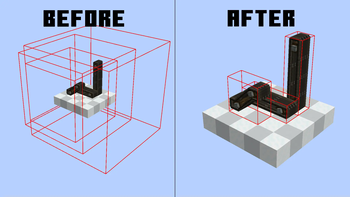
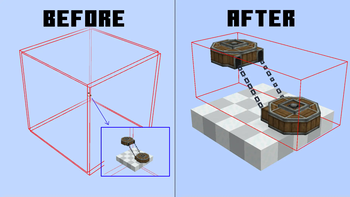
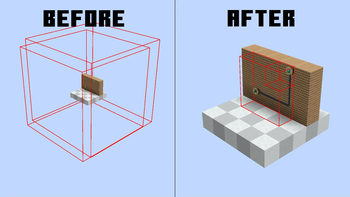
Über diese Mod
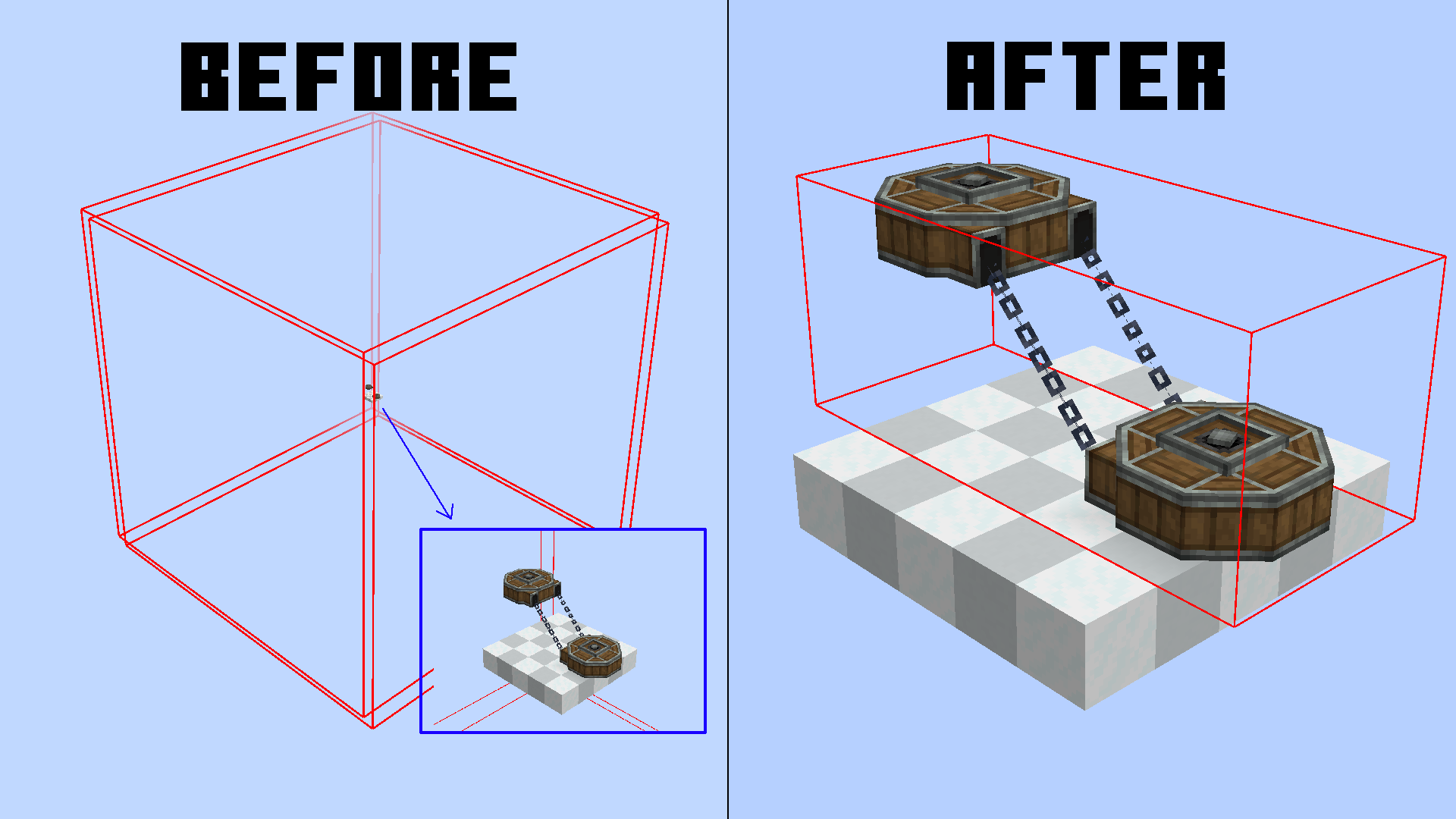
This mod aims to reduce enormous and nonsense render bounds for create block entities.
You can check neoforge block entities render bounds with this command /neoforge debug_blockentity_renderbounds true
It also reworks some block entities render bounds caching
It's a pretty small optimization, but in large contraptions and big machine areas, it can make the difference.
We currently support:
- Mechanical Arms
- Belts
- Chain Conveyors
- Factory Panels
- PSI & Deployers
- Rollers
- Frog Ports
What are render bounds?
Usually, to optimize performance, all blocks that are behind/outside your screen are not rendered to avoid useless computations.
In blocks, this bound is set to a 3x3 area, but in block entities, this is customizable.
The reason? Simple, render things that are bigger than a block. For example, Chain Conveyors need a larger render bounding box for chain connections.
The thing is, most times create goes by "better larger" and just inflates the whole area. This makes most of your block entities get rendered even though they are not even visible.
Render Bounds Caching
The bounding box is not generated every frame, since the block only needs to change his bounding box on some precise events.
This mod also optimizes this, removing useless bounding box reloading for some blocks (Belts) which before reloaded their bounding box EVERY GAME TICK (20 times per second).
Now they only update if the block is broken and replaced, reducing the lag.
Verfügbare Versionen
Create Smart Bounds auf deinem Client installieren
Mod-Loader lokal installieren
Installiere neoforge für deine lokale Minecraft-Version.
Passende Datei herunterladen
Wähle die Create Smart Bounds-Datei für neoforge und Minecraft 1.21.1.
Mod installieren
Lege die .jar-Datei in deinem lokalen .minecraft/mods-Ordner ab und starte Minecraft neu. Eine Installation auf dem Server ist nicht nötig.
Kompatibilität
Mod-Loader
Minecraft-Versionen
1.21.1
Server-seitig
✗ Nicht unterstütztEmpfohlener RAM
6 GB(min. 4 GB)Häufige Fragen
Muss Create Smart Bounds auf dem Minecraft Server installiert werden?
Nein. Modrinth kennzeichnet Create Smart Bounds serverseitig als nicht unterstützt. Installiere die Mod nur im lokalen Minecraft-Mods-Ordner. Dein Server kann unverändert bleiben, sofern die Mod-Seite keine zusätzliche Abhängigkeit nennt.
Welche Version und welchen Loader braucht Create Smart Bounds?
Nutze eine Datei für neoforge und exakt deine Minecraft-Version. Unterstützte Versionen sind unter anderem 1.21.1. Loader-Dateien sind nicht untereinander austauschbar.
Create Smart Bounds funktioniert nicht – was kann ich prüfen?
Prüfe zuerst Minecraft-Version, Loader-Version und erforderliche Abhängigkeiten. Lege die .jar-Datei im lokalen .minecraft/mods-Ordner ab und entferne ältere Duplikate. Da die Mod clientseitig ist, löst mehr Server-RAM dieses Problem nicht.
Ähnliche Mods






Minecraft Server für deine Gruppe
Create Smart Bounds bleibt auf deinem Client. Hoste dazu eine kompatible Welt für deine Mitspieler.