
Cull Clouds
Improving clouds building way to not render parts which you cant see to increase fps
Screenshots
Über diese Mod
Cull Clouds
Fabric mod that adds a small optimization improves clouds building way to not render parts which you cant see to increase fps
Works only with "Fancy" clouds
Why is this mod not updating?
Sodium has added the functionality of this mod in new versions, so, I think updates of this mod are no longer needed
And also, the mod gives too small increase in fps to develop it further, I don't know why people would need it, because as it says a bit above of the fps comparison picture, the mod usually only gives +1 fps if you play in normal scenarios
Compatibility
This mod has compatibility issues, I tested it with two mods:
Extended Clouds - does not run with Cull Clouds
SuperFancyClouds - runs, but Cull Clouds does nothing
The list of incompatibilities may grow, because in order to improve the vanilla clouds, Cull Clouds is essentially rewriting it
Performance
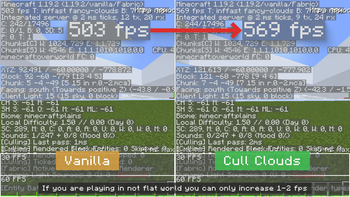
Here's a comparison of fps between Vanilla and Cull Clouds
If you're not playing on a flat world, the increase may be very small, something like a 1-2 fps difference
Verfügbare Versionen
Cull Clouds auf deinem Client installieren
Mod-Loader lokal installieren
Installiere fabric für deine lokale Minecraft-Version.
Passende Datei herunterladen
Wähle die Cull Clouds-Datei für fabric und Minecraft 1.19.2.
Mod installieren
Lege die .jar-Datei in deinem lokalen .minecraft/mods-Ordner ab und starte Minecraft neu. Eine Installation auf dem Server ist nicht nötig.
Kompatibilität
Mod-Loader
Minecraft-Versionen
1.19.2, 1.19.2-rc2, 1.19.2-rc1 (+24 weitere)
Server-seitig
✗ Nicht unterstütztEmpfohlener RAM
4 GB(min. 3 GB)Häufige Fragen
Muss Cull Clouds auf dem Minecraft Server installiert werden?
Nein. Modrinth kennzeichnet Cull Clouds serverseitig als nicht unterstützt. Installiere die Mod nur im lokalen Minecraft-Mods-Ordner. Dein Server kann unverändert bleiben, sofern die Mod-Seite keine zusätzliche Abhängigkeit nennt.
Welche Version und welchen Loader braucht Cull Clouds?
Nutze eine Datei für fabric, quilt und exakt deine Minecraft-Version. Unterstützte Versionen sind unter anderem 1.19.2, 1.19.2-rc2, 1.19.2-rc1. Loader-Dateien sind nicht untereinander austauschbar.
Cull Clouds funktioniert nicht – was kann ich prüfen?
Prüfe zuerst Minecraft-Version, Loader-Version und erforderliche Abhängigkeiten. Lege die .jar-Datei im lokalen .minecraft/mods-Ordner ab und entferne ältere Duplikate. Da die Mod clientseitig ist, löst mehr Server-RAM dieses Problem nicht.
Ähnliche Mods


Minecraft Server für deine Gruppe
Cull Clouds bleibt auf deinem Client. Hoste dazu eine kompatible Welt für deine Mitspieler.
Details
- Lizenz
- GNU Lesser General Public License v3.0 only
- Server-seitig
- Nicht unterstützt