
Dynamic Flight Control
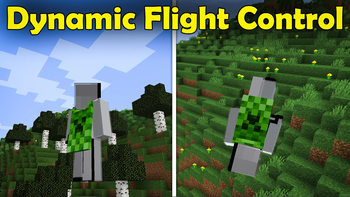
This Mod Let's you fly With different game method, so you don't have use shift and space. You can fly up and down, just by pointing towards it.
Screenshots
Über diese Mod

👉 Click the banner or [start here] to get going.
Dynamic Flight Control
Dynamic Flight Control completely revamps how you fly in Minecraft. Instead of constantly mashing Space and Shift to move up and down, fly effortlessly in the direction you are looking, just like an Elytra, but with full creative flight precision.
✨ Features
- Directional 3D Flight - Your crosshair controls vertical movement. Look up to ascend, look down to descend.
- Smooth 3D Glide & Deceleration - Enjoy realistic, uniform coasting in all directions when letting go of controls.
- Smooth Glide or Instant Stop - Gives additional Instant Stop option (Minecraft java already has smooth glide stop function)
- Full Movement Control - WASD for horizontal steering, with Space/Shift for vertical overrides.
- Configurable Settings (Saved Per Player):
/flight speed <0.1-2.0>- Adjust your flight speed multiplier./flight groundlock <true|false>- Choose whether touching the ground automatically exits flight mode./flight instantstop <true|false>- Toggle between instant halt (Bedrock-style) and momentum gliding./flight reset- Restore all settings back to default.
🎮 How to Use
- Install the mod on client & server (or singleplayer).
- Enter Creative mode (or have flight enabled).
- Double-tap Space to activate flight.
- Look wherever you want to go and you will fly directly in that direction!
- Double-tap Space again to stop flying.
📹 Video Showcase (little outdated)
Terms of Use
- Do not repost or redistribute without permission.
- Credit is appreciated if showcasing in videos or modpacks.
Verfügbare Versionen
Dynamic Flight Control auf dem Server installieren
Server bestellen
Bestelle einen Minecraft Java Server mit mindestens 3 GB RAM (4 GB empfohlen).
fabric Loader setzen
Wähle im Panel unter "Egg" den fabric-Loader und die passende Minecraft-Version (26.2).
Mod installieren
Öffne den Mod-Browser im Dashboard und suche nach "Dynamic Flight Control". Klicke "Installieren" – fertig! Alternativ: Lade die .jar via SFTP in den /mods Ordner.
Kompatibilität
Mod-Loader
Minecraft-Versionen
26.2, 1.21.11, 1.20.1
Server-seitig
✓ ErforderlichEmpfohlener RAM
4 GB(min. 3 GB)Häufige Fragen
Dynamic Flight Control Server crasht beim Start – was tun?
Häufigste Ursache: falsche fabric-Version oder zu wenig RAM. Prüfe im Server-Log (latest.log), ob ein "OutOfMemoryError" oder "Mixin"-Fehler auftritt. Bei Mado Hosting: Stelle sicher, dass mindestens 3 GB RAM zugewiesen sind und der Loader zur Mod-Version passt (26.2). Über das Panel kannst du den Loader mit einem Klick wechseln.
Ist Dynamic Flight Control mit fabric und forge und neoforge kompatibel?
Dynamic Flight Control unterstützt offiziell fabric, forge, neoforge für Minecraft 26.2, 1.21.11, 1.20.1. Achtung: Forge- und Fabric-Mods sind NICHT untereinander kompatibel – wähle einen Loader und bleibe dabei. Im Mado Dashboard werden inkompatible Loader-Kombinationen automatisch erkannt.
Server laggt mit Dynamic Flight Control – wie optimiere ich die Performance?
Empfohlener RAM: 4 GB (+1 GB pro 8 Spieler). Prüfe mit /spark profiler, ob Dynamic Flight Control den meisten Tick-Time verbraucht. Häufige Fixes: Server-View-Distance auf 8-10 reduzieren, bei Forge "performant" oder "starlight" als Zusatz-Mod installieren. Bei Mado Hosting läuft dein Server auf NVMe-SSDs mit dedizierten CPU-Kernen für minimale Latenz.
Ähnliche Mods






Modded Server mieten
Installiere Dynamic Flight Control mit nur einem Klick auf deinem Server.