
ElevatorMod
Simple port of the elevator from OpenBlocks to 1.8+
Screenshots
Über diese Mod

ElevatorMod



Port of the elevator from OpenBlocks to Minecraft 1.8+.
Crafting
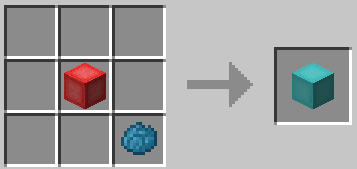
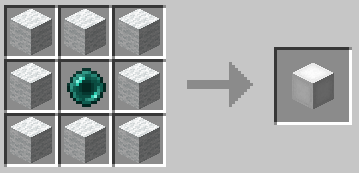
The default recipe is the same as in OpenBlocks.
Example of the white elevator recipe:
You can also re-dye any elevator:
Usage
To use them place two or more elevators in the same X and Z coordinates, to move between them simply jump to go to the
elevator above or sneak to go to the one below.
You can configure the range of the elevators and if they should require XP to teleport in
the configuration file.
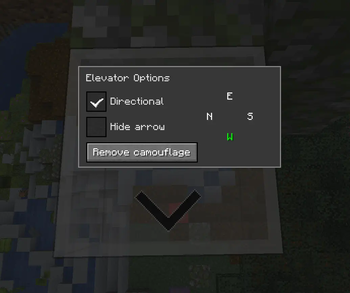
Options Interface
You can access the options interface by right-clicking on the elevator with an empty hand.
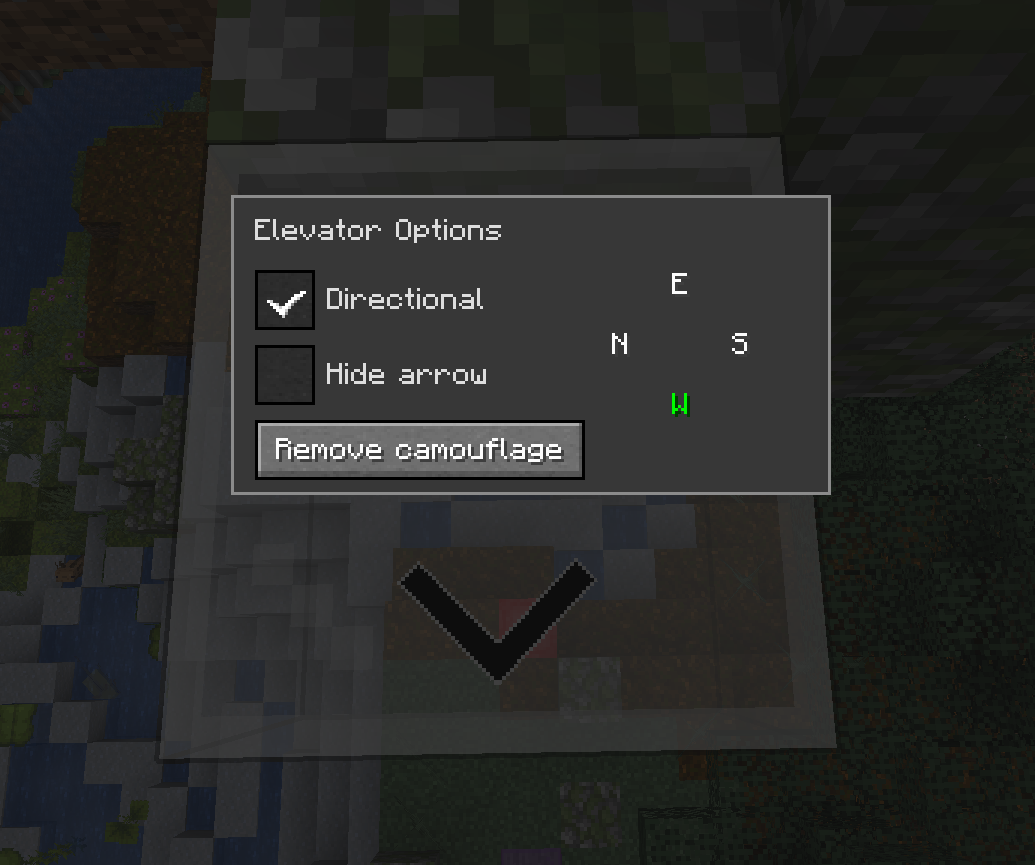
Directional
When the Directional checkbox is enabled, the elevator will adjust the yaw rotation of players who teleport to it
based on the configured direction.
You can change the direction by clicking on the desired direction button. The display order of the buttons will match
the current direction the player is facing.
It will also show an arrow on the elevator to indicate the direction it is facing. You can hide it by selecting
the Hide arrow checkbox.
Note: This has nothing to do with horizontal movement, it only changes the direction the player is facing.
Camouflage
You can use any solid block to camouflage the elevator, just right-click on the elevator with the desired block on your
hand.
Most blocks can be used as camouflage with some exceptions. For example, you can't use a chest because it uses a
different rendering method.
Configuration
The configuration file is per-world and is located at <world-directory>/serverconfig/elevatorid-server.toml.
Here are the default values:
[General]
#Should elevators have the same color in order to teleport ?
sameColor = false

#Elevator range
#Range: 3 ~ 4064
range = 384

#Realign players to the center of elevator ?
precisionTarget = true

#Can mobs spawn on elevators ?
mobSpawn = false

#Reset pitch to 0 when teleporting to normal elevators ?
resetPitchNormal = false

#Reset pitch to 0 when teleporting to directional elevators ?
resetPitchDirectional = true

#Should teleporting require XP ?
useXP = false

#Amount of XP points to use when useXP is enabled
#Note this is NOT experience levels
#Range: > 1
XPPointsAmount = 1
Thanks
- OpenBlocks Team
- All contributors on GitHub
Modpacks
Feel free to use this in any modpack.
Verfügbare Versionen
ElevatorMod auf dem Server installieren
Server bestellen
Bestelle einen Minecraft Java Server mit mindestens 3 GB RAM (4 GB empfohlen).
fabric Loader setzen
Wähle im Panel unter "Egg" den fabric-Loader und die passende Minecraft-Version (26.3).
Mod installieren
Öffne den Mod-Browser im Dashboard und suche nach "ElevatorMod". Klicke "Installieren" – fertig! Alternativ: Lade die .jar via SFTP in den /mods Ordner.
Kompatibilität
Mod-Loader
Minecraft-Versionen
26.3, 26.2, 26.1.2 (+25 weitere)
Server-seitig
✓ ErforderlichEmpfohlener RAM
4 GB(min. 3 GB)Häufige Fragen
ElevatorMod Server crasht beim Start – was tun?
Häufigste Ursache: falsche fabric-Version oder zu wenig RAM. Prüfe im Server-Log (latest.log), ob ein "OutOfMemoryError" oder "Mixin"-Fehler auftritt. Bei Mado Hosting: Stelle sicher, dass mindestens 3 GB RAM zugewiesen sind und der Loader zur Mod-Version passt (26.3). Über das Panel kannst du den Loader mit einem Klick wechseln.
Ist ElevatorMod mit fabric und forge und neoforge kompatibel?
ElevatorMod unterstützt offiziell fabric, forge, neoforge für Minecraft 26.3, 26.2, 26.1.2. Achtung: Forge- und Fabric-Mods sind NICHT untereinander kompatibel – wähle einen Loader und bleibe dabei. Im Mado Dashboard werden inkompatible Loader-Kombinationen automatisch erkannt.
Server laggt mit ElevatorMod – wie optimiere ich die Performance?
Empfohlener RAM: 4 GB (+1 GB pro 8 Spieler). Prüfe mit /spark profiler, ob ElevatorMod den meisten Tick-Time verbraucht. Häufige Fixes: Server-View-Distance auf 8-10 reduzieren, bei Forge "performant" oder "starlight" als Zusatz-Mod installieren. Bei Mado Hosting läuft dein Server auf NVMe-SSDs mit dedizierten CPU-Kernen für minimale Latenz.
Ähnliche Mods


Modded Server mieten
Installiere ElevatorMod mit nur einem Klick auf deinem Server.