Elytra Pitch
A customizable elytra HUD to maintain optimal pitch, monitor flight stats, and track durability.
Screenshots
Über diese Mod
Elytra Pitch



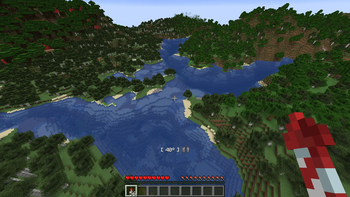
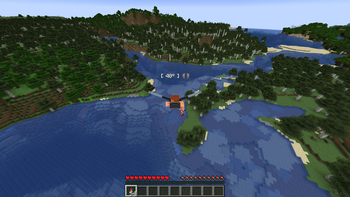
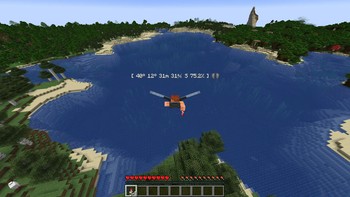
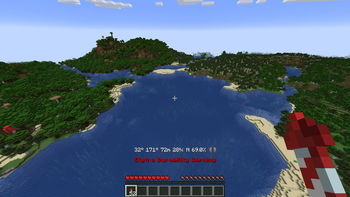
Elytra Pitch is a Minecraft mod that helps players fly more efficiently with elytra. By maintaining a pitch angle of around 40 degrees, players can glide much farther while using fewer rockets. The mod adds a customizable HUD that displays your current pitch during elytra flight, along with an indicator for the optimal angle.
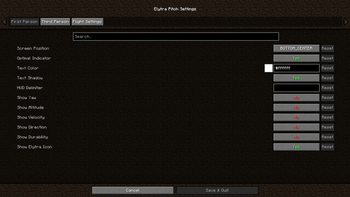
Several optional features include an in-game settings menu via Mod Menu for extensive customization, as well as support for accessory mods like Elytra Slot that use Trinkets or Accessories. Additional HUD elements can be enabled to display yaw, altitude, speed, direction, and elytra durability.
Elytra Pitch also offers optional keybindings for assisted flight, allowing players to lock their pitch or snap to the optimal angle. This functionality revives and expands on the now-unmaintained FlightHelper mod.

Changelog
- ElytraPitch 1.1.0 added separate settings for FP and TP, as well as text color and shadow settings.
- ElytraPitch 1.2.0 added optional HUD elements for yaw, altitude, speed, and direction.
- ElytraPitch 1.3.0 added keybindings to lock the player's pitch and snap to the optimal angle.
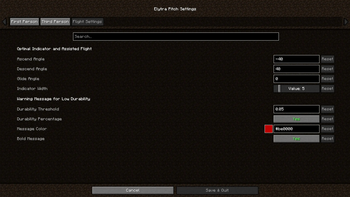
- ElytraPitch 1.3.1 added settings for flight angles, toggle messages and assisted flight.
- ElytraPitch 1.4.0 added an optional HUD element for durability and a warning message.
- ElytraPitch 1.4.1 added Trinkets support (e.g., Elytra Slot) and an optional HUD delimiter.
- ElytraPitch 1.4.2 fixed crashes due to the absence of Trinkets and/or presence of Origins.
- ElytraPitch 1.4.3 moved the position of the optional elytra item above the HUD elements.
- ElytraPitch 1.4.4 added Accessories support for Elytra Slot and refactored rendering code.
- ElytraPitch 1.4.5 added Trinkets Canary support (e.g., Elytra Trinket) for Minecraft 1.21.8+.
- ElytraPitch 1.4.6 added Trinkets Continued and Trinkets Updated support for Minecraft 26.1+.
Verfügbare Versionen
Elytra Pitch auf deinem Client installieren
Mod-Loader lokal installieren
Installiere fabric für deine lokale Minecraft-Version.
Passende Datei herunterladen
Wähle die Elytra Pitch-Datei für fabric und Minecraft 26.3.
Mod installieren
Lege die .jar-Datei in deinem lokalen .minecraft/mods-Ordner ab und starte Minecraft neu. Eine Installation auf dem Server ist nicht nötig.
Kompatibilität
Mod-Loader
Minecraft-Versionen
26.3, 26.2, 26.1.2 (+20 weitere)
Server-seitig
✗ Nicht unterstütztEmpfohlener RAM
4 GB(min. 3 GB)Häufige Fragen
Muss Elytra Pitch auf dem Minecraft Server installiert werden?
Nein. Modrinth kennzeichnet Elytra Pitch serverseitig als nicht unterstützt. Installiere die Mod nur im lokalen Minecraft-Mods-Ordner. Dein Server kann unverändert bleiben, sofern die Mod-Seite keine zusätzliche Abhängigkeit nennt.
Welche Version und welchen Loader braucht Elytra Pitch?
Nutze eine Datei für fabric und exakt deine Minecraft-Version. Unterstützte Versionen sind unter anderem 26.3, 26.2, 26.1.2. Loader-Dateien sind nicht untereinander austauschbar.
Elytra Pitch funktioniert nicht – was kann ich prüfen?
Prüfe zuerst Minecraft-Version, Loader-Version und erforderliche Abhängigkeiten. Lege die .jar-Datei im lokalen .minecraft/mods-Ordner ab und entferne ältere Duplikate. Da die Mod clientseitig ist, löst mehr Server-RAM dieses Problem nicht.
Ähnliche Mods



![[TaCZ] Timeless and Classics Zero](https://cdn.modrinth.com/data/SzzJttH8/fd27766d2bb8390d284696b1dbd358f87e081439_96.webp)


Minecraft Server für deine Gruppe
Elytra Pitch bleibt auf deinem Client. Hoste dazu eine kompatible Welt für deine Mitspieler.