Elytra Pitch
A customizable elytra HUD to maintain optimal pitch, monitor flight stats, and track durability.
Screenshots
About this Mod
Elytra Pitch



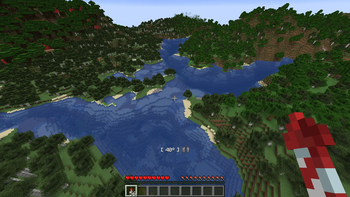
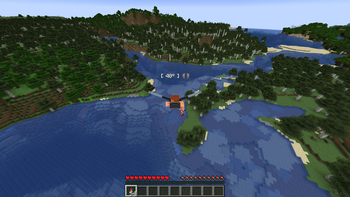
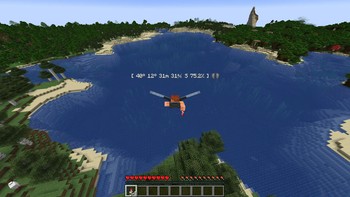
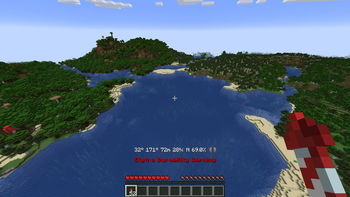
Elytra Pitch is a Minecraft mod that helps players fly more efficiently with elytra. By maintaining a pitch angle of around 40 degrees, players can glide much farther while using fewer rockets. The mod adds a customizable HUD that displays your current pitch during elytra flight, along with an indicator for the optimal angle.
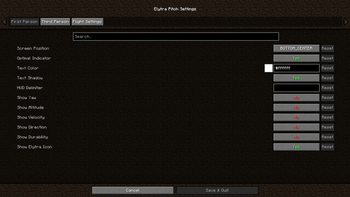
Several optional features include an in-game settings menu via Mod Menu for extensive customization, as well as support for accessory mods like Elytra Slot that use Trinkets or Accessories. Additional HUD elements can be enabled to display yaw, altitude, speed, direction, and elytra durability.
Elytra Pitch also offers optional keybindings for assisted flight, allowing players to lock their pitch or snap to the optimal angle. This functionality revives and expands on the now-unmaintained FlightHelper mod.

Changelog
- ElytraPitch 1.1.0 added separate settings for FP and TP, as well as text color and shadow settings.
- ElytraPitch 1.2.0 added optional HUD elements for yaw, altitude, speed, and direction.
- ElytraPitch 1.3.0 added keybindings to lock the player's pitch and snap to the optimal angle.
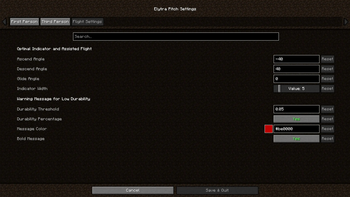
- ElytraPitch 1.3.1 added settings for flight angles, toggle messages and assisted flight.
- ElytraPitch 1.4.0 added an optional HUD element for durability and a warning message.
- ElytraPitch 1.4.1 added Trinkets support (e.g., Elytra Slot) and an optional HUD delimiter.
- ElytraPitch 1.4.2 fixed crashes due to the absence of Trinkets and/or presence of Origins.
- ElytraPitch 1.4.3 moved the position of the optional elytra item above the HUD elements.
- ElytraPitch 1.4.4 added Accessories support for Elytra Slot and refactored rendering code.
- ElytraPitch 1.4.5 added Trinkets Canary support (e.g., Elytra Trinket) for Minecraft 1.21.8+.
- ElytraPitch 1.4.6 added Trinkets Continued and Trinkets Updated support for Minecraft 26.1+.
Available Versions
How to Install Elytra Pitch on Your Client
Install the Mod Loader Locally
Install fabric for your local Minecraft version.
Download the Matching File
Choose the Elytra Pitch file for fabric and Minecraft 26.3.
Install Mod
Place the .jar file in your local .minecraft/mods folder and restart Minecraft. No server-side installation is required.
Compatibility
Mod Loaders
Minecraft Versions
26.3, 26.2, 26.1.2 (+20 more)
Server-side
✗ UnsupportedRecommended RAM
4 GB(min. 3 GB)Frequently Asked Questions
Does Elytra Pitch need to be installed on the Minecraft server?
No. Modrinth marks Elytra Pitch as unsupported on the server side. Install it only in your local Minecraft mods folder. Your server can remain unchanged unless the mod page lists an additional dependency.
Which version and loader does Elytra Pitch require?
Use a file for fabric and your exact Minecraft version. Supported versions include 26.3, 26.2, 26.1.2. Files for different loaders are not interchangeable.
Elytra Pitch is not working – what should I check?
First check the Minecraft version, loader version and required dependencies. Put the .jar file in your local .minecraft/mods folder and remove older duplicates. Because this mod is client-side, adding server RAM will not fix it.
Similar Mods



![[TaCZ] Timeless and Classics Zero](https://cdn.modrinth.com/data/SzzJttH8/fd27766d2bb8390d284696b1dbd358f87e081439_96.webp)


Minecraft Server for Your Group
Elytra Pitch stays on your client. Host a compatible world for your group.