Emoji Type
Type Minecraft emojis and symbols with simple shortcodes.
Screenshots

Über diese Mod
🙂 Emoji Type
Type Minecraft emojis and symbols with simple shortcodes.
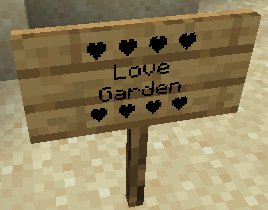
Emoji Type allows you to instantly insert 200+ emojis into your game using intuitive keywords. Type :skull: and get ☠️ instantly. Works in chat, signs, books, anvils - everywhere text appears. No resource packs or texture changes needed.
🚀 Key Features
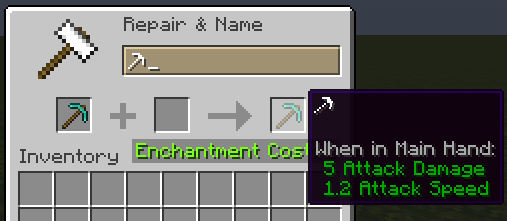
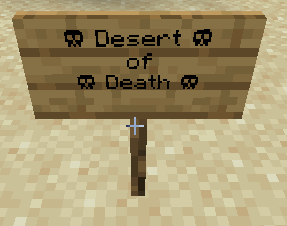
- Seamless Integration: Works in chat, signs, books, and even anvils.
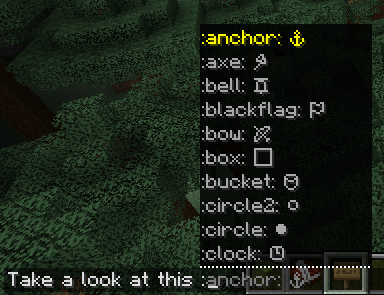
- Smart Autocomplete: Type a colon (
:) in chat to see a real-time list of suggestions. - Vanilla Compatible: Emojis are standard Unicode. Other players can see your emojis even if they don't have the mod installed!
- Emoji Pack: Create, edit your own emoji packs via a built-in visual editor.
Bundled Emoji Packs
| Pack | Description | Examples |
|---|---|---|
| Minecraft Essentials | Tools, weapons, and status icons. | ⚔️ ⛏️ 🏹 ☀️ ❄️ |
| Text Art (Kaomoji) | Classic ASCII and Japanese emoticons. | ¯\_(ツ)_/¯ (╯°□°)╯ |
| Letter Emojis | Stylized circled alphabets. | ⓐ Ⓑ ⓒ Ⓓ |
🛠️ How to Use
- Install: Drop the mod into your
modsfolder (Client-side only!). - Trigger: Press
:in any text field. - Search: Start typing (e.g.,
:sw...) and use your arrow keys or mouse to select. - Anywhere Else: On signs or anvils, simply type the full code (e.g.,
:heart:) and watch it transform.
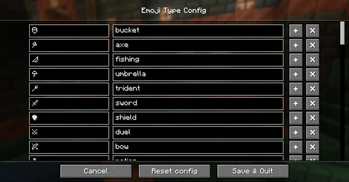
Customizing: Access the config via Mod Menu (Fabric) or the Mods setting (NeoForge) to enable/disable emoji packs or build your own from scratch!
❓ Frequently Asked Questions
Do I need this on my server?
Nope! It’s 100% client-side. It won’t do anything if installed on a server.
Can my friends see the emojis?
Yes! Since these are native Unicode characters, anyone on a modern Minecraft client can see them perfectly.
How do I share my custom packs?
Just send the .yaml file found in config/emojitype/emoji_packs/. Your friends can just drop it in their folder and they're good to go.
Why no autocomplete on signs?
Minecraft’s sign and anvil interfaces are a bit more restrictive than chat. For now, just type the full keyword (like :check:) and it will convert automatically.
🖼️ Gallery
| Chat Suggestions | Config Screen | Emoji Packs |
|---|---|---|
|
 |
 |
Verfügbare Versionen
Emoji Type auf deinem Client installieren
Mod-Loader lokal installieren
Installiere fabric für deine lokale Minecraft-Version.
Passende Datei herunterladen
Wähle die Emoji Type-Datei für fabric und Minecraft 26.2.
Mod installieren
Lege die .jar-Datei in deinem lokalen .minecraft/mods-Ordner ab und starte Minecraft neu. Eine Installation auf dem Server ist nicht nötig.
Kompatibilität
Mod-Loader
Minecraft-Versionen
26.2, 26.1.2, 26.1.1 (+29 weitere)
Server-seitig
✗ Nicht unterstütztEmpfohlener RAM
4 GB(min. 3 GB)Häufige Fragen
Muss Emoji Type auf dem Minecraft Server installiert werden?
Nein. Modrinth kennzeichnet Emoji Type serverseitig als nicht unterstützt. Installiere die Mod nur im lokalen Minecraft-Mods-Ordner. Dein Server kann unverändert bleiben, sofern die Mod-Seite keine zusätzliche Abhängigkeit nennt.
Welche Version und welchen Loader braucht Emoji Type?
Nutze eine Datei für fabric, forge, neoforge, quilt und exakt deine Minecraft-Version. Unterstützte Versionen sind unter anderem 26.2, 26.1.2, 26.1.1. Loader-Dateien sind nicht untereinander austauschbar.
Emoji Type funktioniert nicht – was kann ich prüfen?
Prüfe zuerst Minecraft-Version, Loader-Version und erforderliche Abhängigkeiten. Lege die .jar-Datei im lokalen .minecraft/mods-Ordner ab und entferne ältere Duplikate. Da die Mod clientseitig ist, löst mehr Server-RAM dieses Problem nicht.
Ähnliche Mods






Minecraft Server für deine Gruppe
Emoji Type bleibt auf deinem Client. Hoste dazu eine kompatible Welt für deine Mitspieler.
Details
- Lizenz
- GNU General Public License v3.0 or later
- Server-seitig
- Nicht unterstützt