
EpicFight Sword Light Modifications
Adjusted the swing trails in EpicFight to make it shine.
Über diese Mod
This mod has been redesigned!!!
谢谢你,东非大野猪!
The zylob:acg_trail blade effect included in this mod comes from assets by Epic ACG.
To experience the full version of this mod, please add the Fancy Trail , EpicFight-Nightfall , and Epic Fight - Limbus Company Moveset mods.
When you add the Fancy Trai mod, EpicFight-Nightfall mod, or Epic Fight - Limbus Company Moveset, their trail effects will automatically be added to the list.There are a total of 41
Inside, the Epicfight mod offers 1 trail, this mod provides 4 trails, EpicFight-Nightfall offers 3 trails, Epic Fight - Limbus Company Moveset offers 12 trails, and Fancy Trail offers 21 trails.There are a total of 41 trail .
Currently, this mod focuses on the Epic Fight mod for the latest version of Minecraft 1.20.1 and will be prioritized for updates.
The current setting replaces the global epicfight:swing_trail blade trail particles, and also generates other particles whenever any blade trail particles are created.
The priority of these settings is Global Config < Personal Config < Resource Pack
Also, this module is already set up to sync resource pack settings and personal configurations, so other players can see it too. The effect is: when the swing trail belongs to another entity, it will first use the player's own resource pack settings, and then the global settings; if the swing trail belongs to a player, it will first use the other person's resource pack settings, and if they don't have any, it will show their personal configuration.
Here's the example resource pack setup:
{
"trail": {
"color": [152, 122, 57],
"begin_pos": [0.0, 0.1, 2],
"end_pos": [0.0, -0.05, -2],
"lifetime": 6,
"interpolations": 5,
"texture_path": "epicfight:textures/particle/swing_trail.png",
"particle_type": "zylob:swing_trail",
"overlays": ["zylob:acg_trail","zylob:ender_rift_trail"],
"ender_rift_trail_texture": "zylob:textures/effect/star2.png"
}
}
The values in "overlays" are used to store other trajectory effects generated by this weapon at the same time.
When you use the “zylob:ender_rift_trail” trail effect, you can set a value in "ender_rift_trail_texture" to specify its texture path.
Descriptions are all translated using Bing.( )
Something like that, maybe?
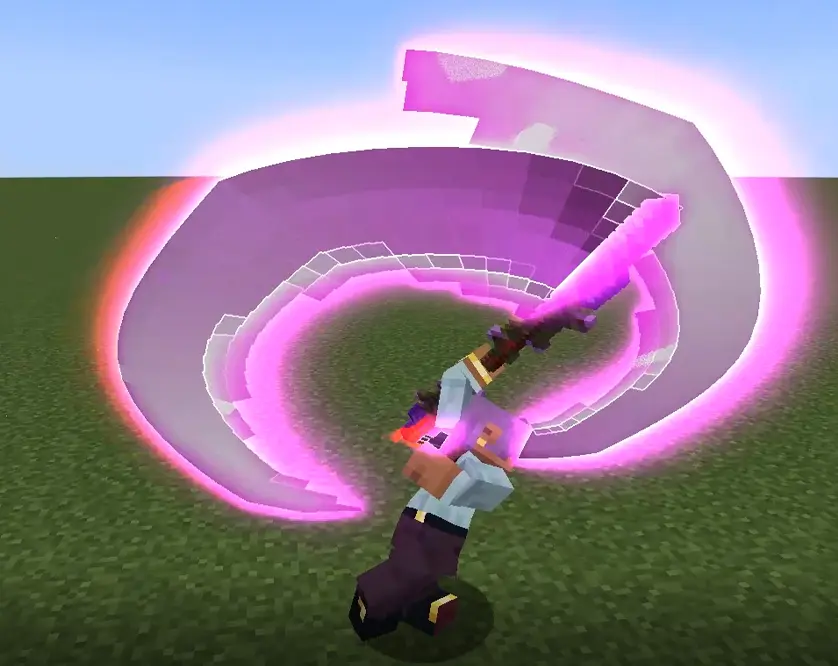

Try to keep the number of overlapping blade flashes to a minimum, because I'm actually generating these particles at the same time as the blade flashes, so having too many overlapping will cause serious lag.
Verfügbare Versionen
EpicFight Sword Light Modifications auf dem Server installieren
Server bestellen
Bestelle einen Minecraft Java Server mit mindestens 3 GB RAM (4 GB empfohlen).
forge Loader setzen
Wähle im Panel unter "Egg" den forge-Loader und die passende Minecraft-Version (1.21.1).
Mod installieren
Öffne den Mod-Browser im Dashboard und suche nach "EpicFight Sword Light Modifications". Klicke "Installieren" – fertig! Alternativ: Lade die .jar via SFTP in den /mods Ordner.
Kompatibilität
Mod-Loader
Minecraft-Versionen
1.21.1, 1.20.1, 1.19.2 (+1 weitere)
Server-seitig
~ OptionalEmpfohlener RAM
4 GB(min. 3 GB)Häufige Fragen
EpicFight Sword Light Modifications Server crasht beim Start – was tun?
Häufigste Ursache: falsche forge-Version oder zu wenig RAM. Prüfe im Server-Log (latest.log), ob ein "OutOfMemoryError" oder "Mixin"-Fehler auftritt. Bei Mado Hosting: Stelle sicher, dass mindestens 3 GB RAM zugewiesen sind und der Loader zur Mod-Version passt (1.21.1). Über das Panel kannst du den Loader mit einem Klick wechseln.
Ist EpicFight Sword Light Modifications mit forge und neoforge kompatibel?
EpicFight Sword Light Modifications unterstützt offiziell forge, neoforge für Minecraft 1.21.1, 1.20.1, 1.19.2. Im Mado Dashboard werden inkompatible Loader-Kombinationen automatisch erkannt.
Server laggt mit EpicFight Sword Light Modifications – wie optimiere ich die Performance?
Empfohlener RAM: 4 GB (+1 GB pro 8 Spieler). Prüfe mit /spark profiler, ob EpicFight Sword Light Modifications den meisten Tick-Time verbraucht. Häufige Fixes: Server-View-Distance auf 8-10 reduzieren, bei Forge "performant" oder "starlight" als Zusatz-Mod installieren. Bei Mado Hosting läuft dein Server auf NVMe-SSDs mit dedizierten CPU-Kernen für minimale Latenz.
Ähnliche Mods

![[ETF] Entity Texture Features](https://cdn.modrinth.com/data/BVzZfTc1/af683d206d50b05258d865b0d6e4aa2f2cee12f2_96.webp)
![[EMF] Entity Model Features](https://cdn.modrinth.com/data/4I1XuqiY/6e5bbd0d06b1741bfdab6c0cfab6de8fdaf0064c_96.webp)



Modded Server mieten
Installiere EpicFight Sword Light Modifications mit nur einem Klick auf deinem Server.