
Equipment Compare
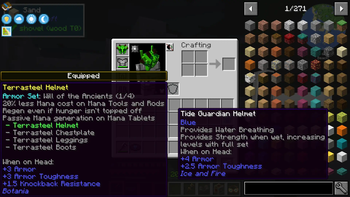
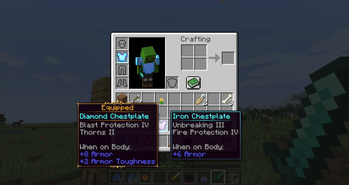
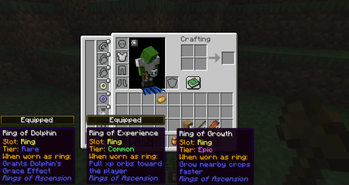
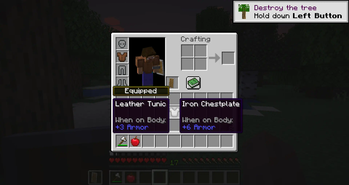
Makes it easier to compare equipment by showing a tooltip for what you're already wearing.
Screenshots
Über diese Mod
Equipment Compare is a configurable client-side mod that simply makes it easier to compare equipment at a glance. Highly useful in a modded environment with lots of unique items to compare!
This mod works differently than most tooltip "comparison" mods--it just shows a tooltip for what you're already wearing next to the tooltip for what you're hovering over. By doing it this way, there is much wider support for new stats and features added by other mods.

All versions besides the 1.12.2 version require Iceberg, you can download it here.
Client / Server
This mod is fully client-side.
Configuration
By default, you can show comparison tooltips by holding the shift key and hovering over an item. This is configurable as a keybind in the inventory section of the controls menu.
The configuration file for the mod also has options to reverse this behavior (always show comparisons unless the key is held), as well as color and text options for the "equipped" badge that shows above tooltips.
Additionally, you can specify a list of item IDs to blacklist if you'd like to disable comparisons for certain items.
You are free to use this mod in modpacks.

Problems, feature request, something else? Join us on Discord!
Verfügbare Versionen
Equipment Compare auf deinem Client installieren
Mod-Loader lokal installieren
Installiere fabric für deine lokale Minecraft-Version.
Passende Datei herunterladen
Wähle die Equipment Compare-Datei für fabric und Minecraft 1.21.5.
Mod installieren
Lege die .jar-Datei in deinem lokalen .minecraft/mods-Ordner ab und starte Minecraft neu. Eine Installation auf dem Server ist nicht nötig.
Kompatibilität
Mod-Loader
Minecraft-Versionen
1.21.5, 1.21.4, 1.21.3 (+18 weitere)
Server-seitig
✗ Nicht unterstütztEmpfohlener RAM
4 GB(min. 3 GB)Häufige Fragen
Muss Equipment Compare auf dem Minecraft Server installiert werden?
Nein. Modrinth kennzeichnet Equipment Compare serverseitig als nicht unterstützt. Installiere die Mod nur im lokalen Minecraft-Mods-Ordner. Dein Server kann unverändert bleiben, sofern die Mod-Seite keine zusätzliche Abhängigkeit nennt.
Welche Version und welchen Loader braucht Equipment Compare?
Nutze eine Datei für fabric, forge, neoforge und exakt deine Minecraft-Version. Unterstützte Versionen sind unter anderem 1.21.5, 1.21.4, 1.21.3. Loader-Dateien sind nicht untereinander austauschbar.
Equipment Compare funktioniert nicht – was kann ich prüfen?
Prüfe zuerst Minecraft-Version, Loader-Version und erforderliche Abhängigkeiten. Lege die .jar-Datei im lokalen .minecraft/mods-Ordner ab und entferne ältere Duplikate. Da die Mod clientseitig ist, löst mehr Server-RAM dieses Problem nicht.
Ähnliche Mods



![[TaCZ] Timeless and Classics Zero](https://cdn.modrinth.com/data/SzzJttH8/fd27766d2bb8390d284696b1dbd358f87e081439_96.webp)


Minecraft Server für deine Gruppe
Equipment Compare bleibt auf deinem Client. Hoste dazu eine kompatible Welt für deine Mitspieler.
Details
- Lizenz
- Creative Commons Attribution Non Commercial No Derivatives 4.0 International
- Server-seitig
- Nicht unterstützt