
Equipment Compare
Makes it easier to compare equipment by showing a tooltip for what you're already wearing.
Screenshots
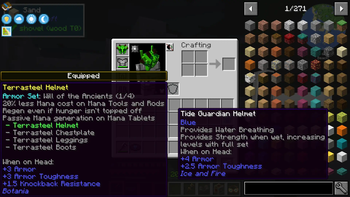
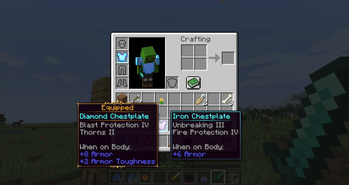
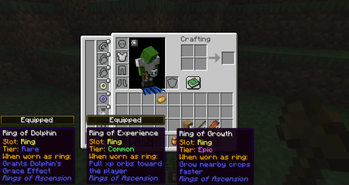
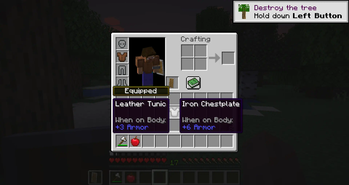
About this Mod
Equipment Compare is a configurable client-side mod that simply makes it easier to compare equipment at a glance. Highly useful in a modded environment with lots of unique items to compare!
This mod works differently than most tooltip "comparison" mods--it just shows a tooltip for what you're already wearing next to the tooltip for what you're hovering over. By doing it this way, there is much wider support for new stats and features added by other mods.

All versions besides the 1.12.2 version require Iceberg, you can download it here.
Client / Server
This mod is fully client-side.
Configuration
By default, you can show comparison tooltips by holding the shift key and hovering over an item. This is configurable as a keybind in the inventory section of the controls menu.
The configuration file for the mod also has options to reverse this behavior (always show comparisons unless the key is held), as well as color and text options for the "equipped" badge that shows above tooltips.
Additionally, you can specify a list of item IDs to blacklist if you'd like to disable comparisons for certain items.
You are free to use this mod in modpacks.

Problems, feature request, something else? Join us on Discord!
Available Versions
How to Install Equipment Compare on Your Client
Install the Mod Loader Locally
Install fabric for your local Minecraft version.
Download the Matching File
Choose the Equipment Compare file for fabric and Minecraft 1.21.5.
Install Mod
Place the .jar file in your local .minecraft/mods folder and restart Minecraft. No server-side installation is required.
Compatibility
Mod Loaders
Minecraft Versions
1.21.5, 1.21.4, 1.21.3 (+18 more)
Server-side
✗ UnsupportedRecommended RAM
4 GB(min. 3 GB)Frequently Asked Questions
Does Equipment Compare need to be installed on the Minecraft server?
No. Modrinth marks Equipment Compare as unsupported on the server side. Install it only in your local Minecraft mods folder. Your server can remain unchanged unless the mod page lists an additional dependency.
Which version and loader does Equipment Compare require?
Use a file for fabric, forge, neoforge and your exact Minecraft version. Supported versions include 1.21.5, 1.21.4, 1.21.3. Files for different loaders are not interchangeable.
Equipment Compare is not working – what should I check?
First check the Minecraft version, loader version and required dependencies. Put the .jar file in your local .minecraft/mods folder and remove older duplicates. Because this mod is client-side, adding server RAM will not fix it.
Similar Mods



![[TaCZ] Timeless and Classics Zero](https://cdn.modrinth.com/data/SzzJttH8/fd27766d2bb8390d284696b1dbd358f87e081439_96.webp)


Minecraft Server for Your Group
Equipment Compare stays on your client. Host a compatible world for your group.
Details
- License
- Creative Commons Attribution Non Commercial No Derivatives 4.0 International
- Server-side
- Unsupported