
Expanded copper
Adds more vanilla uses for copper
Screenshots
Über diese Mod
Ever thought copper should have more uses, but also thought that other mods that add more uses for copper stray too far from vanilla mechanics, well then this is the mod for you.
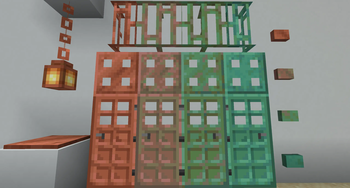
Expanded Copper adds more uses for copper, but keeps things vanilla friendly, adding some light redstone functionality and some decorational blocks.
Click the image below to be taken to
Adds:
Copper button: oxidizable buttons with custom durations
Copper pressure plate: a pressure plate that will only detect dropped items
Copper trapdoor: oxidizable variant of the iron trapdoor for decoration purposes
Copper door: oxidizable variant of the iron door, usefull to spice up your entryway
Copper bars: oxidizable variant of iron bars to make your world seem just a little bit more steampunk
Copper lantern: a light source to liven up your mineshafts(comes with copper chains)
Verfügbare Versionen
Expanded copper auf dem Server installieren
Server bestellen
Bestelle einen Minecraft Java Server mit mindestens 3 GB RAM (4 GB empfohlen).
fabric Loader setzen
Wähle im Panel unter "Egg" den fabric-Loader und die passende Minecraft-Version (1.20.1).
Mod installieren
Öffne den Mod-Browser im Dashboard und suche nach "Expanded copper". Klicke "Installieren" – fertig! Alternativ: Lade die .jar via SFTP in den /mods Ordner.
Kompatibilität
Mod-Loader
Minecraft-Versionen
1.20.1, 1.20, 1.19.4 (+4 weitere)
Server-seitig
✓ ErforderlichEmpfohlener RAM
4 GB(min. 3 GB)Häufige Fragen
Expanded copper Server crasht beim Start – was tun?
Häufigste Ursache: falsche fabric-Version oder zu wenig RAM. Prüfe im Server-Log (latest.log), ob ein "OutOfMemoryError" oder "Mixin"-Fehler auftritt. Bei Mado Hosting: Stelle sicher, dass mindestens 3 GB RAM zugewiesen sind und der Loader zur Mod-Version passt (1.20.1). Über das Panel kannst du den Loader mit einem Klick wechseln.
Ist Expanded copper mit fabric kompatibel?
Expanded copper unterstützt offiziell fabric für Minecraft 1.20.1, 1.20, 1.19.4. Im Mado Dashboard werden inkompatible Loader-Kombinationen automatisch erkannt.
Server laggt mit Expanded copper – wie optimiere ich die Performance?
Empfohlener RAM: 4 GB (+1 GB pro 8 Spieler). Prüfe mit /spark profiler, ob Expanded copper den meisten Tick-Time verbraucht. Häufige Fixes: Server-View-Distance auf 8-10 reduzieren, bei Forge "performant" oder "starlight" als Zusatz-Mod installieren. Bei Mado Hosting läuft dein Server auf NVMe-SSDs mit dedizierten CPU-Kernen für minimale Latenz.
Ähnliche Mods

![[ETF] Entity Texture Features](https://cdn.modrinth.com/data/BVzZfTc1/af683d206d50b05258d865b0d6e4aa2f2cee12f2_96.webp)
![[EMF] Entity Model Features](https://cdn.modrinth.com/data/4I1XuqiY/6e5bbd0d06b1741bfdab6c0cfab6de8fdaf0064c_96.webp)



Modded Server mieten
Installiere Expanded copper mit nur einem Klick auf deinem Server.