
Modrinth · Fabric, Forge, NeoForge, Quilt
William Wythers' Expanded Ecosphere auf deinem Minecraft Server
William Wythers' Expanded Ecosphere läuft auf Minecraft Servern mit Fabric oder Forge oder NeoForge oder Quilt. Bestell deinen Server, stell den Loader im Panel ein und installiere die Mod mit einem Klick im Mod-Browser.
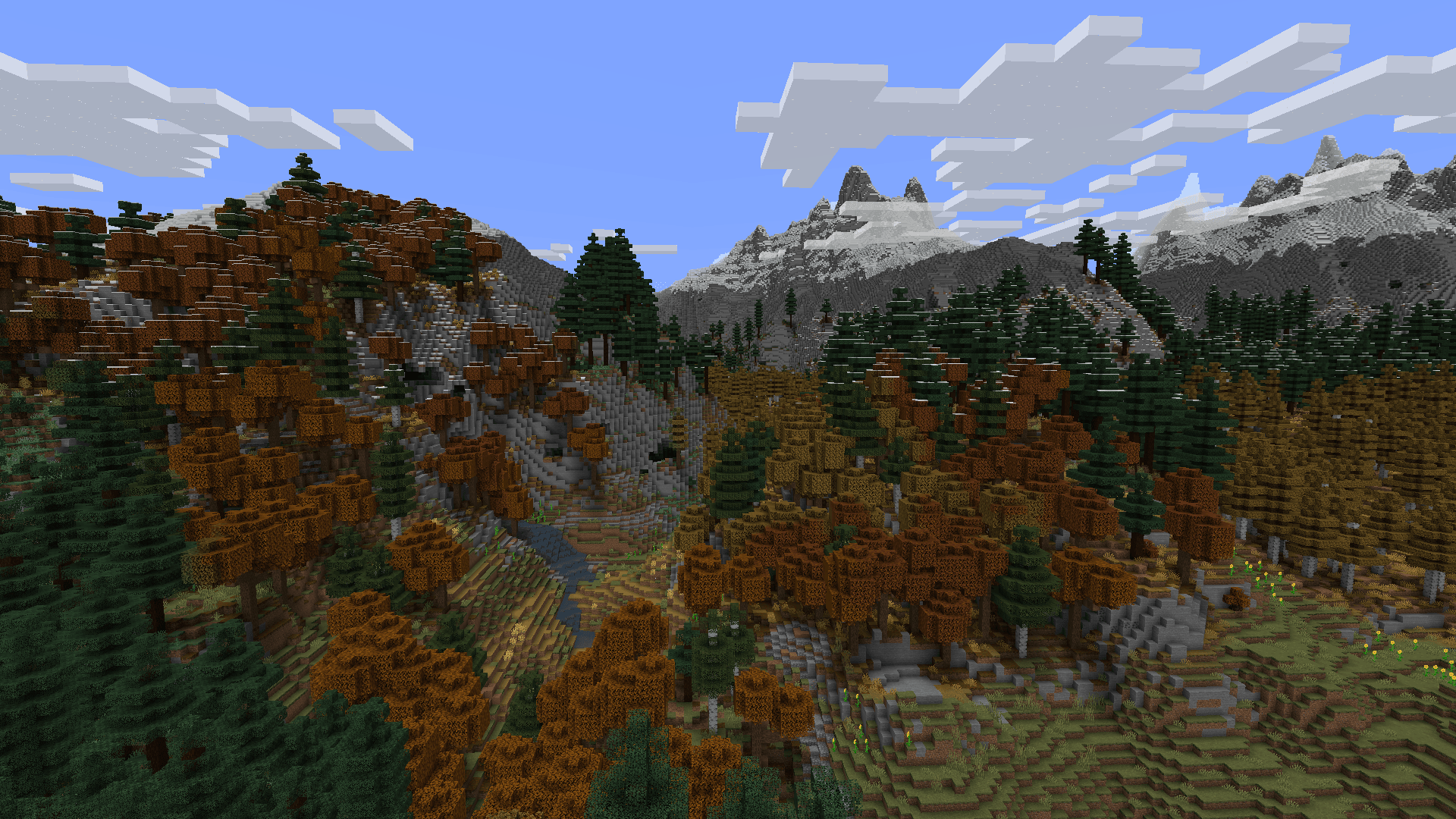
A realistic Minecraft world gen mod that adds nearly 200 new biomes and overhauls all vanilla biomes.
- Downloads
- 1.2M
- Autor
- Cristelknight
- Loader
- Fabric, Forge, NeoForge, Quilt
- Minecraft
- 1.18.2 – 1.21.3
- Aktualisiert
- –
Screenshots
So sieht William Wythers' Expanded Ecosphere aus


Bilder: William Wythers' Expanded Ecosphere auf Modrinth, vom Projektteam veröffentlicht.
Einrichtung
William Wythers' Expanded Ecosphere auf dem Server installieren
Server und Spieler brauchen denselben Loader und dieselbe Minecraft-Version. Sichere die Welt, bevor du Mods hinzufügst oder aktualisierst.
- 01
Konfigurieren
6 GB RAM sind vorausgewählt. Laufzeit und Add-ons wählst du selbst, bezahlt wird per Kreditkarte oder PayPal.
- 02
Loader einstellen
Stell im Panel die Serversoftware auf Fabric oder Forge oder NeoForge oder Quilt und wähl die passende Minecraft-Version, zum Beispiel 1.21.3.
- 03
Mod installieren
Such im Mod-Browser nach „William Wythers' Expanded Ecosphere“ und installiere die Version für deinen Loader. Alternativ lädst du die .jar per SFTP in den Ordner mods. Erforderliche Abhängigkeiten stehen auf der Projektseite.
- 04
Verbinden
William Wythers' Expanded Ecosphere ist auf dem Client optional. Spieler verbinden sich über die Serveradresse aus dem Panel.
- Auf dem Server
- Erforderlich
- Auf dem Client
- Optional
- Loader
- Fabric, Forge, NeoForge, Quilt
- Minecraft
- 1.21.3, 1.21.1, 1.21 +7 weitere
- Lizenz
- Creative Commons Attribution No Derivatives 4.0 International
Das Panel
Mods installieren, Fehler finden.
Echte Screenshots aus dem Mado Panel. Beides ist bei jedem Minecraft Server enthalten.
Mod-Browser
Modrinth und CurseForge direkt im Panel.
Der Browser filtert nach deiner Minecraft-Version. Mods installierst du mit einem Klick, ohne .jar-Dateien hochzuladen.

KI-Crash-Analyse
Wenn ein Mod crasht, liest die Analyse das Log.
Mods scheitern oft an einer falschen Loader-Version, Java-Version oder fehlenden Abhängigkeit. Die Analyse nennt eine wahrscheinliche Ursache und einen Lösungsvorschlag.

Versionen
Veröffentlichte Versionen
Nimm die Datei, die zu Loader und Minecraft-Version deines Servers passt. Server und Spieler brauchen dieselbe Version.
William Wythers' Expanded Ecosphere · Modrinth- WWEE 3.4.74. Juli 2026Minecraft 1.21.1 · Fabric
- WWEE 3.4.74. Juli 2026Minecraft 1.21.1 · NeoForge
- WWEE 3.4.316. November 2024Minecraft 1.21.3 · Fabric
- WWEE 3.4.316. November 2024Minecraft 1.21.3 · NeoForge
- WWEE 3.4.1.116. November 2024Minecraft 1.21, 1.21.1 · Fabric
Originalbeschreibung des Projektautors
William Wythers' Expanded Ecosphere
This Fabric / NeoForge mod soughts to re-create the vanilla overworld in a way that makes a more realistic and atmospheric world.
Description
In the 1.19 update to this mod I have gone far beyond what I ever did before, adding close to 200 new biomes to make a world infinitely more immersive than any of this mod's earlier iterations. With such a large scope, there will surely be areas where refinement is needed. If you see any such places, please give me your feedback in the comments below or even better on Discord.
Where is WWOO (WWOO/WWEE difference)?
We decided to split WWOO in two distinct mods:
- Expanded Ecosphere: This mod includes new biomes and builds upon the old 1.19/1.20 WWOO (bad compatibility with other world-gen mods).
- WWOO: This new project is focused on overhauling the vanilla biomes and is inspired by the style of the old 1.16/1.17 WWOO (good compatibility with other world-gen mods).
You can find the WWOO project here.
Features Expanded Ecosphere
- Large Biomes! Because of some problems with world presets, you should not use the vanilla world presets. Instead use the forceLargeBiomes option, found in the WWOO config.
- A config menu is available if you install Cloth Config and on fabric also Mod Menu.
- The overworld isn't piglin safe. (On datapack it is, so that the Hoglins which can spawn in the overworld don't mutate to Zoglins)
List of all Biomes
Expanded Ecosphere also changes Vanilla biomes. But those aren't listed here.Ancient Copper Beech Forest Ancient Emerald Beech Forest Ancient Golden Beech Forest Ancient Moss Forest Ancient Mossy Swamp Ancient Oak Swamp Ancient Taiga Andesite Crags Aspen Crags Autumnal Birch Forest Autumnal Crags Autumnal Flower Forest Autumnal Forest Autumnal Forest Edge Autumnal Plains Autumnal Swamp Ayers Rock Badlands Canyon Badlands Desert Badlands River Bamboo Jungle Canyon Bamboo Jungle Highlands Bamboo Jungle Swamp Bamboo Swamp Bayou Berry Bog Billabong Birch Swamp Birch Taiga Black Beach Black River Boreal Forest Red Boreal Forest Yellow Cactus Desert Calcite Caverns Calcite Coast Chaparral Coastal Mangroves Cold Island Cold Plains Cold Stony Shore Cool Forest Cool Forest Edge Cool Plains Cool Stony Canyons Cool Stony Peaks Crimson Tundra Danakil Desert Deep Dark Forest Deep Dark Incursion Deep Desert Deep Desert River Deep Icy Ocean Deep Snowy Taiga Deep Underground Deepslate Shore Desert Beach Desert Island Desert Lakes Desert Pinnacles Desert River Dripleaf Swamp Dry Savanna Dry Tropical Forest Dry Tropical Grassland Eucalyptus Deanei Forest Eucalyptus Jungle Eucalyptus Jungle Canyon Eucalyptus Salubris Woodland Eucalyptus Woodland Fen Flooded Jungle Flooded Rainforest Flooded Savanna Flooded Temperate Rainforest Flowering Pantanal Forbidden Forest Forest Edge Forested Highlands Frigid Island Frozen Island Fungous Dripstone Caves Giant Sequoia Forest Glacial Cliffs Granite Canyon Gravelly Beach Gravelly River Guelta Harvest Fields Highland Plains Highland Tropical Rainforest Highlands Huangshan Highlands Humid Tropical Grassland Ice Cap Icy Crags Icy Ocean Icy River Icy Shore Icy Volcano Jacaranda Savanna Jade Highlands Jungle Canyon Jungle Island Jungle River Kwongan Heath Lantern River Lapacho Plains Larch Taiga Lichenous Caves Lichenous Dripstone Caves Lush Dripstone Caves Lush Fungous Dripstone Caves Lush Shroom Caves Maple Mountains Marsh Mediterranean Island Mediterranean Island Thermal Springs Mossy Caves Mossy Dripstone Caves Mud Pools Mushroom Caves Mushroom Island Old Growth Taiga Crags Old Growth Taiga Swamp Outback Outback Desert Pantanal Phantasmal Forest Phantasmal Swamp Pine Barrens Red Desert Red Rock Canyon Sakura Forest Salt Lakes Pink Salt Lakes Turquoise Salt Lakes White Sand Dunes Sandy Jungle Savanna Badlands Savanna Basaltic Incursions Savanna River Scrub Forest Scrubland Snowy Bog Snowy Canyon Snowy Fen Snowy Peaks Snowy Thermal Taiga Snowy Tundra Sparse Bamboo Jungle Sparse Eucalyptus Jungle Sparse Eucalyptus Woodland Spring Flower Fields Spring Flower Forest Stony Canyon Subtropical Forest Subtropical Forest Edge Subtropical Grassland Taiga Crags Tangled Forest Temperate Island Temperate Rainforest Temperate Rainforest Crags Tepui Thermal Taiga Thermal Taiga Crags Tibesti Mountains Tropical Beach Tropical Forest Tropical Forest Canyon Tropical Forest River Tropical Grassland Tropical Island Tropical Rainforest Tropical Volcano Tsingy Forest Tundra Underground Volcanic Chamber Volcanic Crater Volcano Warm Birch Forest Warm Stony Shore Waterlily Swamp Windswept Jungle Wistman Woods Wooded Desert Wooded Savanna
Questions, or need more information? Check out the GitHub!
William Wythers' Expanded Ecosphere Server crasht beim Start – was tun?
Häufige Ursachen: Loader- oder Minecraft-Version passen nicht zur Mod-Datei, eine Abhängigkeit fehlt oder der RAM reicht nicht. Such im Log (latest.log) nach „OutOfMemoryError“, „Mixin“ oder fehlenden Mods. Bei Mado wertet die KI-Crash-Analyse das Log aus und schlägt eine Ursache vor. Loader und Version änderst du im Panel.
Mit welchem Loader läuft William Wythers' Expanded Ecosphere?
Laut Modrinth unterstützt William Wythers' Expanded Ecosphere Fabric, Forge, NeoForge, Quilt für Minecraft 1.21.3, 1.21.1, 1.21. Forge- und Fabric-Dateien sind nicht untereinander austauschbar: Wähl einen Loader für Server und Clients.
Wie viel RAM braucht ein Server mit William Wythers' Expanded Ecosphere?
Als Orientierung 4–6 GB für einen Server mit dieser Mod. Das ist eine Schätzung, keine gemessene Mindestanforderung. Weitere Mods, viele Spieler und große Sichtweiten brauchen mehr. Ob eine Mod die Tick-Zeit belastet, siehst du mit dem spark-Profiler.
Ähnliche Mods
Beliebte Mods aus derselben Kategorie
 Server-fähig

Xaero's Minimap
von thexaero
Displays a map of the nearby world terrain, players, mobs, entities in the corner of your screen. Lets you create waypoints which help you find the locations you've marked.
 Server-fähig

Xaero's World Map
von thexaero
Adds a full screen world map which shows you what you have explored in the world. Works great together with Xaero's Minimap.
 Nur Client

Not Enough Animations
von tr7zw
Bringing first-person animations to the third-person
 Nur Client

3D Skin Layers
von tr7zw
Render the player skin layer in 3d!
Bereit für deinen Server mit William Wythers' Expanded Ecosphere?
6 GB RAM ab 12,00 € im Monat. 35 % auf den 1. Monat mit MADO35.