
Modrinth · Fabric, Forge, NeoForge, Quilt
William Wythers' Expanded Ecosphere on your Minecraft server
William Wythers' Expanded Ecosphere runs on Minecraft servers with Fabric or Forge or NeoForge or Quilt. Order your server, set the loader in the panel and install the mod with one click in the mod browser.
A realistic Minecraft world gen mod that adds nearly 200 new biomes and overhauls all vanilla biomes.
- Downloads
- 1.2M
- Author
- Cristelknight
- Loader
- Fabric, Forge, NeoForge, Quilt
- Minecraft
- 1.18.2 – 1.21.3
- Updated
- –
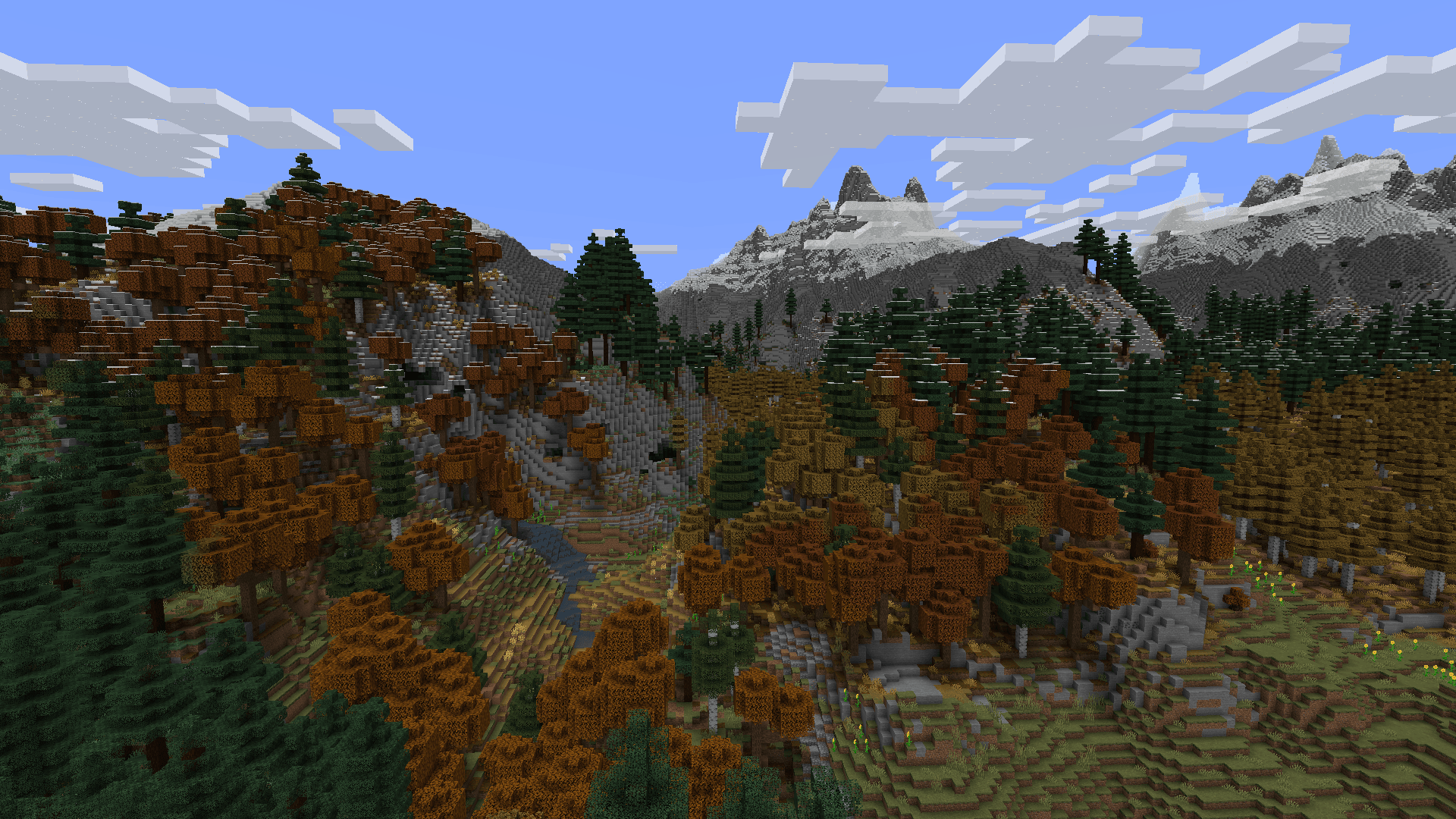
Screenshots
What William Wythers' Expanded Ecosphere looks like


Images: William Wythers' Expanded Ecosphere on Modrinth, published by the project team.
Setup
Install William Wythers' Expanded Ecosphere on your server
The server and players need the same loader and Minecraft version. Back up the world before adding or updating mods.
- 01
Configure
6 GB of RAM is preselected. You choose the term and add-ons and pay by credit card or PayPal.
- 02
Set the loader
In the panel, set the server software to Fabric or Forge or NeoForge or Quilt and choose the matching Minecraft version, for example 1.21.3.
- 03
Install the mod
Search the mod browser for “William Wythers' Expanded Ecosphere” and install the release for your loader. Alternatively, upload the .jar to the mods folder via SFTP. Required dependencies are listed on the project page.
- 04
Connect
William Wythers' Expanded Ecosphere is optional on the client. Players connect using the server address from the panel.
- On the server
- Required
- On the client
- Optional
- Loader
- Fabric, Forge, NeoForge, Quilt
- Minecraft
- 1.21.3, 1.21.1, 1.21 +7 more
- License
- Creative Commons Attribution No Derivatives 4.0 International
The panel
Install mods, find errors.
Real screenshots from the Mado panel. Both come with every Minecraft server.
Mod browser
Modrinth and CurseForge, right in the panel.
The browser filters by your Minecraft version. Install mods with one click, without uploading .jar files.

AI crash analysis
When a mod crashes, the analyzer reads the log.
Mods often fail on a wrong loader version, Java version or missing dependency. The analyzer names a likely cause and suggests a fix.

Releases
Published releases
Pick the file that matches your server’s loader and Minecraft version. The server and players need the same release.
William Wythers' Expanded Ecosphere · Modrinth- WWEE 3.4.7July 4, 2026Minecraft 1.21.1 · Fabric
- WWEE 3.4.7July 4, 2026Minecraft 1.21.1 · NeoForge
- WWEE 3.4.3November 16, 2024Minecraft 1.21.3 · Fabric
- WWEE 3.4.3November 16, 2024Minecraft 1.21.3 · NeoForge
- WWEE 3.4.1.1November 16, 2024Minecraft 1.21, 1.21.1 · Fabric
Original description by the project author
William Wythers' Expanded Ecosphere
This Fabric / NeoForge mod soughts to re-create the vanilla overworld in a way that makes a more realistic and atmospheric world.
Description
In the 1.19 update to this mod I have gone far beyond what I ever did before, adding close to 200 new biomes to make a world infinitely more immersive than any of this mod's earlier iterations. With such a large scope, there will surely be areas where refinement is needed. If you see any such places, please give me your feedback in the comments below or even better on Discord.
Where is WWOO (WWOO/WWEE difference)?
We decided to split WWOO in two distinct mods:
- Expanded Ecosphere: This mod includes new biomes and builds upon the old 1.19/1.20 WWOO (bad compatibility with other world-gen mods).
- WWOO: This new project is focused on overhauling the vanilla biomes and is inspired by the style of the old 1.16/1.17 WWOO (good compatibility with other world-gen mods).
You can find the WWOO project here.
Features Expanded Ecosphere
- Large Biomes! Because of some problems with world presets, you should not use the vanilla world presets. Instead use the forceLargeBiomes option, found in the WWOO config.
- A config menu is available if you install Cloth Config and on fabric also Mod Menu.
- The overworld isn't piglin safe. (On datapack it is, so that the Hoglins which can spawn in the overworld don't mutate to Zoglins)
List of all Biomes
Expanded Ecosphere also changes Vanilla biomes. But those aren't listed here.Ancient Copper Beech Forest Ancient Emerald Beech Forest Ancient Golden Beech Forest Ancient Moss Forest Ancient Mossy Swamp Ancient Oak Swamp Ancient Taiga Andesite Crags Aspen Crags Autumnal Birch Forest Autumnal Crags Autumnal Flower Forest Autumnal Forest Autumnal Forest Edge Autumnal Plains Autumnal Swamp Ayers Rock Badlands Canyon Badlands Desert Badlands River Bamboo Jungle Canyon Bamboo Jungle Highlands Bamboo Jungle Swamp Bamboo Swamp Bayou Berry Bog Billabong Birch Swamp Birch Taiga Black Beach Black River Boreal Forest Red Boreal Forest Yellow Cactus Desert Calcite Caverns Calcite Coast Chaparral Coastal Mangroves Cold Island Cold Plains Cold Stony Shore Cool Forest Cool Forest Edge Cool Plains Cool Stony Canyons Cool Stony Peaks Crimson Tundra Danakil Desert Deep Dark Forest Deep Dark Incursion Deep Desert Deep Desert River Deep Icy Ocean Deep Snowy Taiga Deep Underground Deepslate Shore Desert Beach Desert Island Desert Lakes Desert Pinnacles Desert River Dripleaf Swamp Dry Savanna Dry Tropical Forest Dry Tropical Grassland Eucalyptus Deanei Forest Eucalyptus Jungle Eucalyptus Jungle Canyon Eucalyptus Salubris Woodland Eucalyptus Woodland Fen Flooded Jungle Flooded Rainforest Flooded Savanna Flooded Temperate Rainforest Flowering Pantanal Forbidden Forest Forest Edge Forested Highlands Frigid Island Frozen Island Fungous Dripstone Caves Giant Sequoia Forest Glacial Cliffs Granite Canyon Gravelly Beach Gravelly River Guelta Harvest Fields Highland Plains Highland Tropical Rainforest Highlands Huangshan Highlands Humid Tropical Grassland Ice Cap Icy Crags Icy Ocean Icy River Icy Shore Icy Volcano Jacaranda Savanna Jade Highlands Jungle Canyon Jungle Island Jungle River Kwongan Heath Lantern River Lapacho Plains Larch Taiga Lichenous Caves Lichenous Dripstone Caves Lush Dripstone Caves Lush Fungous Dripstone Caves Lush Shroom Caves Maple Mountains Marsh Mediterranean Island Mediterranean Island Thermal Springs Mossy Caves Mossy Dripstone Caves Mud Pools Mushroom Caves Mushroom Island Old Growth Taiga Crags Old Growth Taiga Swamp Outback Outback Desert Pantanal Phantasmal Forest Phantasmal Swamp Pine Barrens Red Desert Red Rock Canyon Sakura Forest Salt Lakes Pink Salt Lakes Turquoise Salt Lakes White Sand Dunes Sandy Jungle Savanna Badlands Savanna Basaltic Incursions Savanna River Scrub Forest Scrubland Snowy Bog Snowy Canyon Snowy Fen Snowy Peaks Snowy Thermal Taiga Snowy Tundra Sparse Bamboo Jungle Sparse Eucalyptus Jungle Sparse Eucalyptus Woodland Spring Flower Fields Spring Flower Forest Stony Canyon Subtropical Forest Subtropical Forest Edge Subtropical Grassland Taiga Crags Tangled Forest Temperate Island Temperate Rainforest Temperate Rainforest Crags Tepui Thermal Taiga Thermal Taiga Crags Tibesti Mountains Tropical Beach Tropical Forest Tropical Forest Canyon Tropical Forest River Tropical Grassland Tropical Island Tropical Rainforest Tropical Volcano Tsingy Forest Tundra Underground Volcanic Chamber Volcanic Crater Volcano Warm Birch Forest Warm Stony Shore Waterlily Swamp Windswept Jungle Wistman Woods Wooded Desert Wooded Savanna
Questions, or need more information? Check out the GitHub!
William Wythers' Expanded Ecosphere server crashes on startup – what to do?
Common causes: the loader or Minecraft version does not match the mod file, a dependency is missing, or RAM is too low. Check the log (latest.log) for “OutOfMemoryError”, “Mixin” or missing mods. At Mado, the AI crash analysis reads the log and suggests a cause. You can change the loader and version in the panel.
Which loader does William Wythers' Expanded Ecosphere run on?
According to Modrinth, William Wythers' Expanded Ecosphere supports Fabric, Forge, NeoForge, Quilt for Minecraft 1.21.3, 1.21.1, 1.21. Forge and Fabric files are not interchangeable: pick one loader for the server and clients.
How much RAM does a server with William Wythers' Expanded Ecosphere need?
As guidance, 4–6 GB for a server with this mod. This is an estimate, not a measured minimum. More mods, many players and long view distances need more. The spark profiler shows whether a mod is costing tick time.
Similar mods
Popular mods in the same category
 Server-ready

Xaero's Minimap
by thexaero
Displays a map of the nearby world terrain, players, mobs, entities in the corner of your screen. Lets you create waypoints which help you find the locations you've marked.
 Server-ready

Xaero's World Map
by thexaero
Adds a full screen world map which shows you what you have explored in the world. Works great together with Xaero's Minimap.
 Client only

Not Enough Animations
by tr7zw
Bringing first-person animations to the third-person
 Client only

3D Skin Layers
by tr7zw
Render the player skin layer in 3d!
Ready for your server with William Wythers' Expanded Ecosphere?
6 GB of RAM from €12.00 per month. 35% off your first month with MADO35.