
Experience Bottler
Add a block that can be used to bottle any quantity of experience points. The bottled experience points can be drunk like a potion, giving the experience points to user.
Über diese Mod
Experience Bottler - Minecraft Mod for Fabric
Add a block that can be used to bottle any quantity of experience points. The bottled experience points can be drunk like a potion, giving the experience points to user.
How to install
As with other mods, there is nothing special to do, just place the mod files in the mods folder of the environment where Fabric is installed. Also, don't forget about the Fabric API.
How to use
Experience values can be bottled in any quantity from 1 to 2147483647 into an empty bottle by using the GUI. Up to 64 bottled experience values can be stacked. However, this requires that the quantity of bottled experience must be the same.
A working demo has been uploaded to YouTube.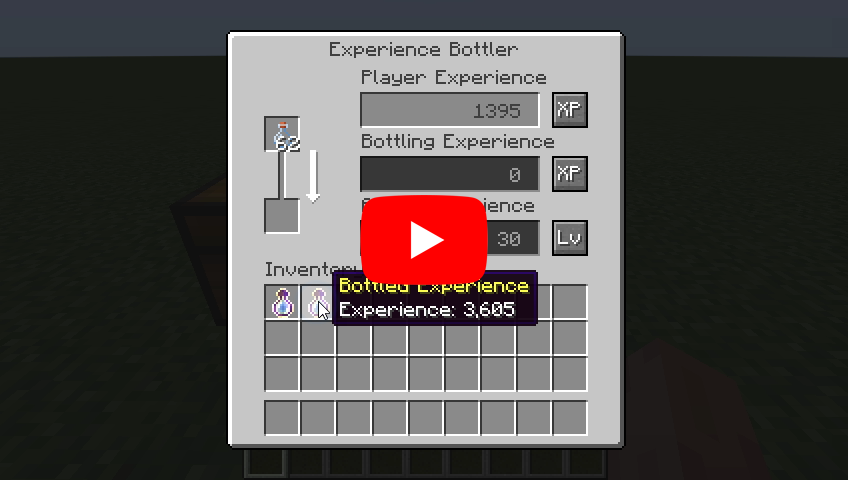
About rare case bugs
If a player's level is abnormally high, the experience calculation logic may not work correctly. This does not occur unless the player's level exceeds 21863, so it generally doesn't matter to most players, but keep it in the back of your mind.
Recipes
Experience Bottler: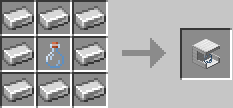
Languages
| Language | Translators | Status |
|---|---|---|
| en_us | Translation Tools | 100% |
| ja_jp | EideeHi | 100% |
| fr_fr | ɪѕнɪ_ѕαʍα | 100% |
| es_es | Bruno Collazo | 100% |
Contacts

Only bug reports are accepted under Issues.

Questions, suggestions and comments are welcome on the Discord Server.
Credits
- Dependencies:
- Translators:
- ɪѕнɪ_ѕαʍα (ishi_sama)
- Bruno Collazo (BrunoCollazo)
- Contributors:
- Kyle Foley (kFo)
License
Experience Bottler is developed and released under the MIT license. For the full text of the license, please see the LICENSE file.
Verfügbare Versionen
Experience Bottler auf dem Server installieren
Server bestellen
Bestelle einen Minecraft Java Server mit mindestens 3 GB RAM (4 GB empfohlen).
fabric Loader setzen
Wähle im Panel unter "Egg" den fabric-Loader und die passende Minecraft-Version (26.3).
Mod installieren
Öffne den Mod-Browser im Dashboard und suche nach "Experience Bottler". Klicke "Installieren" – fertig! Alternativ: Lade die .jar via SFTP in den /mods Ordner.
Kompatibilität
Mod-Loader
Minecraft-Versionen
26.3, 26.2, 26.1 (+15 weitere)
Server-seitig
✓ ErforderlichEmpfohlener RAM
4 GB(min. 3 GB)Häufige Fragen
Experience Bottler Server crasht beim Start – was tun?
Häufigste Ursache: falsche fabric-Version oder zu wenig RAM. Prüfe im Server-Log (latest.log), ob ein "OutOfMemoryError" oder "Mixin"-Fehler auftritt. Bei Mado Hosting: Stelle sicher, dass mindestens 3 GB RAM zugewiesen sind und der Loader zur Mod-Version passt (26.3). Über das Panel kannst du den Loader mit einem Klick wechseln.
Ist Experience Bottler mit fabric kompatibel?
Experience Bottler unterstützt offiziell fabric für Minecraft 26.3, 26.2, 26.1. Im Mado Dashboard werden inkompatible Loader-Kombinationen automatisch erkannt.
Server laggt mit Experience Bottler – wie optimiere ich die Performance?
Empfohlener RAM: 4 GB (+1 GB pro 8 Spieler). Prüfe mit /spark profiler, ob Experience Bottler den meisten Tick-Time verbraucht. Häufige Fixes: Server-View-Distance auf 8-10 reduzieren, bei Forge "performant" oder "starlight" als Zusatz-Mod installieren. Bei Mado Hosting läuft dein Server auf NVMe-SSDs mit dedizierten CPU-Kernen für minimale Latenz.
Ähnliche Mods


Modded Server mieten
Installiere Experience Bottler mit nur einem Klick auf deinem Server.