
FalseTweaks
Multithreaded rendering plus a large collection of improvements, fixes, optimizations and additions to 1.7.10 clients.
Screenshots
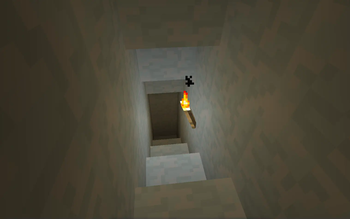
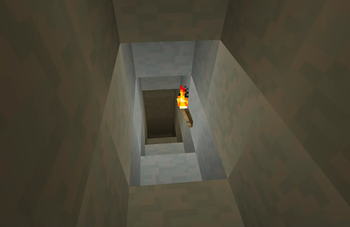
Über diese Mod
FalseTweaks
FalsePattern's flagship tweaking, patching, and optimization mod.
NOTICE
This mod completely replaces Triangulator and AnimFix. Make sure you delete these two mods before installing FalseTweaks.
List of major features:
- Multithreaded chunk rendering (compatible with OptiFine and FastCraft)
- Replaced minecraft's quad-based rendering with triangle-based rendering
- Fixed ambient occlusion and smooth lighting (vanilla bugs MC-138211 and MC-43968)
- Optimized beacon beam rendering
- Voxel-based item rendering that replaces the ugly vanilla renderer
- Fixed light leaking between blocks on chunk boundaries
- Tile entity render order fixes
- Optimized animated textures
- 3D rails
- Faster texture stitching, with an algorithm based on Packing2D
- Fixed block light leaks
- Multithreaded mipmap generation (way faster resource pack switching)
- Multilayer items (see below)
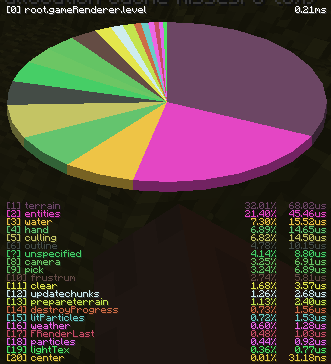
- An improved version of the Shift+F3 profiler
And all of these tweaks can be individually toggled on/off in the config!
Using multilayer items
Multilayer items are defined using mcmeta files, and require the VOXELIZER module to be enabled for them to function properly.
Example mcmeta format for a 3-layer texture:
{
  "voxelLayers": {
    "layers": [1.0, 1.0, 0.5]
  }
}
The mcmeta should be attached to the base texture without any layering, and the layers should have the name of the base
texture with _0, _1, _2, ... numeric suffixes for each layer.
Example file layout:
myItem.png
myItem.png.mcmeta
myItem_0.png
myItem_1.png
myItem_2.png
Fixing known problems
| Issue | Potential solution |
|---|---|
| Game crashes on startup, forge log says MixinTargetAlreadyLoadedException |
Under the 00_modules category in the config,set B:STARTUP_OPTIMIZATIONS to false. |
| Game crashes on startup, loading screen was already present (or fixing issue 1 didn't help) |
Under the triangulator category in the config,set B:RENDER_HOOK_COMPAT_MODE to true. |
| Crash with OptiFine | Under the 00_modules category in the config,set B:MIPMAP_FIX to false. |
| Crash with ShadersModCore | Standalone shadersmod is unsupported, use optifine instead. |
| Crash with "IllegalArgumentException: Comparison method violates its general contract!" | Under the 00_modules category in the config,set B:TE_TRANSPARENCY_FIX to false. |
| Flickering blocks when using optifine shaders and PBR resource packs | Under the 00_modules category in the config,set B:TEXTURE_OPTIMIZATIONS to false. |
| Crash with ArchaicFix | Disable the occlusion culling feature in ArchaicFix if you enable the one in FalseTweaks. (The FalseTweaks one is compatible with FastCraft/OptiFine) |
| Buggy/invisible world with LWJGL3ify | Under the 00_modules category in the config,set B:TEXTURE_OPTIMIZATIONS to false. |
Any bug reports concerning the known problems listed in this table will be closed without response. Read before you open issues.
Dependencies
Verfügbare Versionen
FalseTweaks auf dem Server installieren
Server bestellen
Bestelle einen Minecraft Java Server mit mindestens 3 GB RAM (4 GB empfohlen).
forge Loader setzen
Wähle im Panel unter "Egg" den forge-Loader und die passende Minecraft-Version (1.7.10).
Mod installieren
Öffne den Mod-Browser im Dashboard und suche nach "FalseTweaks". Klicke "Installieren" – fertig! Alternativ: Lade die .jar via SFTP in den /mods Ordner.
Kompatibilität
Mod-Loader
Minecraft-Versionen
1.7.10
Server-seitig
~ OptionalEmpfohlener RAM
4 GB(min. 3 GB)Häufige Fragen
FalseTweaks Server crasht beim Start – was tun?
Häufigste Ursache: falsche forge-Version oder zu wenig RAM. Prüfe im Server-Log (latest.log), ob ein "OutOfMemoryError" oder "Mixin"-Fehler auftritt. Bei Mado Hosting: Stelle sicher, dass mindestens 3 GB RAM zugewiesen sind und der Loader zur Mod-Version passt (1.7.10). Über das Panel kannst du den Loader mit einem Klick wechseln.
Ist FalseTweaks mit forge kompatibel?
FalseTweaks unterstützt offiziell forge für Minecraft 1.7.10. Im Mado Dashboard werden inkompatible Loader-Kombinationen automatisch erkannt.
Server laggt mit FalseTweaks – wie optimiere ich die Performance?
Empfohlener RAM: 4 GB (+1 GB pro 8 Spieler). Prüfe mit /spark profiler, ob FalseTweaks den meisten Tick-Time verbraucht. Häufige Fixes: Server-View-Distance auf 8-10 reduzieren, bei Forge "performant" oder "starlight" als Zusatz-Mod installieren. Bei Mado Hosting läuft dein Server auf NVMe-SSDs mit dedizierten CPU-Kernen für minimale Latenz.
Ähnliche Mods


Modded Server mieten
Installiere FalseTweaks mit nur einem Klick auf deinem Server.
Details
- Lizenz
- GNU Lesser General Public License v3.0 or later
- Server-seitig
- Optional