
Modrinth · Fabric, Quilt · Client-Mod
FastQuit
FastQuit ist eine clientseitige Mod. Du installierst sie auf deinem Rechner, auf dem Server ist sie nicht nötig.
Lets you return to the Title Screen early while your world is still saving in the background!
- Downloads
- 25.3M
- Autor
- contaria
- Loader
- Fabric, Quilt
- Minecraft
- 1.17 – 26.3
- Aktualisiert
- –
Screenshots
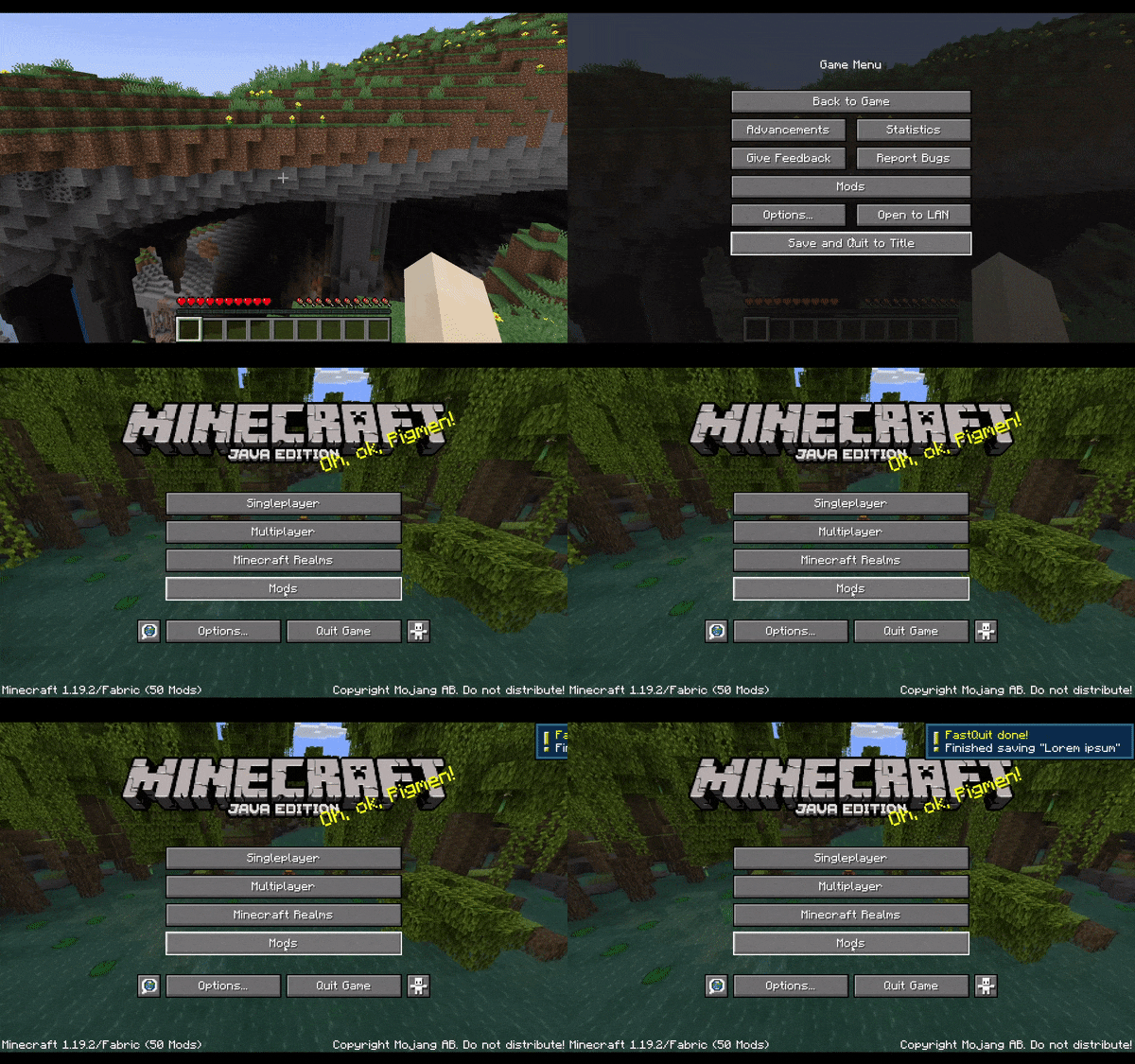
So sieht FastQuit aus
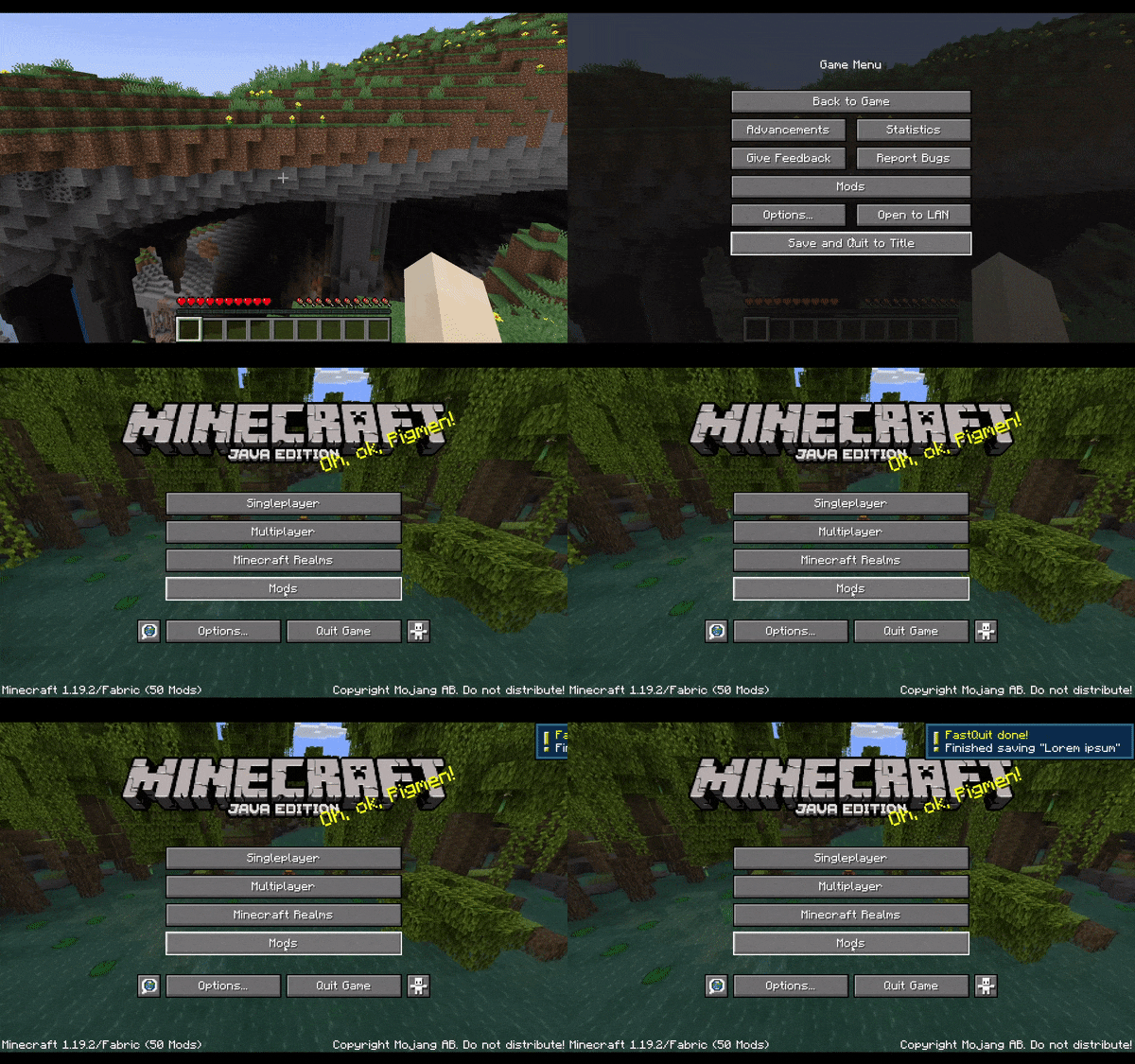
Bilder: FastQuit auf Modrinth, vom Projektteam veröffentlicht.
Einrichtung
FastQuit auf deinem Client installieren
Clientseitige Mods laufen nur auf deinem Rechner. Mehr Server-RAM ändert an ihrer Leistung nichts.
- 01
Loader lokal installieren
Installiere Fabric oder Quilt für deine Minecraft-Version in deinem Launcher.
- 02
Datei herunterladen
Lade die FastQuit-Datei für deinen Loader und exakt deine Minecraft-Version herunter, zum Beispiel 26.3.
- 03
In den Mods-Ordner legen
Lege die .jar-Datei in den lokalen Ordner .minecraft/mods und entferne ältere Duplikate.
- 04
Starten
Starte Minecraft mit dem Loader-Profil. Auf dem Server musst du nichts ändern.
- Auf dem Server
- Nicht nötig
- Auf dem Client
- Erforderlich
- Loader
- Fabric, Quilt
- Minecraft
- 26.3, 26.2, 26.1.2 +39 weitere
- Lizenz
- MIT License
Versionen
Veröffentlichte Versionen
Nimm die Datei, die zu Loader und Minecraft-Version deines Servers passt. Server und Spieler brauchen dieselbe Version.
FastQuit · Modrinth- 3.0.0 - 1.20.5-1.21.12. Mai 2024Minecraft 1.20.5, 1.20.6, 1.21, 1.21.1 · Fabric, Quilt
- 3.0.0 - 1.20.3-1.20.414. Januar 2024Minecraft 1.20.3, 1.20.4 · Fabric, Quilt
- 3.0.0 - 1.20-1.20.25. September 2023Minecraft 1.20, 1.20.1, 1.20.2 · Fabric, Quilt
- 2.1.0 - 1.19.3-1.19.49. Januar 2023Minecraft 1.19.3, 1.19.4 · Fabric, Quilt
- 2.1.0 - 1.19-1.19.29. Januar 2023Minecraft 1.19, 1.19.1, 1.19.2 · Fabric, Quilt
Originalbeschreibung des Projektautors
FastQuit
About this mod
This mod lets you return to the title screen early while your world is still saving in the background.
Don't worry, the mod will wait for the world to finish saving when necessary, no data will be lost!
The world will show up on the world list, and you can even edit, delete or recreate it while it is still saving.
This is done by reusing the info from the still saving world.
In its current state this should be safe to do as measures for thread safety have been taken.
If you do somehow still encounter an issue, the worst thing to happen will be the action failing and Minecraft showing you a toast informing you of it.
If that happens, please open an issue with your .minecraft/logs/latest.log file attached!
Join the Discord!
If you are interested in my mods or have any questions, you can join my Discord!
Configure
To configure the mod, open the config screen from ModMenu or go to .minecraft/config/fastquit-config.txt.
There is currently three options to configure:
Show Toasts:
Determines whether a toast gets shown when a world finishes saving.
Background Thread Priority:
Sets the thread priority of the server when saving worlds in the background.
This is done to improve client performance while saving, but will make the saving take longer over all.
Value has to be between 0 and 10, setting it to 0 will disable changing thread priority.
Render "Saving world" Screen:
When playing on high render distance, quitting the world can still take a bit because the client-side chunk storage has to be cleared.
By enabling this setting the "Saving world" screen will be rendered.
Show Saving Time
Determines whether the time it took to save the world gets displayed on toasts and the world list.
Value has to be between 0 and 2, with 0 never showing the time, 1 only on the toast and 2 also on the world list. In ModMenu these are accordingly labelled.
How does this mod work?
At it's core, this mod is quite simple:
Normally, when quitting a singleplayer world, the client will wait until the server thread has finished saving the world before going to the Title Screen.
This mod skips this waiting period and lets the server continue saving in the background.
PLEASE NOTE this does not always make quitting a world instant, as the client can still take a bit of time to unload rendered chunks etc. However, even in that case you will see a speedup as clientside unloading and serverside saving now perform simultaneously instead of one after the other.
Of course in practice this is not quite that easy:
When working with multiple threads like this, many problems arise.
For example, when going to the world list, Minecraft will try to read its level data but fails because the background saving still locks the world file.
Instead, we now access the information through the still saving server.
Similarly, when trying to edit, delete or recreate the world, we have to use the existing session.
To keep these processes thread safe, a lot of synchronization has to be done to ensure the saving server and the client don't get in each other's way.
For some things, like rejoining the still saving world or making a backup, we just wait for the server to finish saving completely.
We also wait for the worlds to finish saving when quitting the game to ensure no data is lost.
Thanks to...
Translators:
- Felix14-v2 (Russian)
- Cccc-owo (Simplified Chinese)
- JustAlittleWolf (German)
- YakisikliBaran (Turkish)
- Skidamek (Polish)
- Oondanomala (Italian)
- Madis0 (Estonian)
- notlin4 (Traditional Chinese)
- BurrConnie (Ukrainian)
- GodGun968 (Simplified Chinese)
- ImVietnam (Vietnamese)
- ishi-sama (French)
- KAGUYA-1137 (Japanese)
- demorogabrtz (Portuguese)
- ReallySuperOtter (Swedish)
- asabhi6776 (Hindi)
Compatibility
With the help of MixinExtras and a custom Mixin Config Plugin, the mixins have been designed to be very non-intrusive while also being very effective.
Fast Backups:
- (FIXED in FastQuit v3.1.0+) crash on world exit when "Allow multiple running Worlds" is ON
- (FIXED in Fast Backups v0.17+) crash when quitting Minecraft immediately after world exit, fixed in newer versions of Fast Backup
Wakes:
- (FIXED in Wakes v0.4.0+) crash on world exit with Wakes 0.3.0
If you suspect an incompatibility with another mod, please open an issue!
Problems?
If you are experiencing any problems, please open an issue on the issue tracker!
Make sure to attach important info like other mods you were using, log- or crash-files and if possible steps to reproduce.
Before uploading any files make sure to get rid of personal data! (For example your computers username in logged directories)
Muss FastQuit auf dem Minecraft Server installiert werden?
Nein. Modrinth kennzeichnet FastQuit serverseitig als nicht unterstützt. Installiere die Mod nur im lokalen Mods-Ordner. Dein Server kann unverändert bleiben, sofern die Projektseite keine zusätzliche Abhängigkeit nennt.
Welche Version und welchen Loader braucht FastQuit?
Nutze eine Datei für Fabric, Quilt und exakt deine Minecraft-Version. Unterstützt werden unter anderem 26.3, 26.2, 26.1.2. Dateien für verschiedene Loader sind nicht austauschbar.
FastQuit funktioniert nicht – was kann ich prüfen?
Prüfe zuerst Minecraft-Version, Loader-Version und erforderliche Abhängigkeiten. Da die Mod clientseitig ist, löst mehr Server-RAM das Problem nicht.
Ähnliche Mods
Beliebte Mods aus derselben Kategorie
 Nur Client

Sodium
von jellysquid3
A high-performance rendering engine replacement for Minecraft, which greatly improves frame rates and reduces micro-stutter.
 Nur Client

Iris Shaders
von coderbot
A modern shader pack loader for Minecraft intended to be compatible with existing OptiFine shader packs
 Nur Client

Entity Culling
von tr7zw
Using async path-tracing to hide Block-/Entities that are not visible
 Server-fähig

FerriteCore
von malte0811
Memory usage optimizations
Mods für deinen eigenen Server gesucht?
Im Katalog findest du Mods, die auf Minecraft Servern laufen.