
Feather remake
Feather Remake Client is made to mimic the functionality of popular client with great UI experience for Linux devices which runs minecraft eg. Feather client
Screenshots
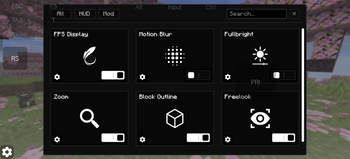
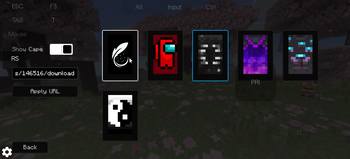
Über diese Mod


Feather Remake
This Client is a utility mod which adds many functions with monochrome UI elements.
this client is generally made for people who use linux devices and want to experience clients eg. feather client
Features
- In game account switcher
- Modrinth downloader Screen (to download content directly from mc)
- Modules eg. Fps hud, Ping hud, Cord hud.
- Mod Menu
- Fog customizer
- Item resizer
- Keybind Scroll
- Titlescreen Switcher (to change titlescreen to vanilla if custom one hurts you)
- Module Resizer and Positioning.
- Skin and Cape options. (only works client-side)
Modules
- Fps
- Ping
- Cordinate
- Speed
- Potion
- Bossbar
- Direction
- Memory
- Cps
- Timer
- Clock
- Playtime
- Many more, idk specifically.
Compatibility
- Fabric loader
- 1.21.1 - 26.2
- Fabric API
- Linux, Windows and even Android
UI
- Monochrome Theme
- Toggle Switches
- Buttons
- Sliders
- Textfields
Optimization
this mod is not made to increase fps or performance any kind of
Preview
Verfügbare Versionen
Feather remake auf deinem Client installieren
Mod-Loader lokal installieren
Installiere fabric für deine lokale Minecraft-Version.
Passende Datei herunterladen
Wähle die Feather remake-Datei für fabric und Minecraft 26.3.
Mod installieren
Lege die .jar-Datei in deinem lokalen .minecraft/mods-Ordner ab und starte Minecraft neu. Eine Installation auf dem Server ist nicht nötig.
Kompatibilität
Mod-Loader
Minecraft-Versionen
26.3, 26.2, 26.1.2 (+14 weitere)
Server-seitig
✗ Nicht unterstütztEmpfohlener RAM
4 GB(min. 3 GB)Häufige Fragen
Muss Feather remake auf dem Minecraft Server installiert werden?
Nein. Modrinth kennzeichnet Feather remake serverseitig als nicht unterstützt. Installiere die Mod nur im lokalen Minecraft-Mods-Ordner. Dein Server kann unverändert bleiben, sofern die Mod-Seite keine zusätzliche Abhängigkeit nennt.
Welche Version und welchen Loader braucht Feather remake?
Nutze eine Datei für fabric und exakt deine Minecraft-Version. Unterstützte Versionen sind unter anderem 26.3, 26.2, 26.1.2. Loader-Dateien sind nicht untereinander austauschbar.
Feather remake funktioniert nicht – was kann ich prüfen?
Prüfe zuerst Minecraft-Version, Loader-Version und erforderliche Abhängigkeiten. Lege die .jar-Datei im lokalen .minecraft/mods-Ordner ab und entferne ältere Duplikate. Da die Mod clientseitig ist, löst mehr Server-RAM dieses Problem nicht.
Ähnliche Mods






Minecraft Server für deine Gruppe
Feather remake bleibt auf deinem Client. Hoste dazu eine kompatible Welt für deine Mitspieler.