
Feather remake
Feather Remake Client is made to mimic the functionality of popular client with great UI experience for Linux devices which runs minecraft eg. Feather client
Screenshots
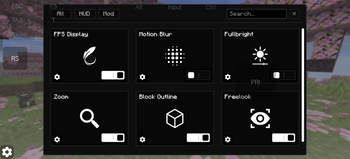
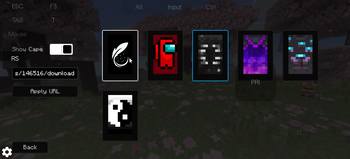
About this Mod


Feather Remake
This Client is a utility mod which adds many functions with monochrome UI elements.
this client is generally made for people who use linux devices and want to experience clients eg. feather client
Features
- In game account switcher
- Modrinth downloader Screen (to download content directly from mc)
- Modules eg. Fps hud, Ping hud, Cord hud.
- Mod Menu
- Fog customizer
- Item resizer
- Keybind Scroll
- Titlescreen Switcher (to change titlescreen to vanilla if custom one hurts you)
- Module Resizer and Positioning.
- Skin and Cape options. (only works client-side)
Modules
- Fps
- Ping
- Cordinate
- Speed
- Potion
- Bossbar
- Direction
- Memory
- Cps
- Timer
- Clock
- Playtime
- Many more, idk specifically.
Compatibility
- Fabric loader
- 1.21.1 - 26.2
- Fabric API
- Linux, Windows and even Android
UI
- Monochrome Theme
- Toggle Switches
- Buttons
- Sliders
- Textfields
Optimization
this mod is not made to increase fps or performance any kind of
Preview
Available Versions
How to Install Feather remake on Your Client
Install the Mod Loader Locally
Install fabric for your local Minecraft version.
Download the Matching File
Choose the Feather remake file for fabric and Minecraft 26.3.
Install Mod
Place the .jar file in your local .minecraft/mods folder and restart Minecraft. No server-side installation is required.
Compatibility
Mod Loaders
Minecraft Versions
26.3, 26.2, 26.1.2 (+14 more)
Server-side
✗ UnsupportedRecommended RAM
4 GB(min. 3 GB)Frequently Asked Questions
Does Feather remake need to be installed on the Minecraft server?
No. Modrinth marks Feather remake as unsupported on the server side. Install it only in your local Minecraft mods folder. Your server can remain unchanged unless the mod page lists an additional dependency.
Which version and loader does Feather remake require?
Use a file for fabric and your exact Minecraft version. Supported versions include 26.3, 26.2, 26.1.2. Files for different loaders are not interchangeable.
Feather remake is not working – what should I check?
First check the Minecraft version, loader version and required dependencies. Put the .jar file in your local .minecraft/mods folder and remove older duplicates. Because this mod is client-side, adding server RAM will not fix it.
Similar Mods






Minecraft Server for Your Group
Feather remake stays on your client. Host a compatible world for your group.