
Ferium
Shaders Vibrant Visuals like
Screenshots
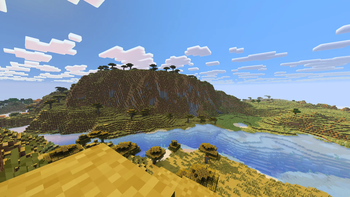
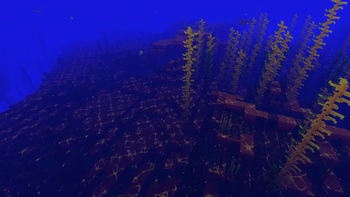
Über diese Mod
🌌 Ferium
⚠️ WARNING: This project is in deep pre-alpha stage!
The mod is currently very raw. Frequent bugs, crashes, performance issues, or incompatibility with other mods may occur. Use it at your own risk! In the future, the project will most likely be completely restructured into something much larger than what it is now.🔴 CRITICAL REQUIREMENT: This mod MUST be run with the Vulkan API enabled. If you run the mod without Vulkan, you will experience severe lag and your FPS will drop to 0!
Ferium is an experimental graphics mod for Minecraft (Fabric) designed to improve the visual and technical parts of the game, with a focus on modern graphics APIs and native integration.
🚀 What does the mod do right now?
🐧 1. Native Wayland Integration for Linux
If you play on Linux under Wayland, you have probably encountered Minecraft starting through XWayland (X11 compatibility layer), which can cause input lag, scaling issues, or screen tearing.
- What Ferium does: The mod forces GLFW to initialize a native Wayland window. This provides smooth mouse input, correct scaling, and better performance on modern Linux distributions.
- Note: For Windows and macOS users, this feature is automatically disabled safely without breaking the game's startup.
🎨 2. Built-in Shaders (Inspired by Vibrant Visuals)
Since the original Vibrant Visuals shader (known from Bedrock Edition) is not yet available on Java Edition, this mod attempts to recreate and approximate this unique warm and saturated aesthetic on Java:
- Volumetric Clouds: High-quality fullscreen cloud raymarching with soft lighting.
- Shadows and Warm Light: Dynamic cascaded shadow maps with soft filtering (PCF).
- Improved Water Caustics: Thin, detailed, and aesthetically refracting yellowish patterns of light underwater.
Verfügbare Versionen
Ferium auf deinem Client installieren
Mod-Loader lokal installieren
Installiere fabric für deine lokale Minecraft-Version.
Passende Datei herunterladen
Wähle die Ferium-Datei für fabric und Minecraft 26.2.
Mod installieren
Lege die .jar-Datei in deinem lokalen .minecraft/mods-Ordner ab und starte Minecraft neu. Eine Installation auf dem Server ist nicht nötig.
Kompatibilität
Mod-Loader
Minecraft-Versionen
26.2, 26.2-rc-2, 26.2-rc-1 (+6 weitere)
Server-seitig
✗ Nicht unterstütztEmpfohlener RAM
4 GB(min. 3 GB)Häufige Fragen
Muss Ferium auf dem Minecraft Server installiert werden?
Nein. Modrinth kennzeichnet Ferium serverseitig als nicht unterstützt. Installiere die Mod nur im lokalen Minecraft-Mods-Ordner. Dein Server kann unverändert bleiben, sofern die Mod-Seite keine zusätzliche Abhängigkeit nennt.
Welche Version und welchen Loader braucht Ferium?
Nutze eine Datei für fabric und exakt deine Minecraft-Version. Unterstützte Versionen sind unter anderem 26.2, 26.2-rc-2, 26.2-rc-1. Loader-Dateien sind nicht untereinander austauschbar.
Ferium funktioniert nicht – was kann ich prüfen?
Prüfe zuerst Minecraft-Version, Loader-Version und erforderliche Abhängigkeiten. Lege die .jar-Datei im lokalen .minecraft/mods-Ordner ab und entferne ältere Duplikate. Da die Mod clientseitig ist, löst mehr Server-RAM dieses Problem nicht.
Ähnliche Mods


Minecraft Server für deine Gruppe
Ferium bleibt auf deinem Client. Hoste dazu eine kompatible Welt für deine Mitspieler.