
Firorize
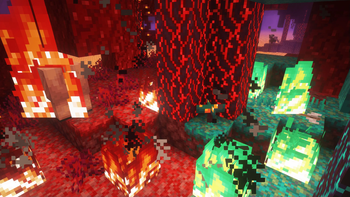
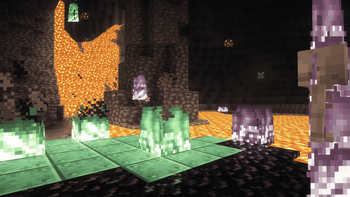
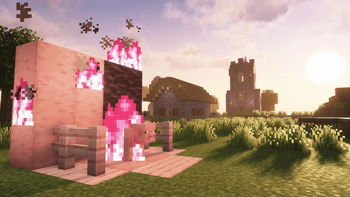
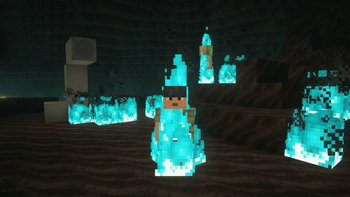
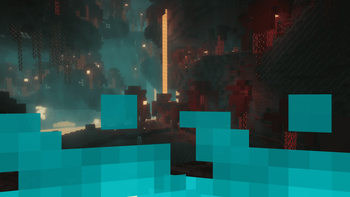
This client side mod allows full color customization over fire, depending on the biome it's in, or even the block it's on! There is also a fire height slider to shrink that large overlay. Also, it fixes the bug where soul fire did not have a blue overlay!
Screenshots
Über diese Mod
Firorize
Full colour customization for Minecraft fire





What's this mod?
Are you bored of that same old orange fire? In need of more atmospheric nether biomes? Wishing for some
colorful variety next time you decide to burn your friend's house down?
Firorize lets you recolour fire however you like – per biome, per block it sits on, and per
block tag – with a priority system to settle any clashes. Group your colours into named profiles,
and now share them with the whole community or send them straight to a friend, right inside the game.
It's fully client-side, so it works on any server without installing anything server-side.

Features
Colour customization
- Recolour the base fire to any colour you like
- Per-biome fire colours
- Per-block fire colours (based on the block the fire is ignited on)
- Per-block-tag fire colours
- Independent base and overlay tint control
- Adjustable priority hierarchy to resolve any colour conflicts
- Built-in colour presets for quick customizations
Profiles
- Save complete colour setups as named profiles
- Activate / deactivate and reorder profiles to get the customisation you want
- One-click reset back to a profile's defaults
- A preloaded nether profile to get you started
Online sharing
- Built-in Gallery – take a pick from many built-in fire profiles made by me
- Community Gallery – browse fire profiles shared by other players and import them with a single click
- Upload your own profiles to share them publicly
- Inbox – privately send your custom profiles to friends
Quality of life
- Simple, flexible configuration menu (open with I by default)
- Adjustable fire-overlay height
- Fixes the vanilla soul-fire overlay bug
- Works with modded blocks, biomes and block tags
- Compatible with Iris shaders
Fire height
Adjust the first-person fire height
Shrink the first-person fire overlay so it's less obtrusive when you're on fire.

Profiles & sharing
Built-in profiles, ready to import
Ship straight from a curated set – like the Soul Fire profile that restores the classic blue to
soul sand and soul soil – and import them with one click.

Browse and import from the community
Discover fire profiles shared by other players and add them to your collection instantly.

Send profiles straight to friends
Your Inbox collects profiles other players have sent you, and lets you share your own privately.

Compatibility
| Mod | Notes |
|---|---|
| Fabric API | Required |
| Mod Menu | Suggested (for opening config) |
| Sodium | Compatible |
| Indium | Required if Sodium is installed |
| Iris shaders | Compatible |
| OptiFabric | Incompatible |
Verfügbare Versionen
Firorize auf deinem Client installieren
Mod-Loader lokal installieren
Installiere fabric für deine lokale Minecraft-Version.
Passende Datei herunterladen
Wähle die Firorize-Datei für fabric und Minecraft 26.1.2.
Mod installieren
Lege die .jar-Datei in deinem lokalen .minecraft/mods-Ordner ab und starte Minecraft neu. Eine Installation auf dem Server ist nicht nötig.
Kompatibilität
Mod-Loader
Minecraft-Versionen
26.1.2, 1.21.11, 1.21.1 (+17 weitere)
Server-seitig
✗ Nicht unterstütztEmpfohlener RAM
4 GB(min. 3 GB)Häufige Fragen
Muss Firorize auf dem Minecraft Server installiert werden?
Nein. Modrinth kennzeichnet Firorize serverseitig als nicht unterstützt. Installiere die Mod nur im lokalen Minecraft-Mods-Ordner. Dein Server kann unverändert bleiben, sofern die Mod-Seite keine zusätzliche Abhängigkeit nennt.
Welche Version und welchen Loader braucht Firorize?
Nutze eine Datei für fabric und exakt deine Minecraft-Version. Unterstützte Versionen sind unter anderem 26.1.2, 1.21.11, 1.21.1. Loader-Dateien sind nicht untereinander austauschbar.
Firorize funktioniert nicht – was kann ich prüfen?
Prüfe zuerst Minecraft-Version, Loader-Version und erforderliche Abhängigkeiten. Lege die .jar-Datei im lokalen .minecraft/mods-Ordner ab und entferne ältere Duplikate. Da die Mod clientseitig ist, löst mehr Server-RAM dieses Problem nicht.
Ähnliche Mods

![[ETF] Entity Texture Features](https://cdn.modrinth.com/data/BVzZfTc1/af683d206d50b05258d865b0d6e4aa2f2cee12f2_96.webp)
![[EMF] Entity Model Features](https://cdn.modrinth.com/data/4I1XuqiY/6e5bbd0d06b1741bfdab6c0cfab6de8fdaf0064c_96.webp)



Minecraft Server für deine Gruppe
Firorize bleibt auf deinem Client. Hoste dazu eine kompatible Welt für deine Mitspieler.