

Modrinth · Fabric, Forge
FoamFix auf deinem Minecraft Server
FoamFix läuft auf Minecraft Servern mit Fabric oder Forge. Bestell deinen Server, stell den Loader im Panel ein und installiere die Mod mit einem Klick im Mod-Browser.
FoamFix is a mod designed to improve modded Minecraft memory usage using simple, targeted optimizations.
- Downloads
- 1.4M
- Autor
- asie
- Loader
- Fabric, Forge
- Minecraft
- 1.10.2 – 1.8.9
- Aktualisiert
- –
Einrichtung
FoamFix auf dem Server installieren
Server und Spieler brauchen denselben Loader und dieselbe Minecraft-Version. Sichere die Welt, bevor du Mods hinzufügst oder aktualisierst.
- 01
Konfigurieren
4 GB RAM sind vorausgewählt. Laufzeit und Add-ons wählst du selbst, bezahlt wird per Kreditkarte oder PayPal.
- 02
Loader einstellen
Stell im Panel die Serversoftware auf Fabric oder Forge und wähl die passende Minecraft-Version, zum Beispiel 1.8.9.
- 03
Mod installieren
Such im Mod-Browser nach „FoamFix“ und installiere die Version für deinen Loader. Alternativ lädst du die .jar per SFTP in den Ordner mods. Erforderliche Abhängigkeiten stehen auf der Projektseite.
- 04
Verbinden
FoamFix ist auf dem Client optional. Spieler verbinden sich über die Serveradresse aus dem Panel.
- Auf dem Server
- Optional
- Auf dem Client
- Optional
- Loader
- Fabric, Forge
- Minecraft
- 1.8.9, 1.7.10, 1.14 +4 weitere
- Lizenz
- LicenseRef-Custom
Das Panel
Mods installieren, Fehler finden.
Echte Screenshots aus dem Mado Panel. Beides ist bei jedem Minecraft Server enthalten.
Mod-Browser
Modrinth und CurseForge direkt im Panel.
Der Browser filtert nach deiner Minecraft-Version. Mods installierst du mit einem Klick, ohne .jar-Dateien hochzuladen.

KI-Crash-Analyse
Wenn ein Mod crasht, liest die Analyse das Log.
Mods scheitern oft an einer falschen Loader-Version, Java-Version oder fehlenden Abhängigkeit. Die Analyse nennt eine wahrscheinliche Ursache und einen Lösungsvorschlag.

Versionen
Veröffentlichte Versionen
Nimm die Datei, die zu Loader und Minecraft-Version deines Servers passt. Server und Spieler brauchen dieselbe Version.
FoamFix · Modrinth- FoamFix 1.0.4 (1.7.10)3. April 2023Minecraft 1.7.10 · Forge
- FoamFix 0.10.15 (1.12.2)8. September 2022Minecraft 1.12.2 · Forge
Originalbeschreibung des Projektautors
FoamFix is a mod designed to optimize certain aspects of a modded Minecraft experience using simple, targeted optimizations.
Features
FoamFix focuses on the following aspects of modded Minecraft in particular:
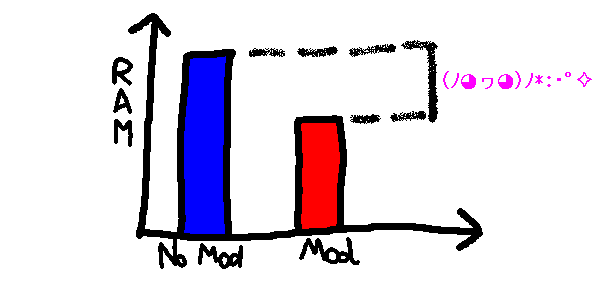
- Memory usage (in Minecraft 1.8+). This is the original reason FoamFix was made for, and the most important reason for it being adopted in modpacks today. Observations show that, on particularly heavy modpacks, Java heap usage (as measured on the main menu, after the game has finished loading, with VisualVM) can fall by as much as 50%!
- TPS usage, particularly on larger servers - ghost chunk-loading and network improvements will not help the single-player experience much, but can be incredibly beneficial when trying to scale up a multiplayer world.
There are also other, more minor optimizations, but they will probably not have a significant impact on your gameplay directly. Check your foamfix.cfg file for a complete list!
FAQ
- Q: I'm having performance issues, and removing FoamFix fixes them!
- A: Make sure you have updated to the latest version. It is impossible for me to test FoamFix on the thousands of computer hardware configurations out there with my own resources, and sometimes issues specific to some of them can occur. If you have updated to the latest version and are still experiencing issues, contact me!
- Q: Can I run FoamFix on the server/client side if it's not present on the client/server side?
- A: Yes.
- Q: Can I mix versions of FoamFix between the server and client side?
- A: Similarly, yes.
- Q: Why is there a FoamFix to 1.7.10?
- A: FoamFix primarily targets 1.8+ modded Minecraft. However, some of its later optimizations - particularly ghost chunkloading fixes - in combination with some abandoned bugfixing/optimization projects (BugfixMod, Minecraft Forkage) have led me to create an optimization mod under the same name for 1.7.10, which shares some of the functionality. As always, check foamfix.cfg to learn more!
- Q: Can you make a FoamFix for vanilla?
- A: Almost all of FoamFix focuses on optimizations particular to modded environments. Porting it to vanilla would have very few benefits, as vanilla by itself is more efficient than even Forge+FoamFix. If you're running a large vanilla server, it might be a better idea to use a dedicated solution for that.
- Q: Can you run FoamFix in a development environment?
- A: Yes, but you must manually deobfuscate it with BON2 or a similar tool.
Bug Reporting
Please try to reproduce the bug without FoamFix first - if it is still present without FoamFix, it is most likely not a FoamFix issue.
When you report a bug that only appears with FoamFix installed,
- Please ONLY report them here! This helps me keep track of existing issues.
- In particular, please do not report them to the other mod developers! If I get to the conclusion that the issue is caused by a different mod, I'll do my best to contact the other author myself and discuss the fix with them; however, unnecessary bug reports are a bit of a nuisance.
Additional Tips
(Note that this section will be rewritten as a more comprehensive optimization guide at some point)
- Enable alwaysSetupTerrainOffThread in forge.cfg. (Since 0.6.3, FoamFix will automatically do this for you on new instances!)
- If you're experiencing "ghost chunk loading"-related lag (a noticeable lag spike every ~30 seconds), a way to partially work around the problem is to increase the value of dormantChunkCacheSize in forgeChunkLoading.cfg.
- For some GPU/driver configurations (in particular, certain AMD driver/card pairs), disabling mipmaps (setting Mipmap Levels to 0) will boost FPS considerably. This is due to lag caused by animated texture updates being much higher with increasing amounts of textures to update, which scales linearly with the amount of mipmap levels.
- On dedicated servers, setting max-tick-time=0 can solve crashes related to "java.lang.Error: Watching server". Still looking into why this happens!
Common Crashes
- java.lang.NoSuchMethodError: net.minecraftforge.common.model.TRSRTransformation.isIdentity()Z on FoamFix 0.9.6+ - Update Forge to the latest recommended version, or downgrade FoamFix to 0.9.5.
- java.lang.IllegalArgumentException: Cannot set property [...], it is not an allowed value - The codepath causing this error mimics vanilla behaviour very closely, and should cause the same crash without FoamFix. Make sure it cannot be reproduced without FoamFix.
- If you're using SpongeForge alongside FoamFix (keep in mind that I do not support it), a common crash related to MixinMutableBlockPos can be fixed by disabling coremod.optimizedBlockPos in config/foamfix.cfg.
Support
- Please only use the GitHub issue tracker for bug reports. Makes it easier to keep track of them.
- Please note that "not supported" does not mean "won't work at all" - rather, it means "things can break and I might be unable to help you for various reasons". Be careful!
The following mods are not supported and I cannot guarantee satisfactory fixes related to interactions with them:
- FastCraft 2. The licensing is very strict and debugging impossible without relying on the developer as an oracle.
- NotEnoughIDs. Not maintained since September 2017.
- OptiFine. The licensing is very strict and debugging impossible without relying on the developer as an oracle.
- Sponge. Some of our engine changes conflict. (Note that, even if you have Sponge on the server side, using FoamFix on the client side while connecting to a Sponge server is supported!)
- TexFix.
- most other proprietary optimization mods. If I can't see the source code, I'm not likely to work on fixing it.
FoamFix Server crasht beim Start – was tun?
Häufige Ursachen: Loader- oder Minecraft-Version passen nicht zur Mod-Datei, eine Abhängigkeit fehlt oder der RAM reicht nicht. Such im Log (latest.log) nach „OutOfMemoryError“, „Mixin“ oder fehlenden Mods. Bei Mado wertet die KI-Crash-Analyse das Log aus und schlägt eine Ursache vor. Loader und Version änderst du im Panel.
Mit welchem Loader läuft FoamFix?
Laut Modrinth unterstützt FoamFix Fabric, Forge für Minecraft 1.8.9, 1.7.10, 1.14. Forge- und Fabric-Dateien sind nicht untereinander austauschbar: Wähl einen Loader für Server und Clients.
Wie viel RAM braucht ein Server mit FoamFix?
Als Orientierung 3–4 GB für einen Server mit dieser Mod. Das ist eine Schätzung, keine gemessene Mindestanforderung. Weitere Mods, viele Spieler und große Sichtweiten brauchen mehr. Ob eine Mod die Tick-Zeit belastet, siehst du mit dem spark-Profiler.
Ähnliche Mods
Beliebte Mods aus derselben Kategorie
 Nur Client

Sodium
von jellysquid3
A high-performance rendering engine replacement for Minecraft, which greatly improves frame rates and reduces micro-stutter.
 Nur Client

Iris Shaders
von coderbot
A modern shader pack loader for Minecraft intended to be compatible with existing OptiFine shader packs
 Nur Client

Entity Culling
von tr7zw
Using async path-tracing to hide Block-/Entities that are not visible
 Server-fähig

FerriteCore
von malte0811
Memory usage optimizations
Bereit für deinen Server mit FoamFix?
4 GB RAM ab 8,00 € im Monat. 35 % auf den 1. Monat mit MADO35.