![Food Effect Tooltips [Fabric / NeoForge]](https://cdn.modrinth.com/data/GGfyJWnG/3de40cea756f9803246624dc88a9a12be6667084.png)
Food Effect Tooltips [Fabric / NeoForge]
Adds Tooltips to food that gives Status Effects when eaten
Screenshots

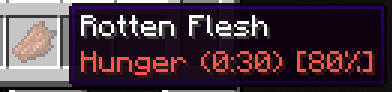


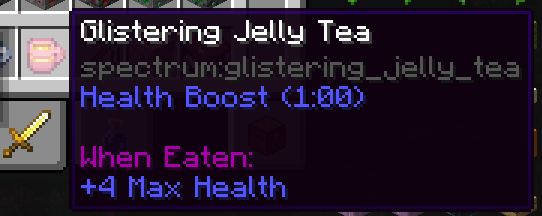
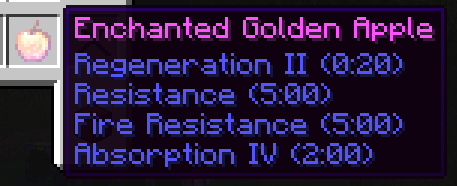
Über diese Mod
Your one-drop-shop for everything Consumable
Quite a few food items grant the player bonuses in the form of status effects. These effects, however, are never listed ingame. Which is a nuisance, especially in modded scenarios, where the player is not acquainted with all food options and their effects.
With Food Effect Tooltips all effects are shown in the items tooltip!
- fully client side
- handles effects that only get applied with a % chance
- shows stat changes for effects
- compatible with other mods that display food information, like AppleSkin
- also lists effects of items that clear status effects (like Milk), items that teleport (like Chrorus Fruit), Mushromm Stew and items that apply effects on death (like Totems of Undying)
- Fully compatible with other mods
How it works
The mod reads components of hovered items, parses their data and displays them in the tooltip. As of v2.0.0 FoodEffectTooltips handles:
consume_componentapply_effectsremove_effectsclear_all_effectsteleport_randomly
death_protectionsuspicious_stew_effects
Verfügbare Versionen
Food Effect Tooltips [Fabric / NeoForge] auf deinem Client installieren
Mod-Loader lokal installieren
Installiere fabric für deine lokale Minecraft-Version.
Passende Datei herunterladen
Wähle die Food Effect Tooltips [Fabric / NeoForge]-Datei für fabric und Minecraft 26.2.
Mod installieren
Lege die .jar-Datei in deinem lokalen .minecraft/mods-Ordner ab und starte Minecraft neu. Eine Installation auf dem Server ist nicht nötig.
Kompatibilität
Mod-Loader
Minecraft-Versionen
26.2, 26.1.2, 26.1.1 (+18 weitere)
Server-seitig
✗ Nicht unterstütztEmpfohlener RAM
4 GB(min. 3 GB)Häufige Fragen
Muss Food Effect Tooltips [Fabric / NeoForge] auf dem Minecraft Server installiert werden?
Nein. Modrinth kennzeichnet Food Effect Tooltips [Fabric / NeoForge] serverseitig als nicht unterstützt. Installiere die Mod nur im lokalen Minecraft-Mods-Ordner. Dein Server kann unverändert bleiben, sofern die Mod-Seite keine zusätzliche Abhängigkeit nennt.
Welche Version und welchen Loader braucht Food Effect Tooltips [Fabric / NeoForge]?
Nutze eine Datei für fabric, neoforge, quilt und exakt deine Minecraft-Version. Unterstützte Versionen sind unter anderem 26.2, 26.1.2, 26.1.1. Loader-Dateien sind nicht untereinander austauschbar.
Food Effect Tooltips [Fabric / NeoForge] funktioniert nicht – was kann ich prüfen?
Prüfe zuerst Minecraft-Version, Loader-Version und erforderliche Abhängigkeiten. Lege die .jar-Datei im lokalen .minecraft/mods-Ordner ab und entferne ältere Duplikate. Da die Mod clientseitig ist, löst mehr Server-RAM dieses Problem nicht.
Ähnliche Mods



Minecraft Server für deine Gruppe
Food Effect Tooltips [Fabric / NeoForge] bleibt auf deinem Client. Hoste dazu eine kompatible Welt für deine Mitspieler.
Details
- Lizenz
- GNU Lesser General Public License v3.0 only
- Server-seitig
- Nicht unterstützt