![Food Effect Tooltips [Fabric / NeoForge]](https://cdn.modrinth.com/data/GGfyJWnG/3de40cea756f9803246624dc88a9a12be6667084.png)
Food Effect Tooltips [Fabric / NeoForge]
Adds Tooltips to food that gives Status Effects when eaten
Screenshots

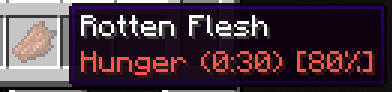


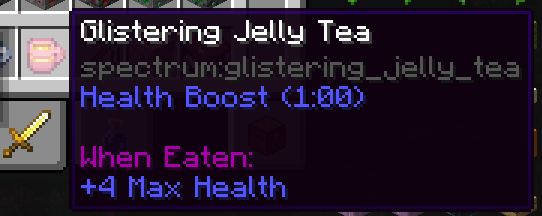
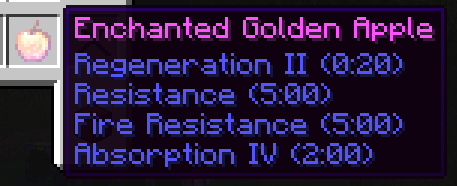
About this Mod
Your one-drop-shop for everything Consumable
Quite a few food items grant the player bonuses in the form of status effects. These effects, however, are never listed ingame. Which is a nuisance, especially in modded scenarios, where the player is not acquainted with all food options and their effects.
With Food Effect Tooltips all effects are shown in the items tooltip!
- fully client side
- handles effects that only get applied with a % chance
- shows stat changes for effects
- compatible with other mods that display food information, like AppleSkin
- also lists effects of items that clear status effects (like Milk), items that teleport (like Chrorus Fruit), Mushromm Stew and items that apply effects on death (like Totems of Undying)
- Fully compatible with other mods
How it works
The mod reads components of hovered items, parses their data and displays them in the tooltip. As of v2.0.0 FoodEffectTooltips handles:
consume_componentapply_effectsremove_effectsclear_all_effectsteleport_randomly
death_protectionsuspicious_stew_effects
Available Versions
How to Install Food Effect Tooltips [Fabric / NeoForge] on Your Client
Install the Mod Loader Locally
Install fabric for your local Minecraft version.
Download the Matching File
Choose the Food Effect Tooltips [Fabric / NeoForge] file for fabric and Minecraft 26.2.
Install Mod
Place the .jar file in your local .minecraft/mods folder and restart Minecraft. No server-side installation is required.
Compatibility
Mod Loaders
Minecraft Versions
26.2, 26.1.2, 26.1.1 (+18 more)
Server-side
✗ UnsupportedRecommended RAM
4 GB(min. 3 GB)Frequently Asked Questions
Does Food Effect Tooltips [Fabric / NeoForge] need to be installed on the Minecraft server?
No. Modrinth marks Food Effect Tooltips [Fabric / NeoForge] as unsupported on the server side. Install it only in your local Minecraft mods folder. Your server can remain unchanged unless the mod page lists an additional dependency.
Which version and loader does Food Effect Tooltips [Fabric / NeoForge] require?
Use a file for fabric, neoforge, quilt and your exact Minecraft version. Supported versions include 26.2, 26.1.2, 26.1.1. Files for different loaders are not interchangeable.
Food Effect Tooltips [Fabric / NeoForge] is not working – what should I check?
First check the Minecraft version, loader version and required dependencies. Put the .jar file in your local .minecraft/mods folder and remove older duplicates. Because this mod is client-side, adding server RAM will not fix it.
Similar Mods



Minecraft Server for Your Group
Food Effect Tooltips [Fabric / NeoForge] stays on your client. Host a compatible world for your group.