
Friends For Life
Take your pets on your next adventure with this QoL mod!
Screenshots


Über diese Mod

Bring your pets along for the journey with Friends For Life!
Never worry about losing a pet again. Once a pet is equipped with a Friendship Collar, and depending on the set behavior mode, it becomes invulnerable and fully protected.
Use the Ocarina to instantly summon your pet to your side, across dimensions, or play it again to send them back home safely.
Pets will wander around their home area instead of sitting in one spot, giving your base a more lively and natural feel!
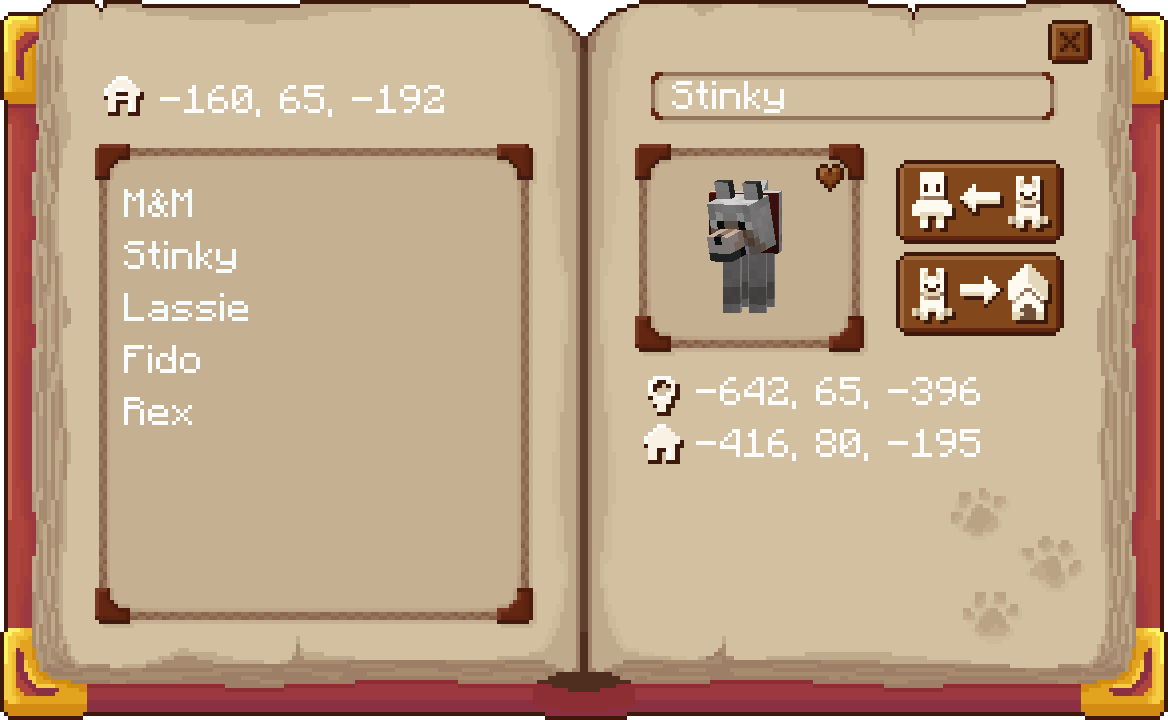
Have a big pack of animals? The Pet Roster helps you keep track of every companion you’ve bonded with. View them all in one place, manage their settings, change their behavior mode, and stay organized no matter how many pets you have.

How it works
Friends For Life introduces 3 unique items, the Collar, Ocarina, and Roster.
This mod effects the following mobs: Cat, Wolf, Parrot, Horse, Donkey, Mule, Llama, and Trader Llama.
The Collar
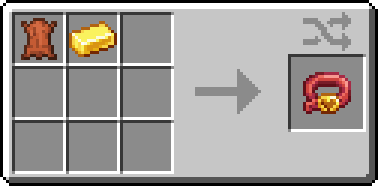
The Collar can be put on your tamed pet to make them invincible!
Once your pet is equipped with a collar, they become a Forever Pet, and will no longer take any damage from any source outside of creative/the void. If your Forever Pet does somehow perish, they will always come when you call them!
Sneak+Right-Click while holding the Collar to register a home point to the block you're looking at. When the collar is put on a pet, the pet's home will be set to that location! Whenever you send it home using the Ocarina or the Roster, it will return to that location. It will also wander around the location you set.
Your pet will now be registered in the Roster, and can have an Ocarina bound to it to teleport it to your location.
The Ocarina

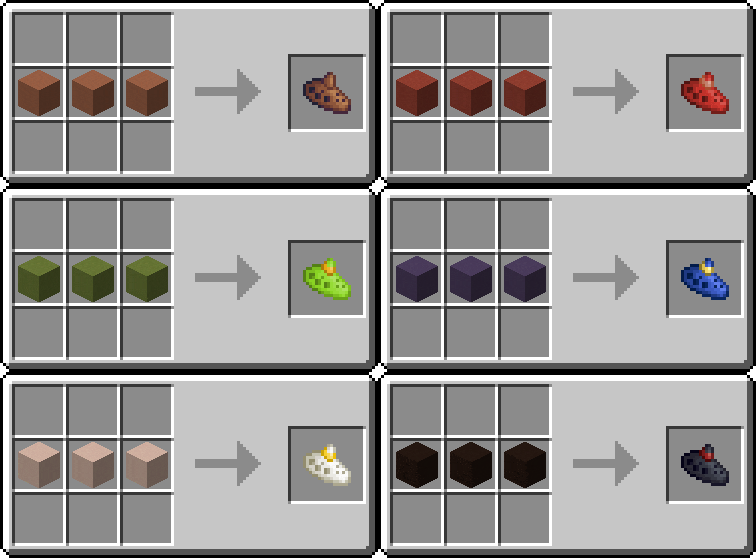
The Ocarina is a magical item that allows you to call your Forever Pets. Sneak+Right-Click a Forever Pet with the Ocarina to bind the Ocarina to it. Now, whenever you play the Ocarina, your Forever Pet will be summoned to your side! They will follow you as normal.
You can send your Forever Pet back home, either to the default Home location, set by the Roster, or the position set by their Collar. To do so, Sneak+Right-Click while holding the Ocarina.
Using different Terracotta blocks, you can choose from 17 different color options!
The Roster
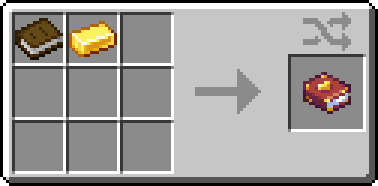
The Roster is a book that lists all of your Forever Pets. You can use the roster to view stats, change behavior modes, summon them, or send them home. The Roster includes the location of your pet, as well as its home location. You can open the Roster with a keybind (default: P).
Sneak+Right-Click while holding the Roster on a block will set the default Home location for all your Forever Pets. If your Pets don't have their own unique home, they will be sent here. If the Home location isn't set, they will be sent to your respawn point.
NOTE: If your Home location isn't set and you haven't set your respawn point, your pets will be sent to spawn.
Behavior Modes

In the top right corner of the pet portrait in the Roster, you'll find a button that lets you toggle your pet's behavior. The default setting will be Companion Mode ❤︎, however, clicking it will switch it to Guardian Mode ⛊.
Companion Mode ❤︎ will make your pet 100% invulnerable and 100% peaceful so you can adventure at ease.
Meanwhile Guardian Mode ⛊ will have your pet will behave like vanilla mobs, however, instead of dying when their hearts hit zero, they will teleport back to their Home location and "heal back up" forcing you to wait 60 seconds before summoning them again.
NOTE: The cooldown time limit can be customized using via "petRespawnTimer" in the config.
Compatability
This mod is designed to be compatible with modded pets, specifically tameable animals, but this isn't a guarantee all modded pets will work.
Planned Updates
Nothing for now!
Questions? Comments? Feedback? Join us on Discord!
Support The Good Wizard on Ko-Fi!
Special Credits
Mondonater — Sound design
Kit Aielgeth — Ocarina colors, testing
Shosai — Testing
Mama Native — Testing
V1G1L4NT3 — Testing
Special thanks to Tokimi and CozyStudios
Verfügbare Versionen
Friends For Life auf dem Server installieren
Server bestellen
Bestelle einen Minecraft Java Server mit mindestens 3 GB RAM (4 GB empfohlen).
fabric Loader setzen
Wähle im Panel unter "Egg" den fabric-Loader und die passende Minecraft-Version (1.21.1).
Mod installieren
Öffne den Mod-Browser im Dashboard und suche nach "Friends For Life". Klicke "Installieren" – fertig! Alternativ: Lade die .jar via SFTP in den /mods Ordner.
Kompatibilität
Mod-Loader
Minecraft-Versionen
1.21.1, 1.20.1
Server-seitig
✓ ErforderlichEmpfohlener RAM
4 GB(min. 3 GB)Häufige Fragen
Friends For Life Server crasht beim Start – was tun?
Häufigste Ursache: falsche fabric-Version oder zu wenig RAM. Prüfe im Server-Log (latest.log), ob ein "OutOfMemoryError" oder "Mixin"-Fehler auftritt. Bei Mado Hosting: Stelle sicher, dass mindestens 3 GB RAM zugewiesen sind und der Loader zur Mod-Version passt (1.21.1). Über das Panel kannst du den Loader mit einem Klick wechseln.
Ist Friends For Life mit fabric und neoforge kompatibel?
Friends For Life unterstützt offiziell fabric, neoforge für Minecraft 1.21.1, 1.20.1. Im Mado Dashboard werden inkompatible Loader-Kombinationen automatisch erkannt.
Server laggt mit Friends For Life – wie optimiere ich die Performance?
Empfohlener RAM: 4 GB (+1 GB pro 8 Spieler). Prüfe mit /spark profiler, ob Friends For Life den meisten Tick-Time verbraucht. Häufige Fixes: Server-View-Distance auf 8-10 reduzieren, bei Forge "performant" oder "starlight" als Zusatz-Mod installieren. Bei Mado Hosting läuft dein Server auf NVMe-SSDs mit dedizierten CPU-Kernen für minimale Latenz.
Ähnliche Mods
![[EMF] Entity Model Features](https://cdn.modrinth.com/data/4I1XuqiY/6e5bbd0d06b1741bfdab6c0cfab6de8fdaf0064c_96.webp)


Modded Server mieten
Installiere Friends For Life mit nur einem Klick auf deinem Server.