
Furniture Plan
A single mod for minecraft survival, friendly to resourcepacks.
Screenshots
Über diese Mod
About the Mod
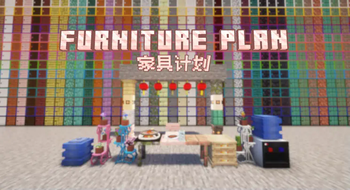
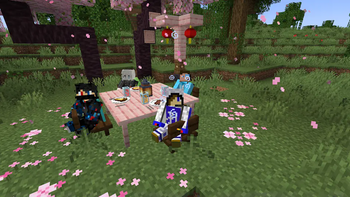
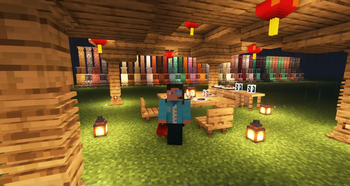
This is a Minecraft mod based on Forge, aiming to provide players with more furniture choices to make your Minecraft world more colorful.
The mod's inspiration came from our multiplayer Minecraft survival experience: at that time, my friend jing_qi was building a house and realized that a house without furniture always seemed somewhat monotonous and incomplete. Thus, the "Furniture Plan" was born.
Most items in this mod are carved with the "Graver" item, so players don't need to memorize too many crafting recipes.
Some of the Blocks:
Pot holder: Probably the most exquisite multi-block decoration in this mod, for planting flowers.
Cupboard: This block took the longest to make, only for you to experience more detailed block interaction with drawer animations. Each cupboard has three drawers.
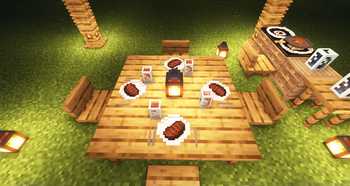
Chair: Chairs of various materials, players can sit down and enjoy a moment of relaxation.
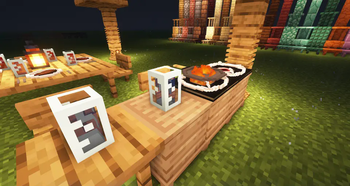
Table: Tables of various materials, seems to be a nice decorative block.
Cabinet(with disguise block kind): Practical storage cabinets, holding an entire row more space than a single chest, making it more cost-effective. Of course, you can also hide it among a pile of blocks so that others won't recognize it.
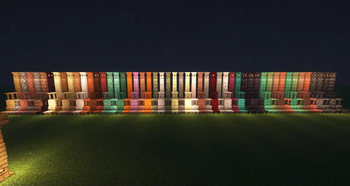
Columns: Decorative columns that add a unique aesthetic to buildings.
Tableware: Exquisite tableware to place food and drinks, making your dining table more perfect.
Table Lamp: Hotel-style table lamps to light up the room and add a touch of elegance.
Lantern: Originally intended to be released during the Lunar New Year, but it can also be used to decorate during any time you like.
Water Dispenser: MakerTechno felt proud of his drawing skills for the first time.(But still not finish yet.)
Also, welcome to our website:Ti works-Ti adventurers' party
Verfügbare Versionen
Furniture Plan auf dem Server installieren
Server bestellen
Bestelle einen Minecraft Java Server mit mindestens 3 GB RAM (4 GB empfohlen).
neoforge Loader setzen
Wähle im Panel unter "Egg" den neoforge-Loader und die passende Minecraft-Version (1.21.4).
Mod installieren
Öffne den Mod-Browser im Dashboard und suche nach "Furniture Plan". Klicke "Installieren" – fertig! Alternativ: Lade die .jar via SFTP in den /mods Ordner.
Kompatibilität
Mod-Loader
Minecraft-Versionen
1.21.4, 1.21.3, 1.21.2 (+2 weitere)
Server-seitig
✓ ErforderlichEmpfohlener RAM
4 GB(min. 3 GB)Häufige Fragen
Furniture Plan Server crasht beim Start – was tun?
Häufigste Ursache: falsche neoforge-Version oder zu wenig RAM. Prüfe im Server-Log (latest.log), ob ein "OutOfMemoryError" oder "Mixin"-Fehler auftritt. Bei Mado Hosting: Stelle sicher, dass mindestens 3 GB RAM zugewiesen sind und der Loader zur Mod-Version passt (1.21.4). Über das Panel kannst du den Loader mit einem Klick wechseln.
Ist Furniture Plan mit neoforge kompatibel?
Furniture Plan unterstützt offiziell neoforge für Minecraft 1.21.4, 1.21.3, 1.21.2. Im Mado Dashboard werden inkompatible Loader-Kombinationen automatisch erkannt.
Server laggt mit Furniture Plan – wie optimiere ich die Performance?
Empfohlener RAM: 4 GB (+1 GB pro 8 Spieler). Prüfe mit /spark profiler, ob Furniture Plan den meisten Tick-Time verbraucht. Häufige Fixes: Server-View-Distance auf 8-10 reduzieren, bei Forge "performant" oder "starlight" als Zusatz-Mod installieren. Bei Mado Hosting läuft dein Server auf NVMe-SSDs mit dedizierten CPU-Kernen für minimale Latenz.
Ähnliche Mods

![[ETF] Entity Texture Features](https://cdn.modrinth.com/data/BVzZfTc1/af683d206d50b05258d865b0d6e4aa2f2cee12f2_96.webp)
![[EMF] Entity Model Features](https://cdn.modrinth.com/data/4I1XuqiY/6e5bbd0d06b1741bfdab6c0cfab6de8fdaf0064c_96.webp)



Modded Server mieten
Installiere Furniture Plan mit nur einem Klick auf deinem Server.