
Genshin Instruments
A mod that adds Genshin Impact's set of instruments into Minecraft!
Screenshots


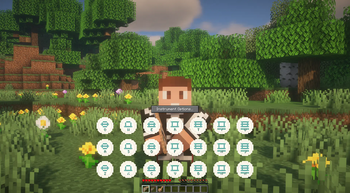
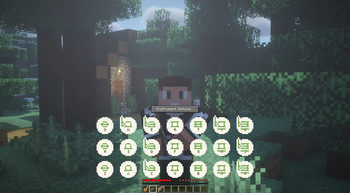
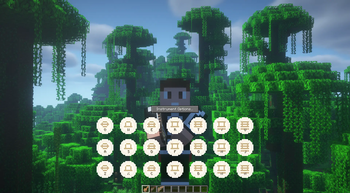
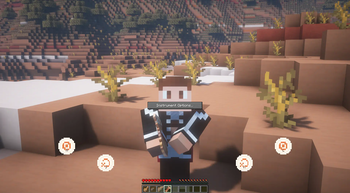
Über diese Mod

Add Genshin Impact's set of instruments to your own Minecraft experience, and play your favorite songs with the familiar keybindings!
Looking for even more instruments? 👀
(New to playing? Check out this neat tutorial)
Full MIDI Support!
This mod adds the following instruments to the game:
- Windsong Lyre [Stereo support]
- Floral Zither [Old & New]
- Vintage Lyre [Normalization support]
- Arataki's Great and Glorious Drum
- Nightwind Horn [Sustainable]
Instrument re-textures done by the awesome Gen (#9)! Check out their stuff, and show your support 😋
Modrinth | PlanetMinecraft | Patreon | Twitter
Support for:
- Custom pitch on each instrument
- Adjustable transposition with Left/Right shift (as set by your keybinds)
- Several sets of note labels (Keyboard labels match your language & layout)
- Multiplayer and shared instrument screens!
⚠️ IMPORTANT ⚠️: The Mod Author has Retired the project
Watch the video below to learn more:
Content Spotlight
(The video above was made possible through the M2KB project) Are you a content creator? Lyre player?
Reach out to me in CurseForge PMs to have your video showcased here!
Recipes
Windsong Lyre

Vintage Lyre

Floral Zither

Arataki's Great and Glorious Drum

Nightwind Horn

THIS PROJECT IS NOT AFFILIATED WITH NEITHER HOYOVERSE NOR GENSHIN IMPACT.
All audio assets and design elements belong to said company.
What started as a small, learning test project, has made its way to be my first ever published creation. I'm very thrilled and excited to be able to share something with the community, as both an average Minecraft and Genshin enjoyer :^)
Verfügbare Versionen
Genshin Instruments auf dem Server installieren
Server bestellen
Bestelle einen Minecraft Java Server mit mindestens 3 GB RAM (4 GB empfohlen).
fabric Loader setzen
Wähle im Panel unter "Egg" den fabric-Loader und die passende Minecraft-Version (1.21.1).
Mod installieren
Öffne den Mod-Browser im Dashboard und suche nach "Genshin Instruments". Klicke "Installieren" – fertig! Alternativ: Lade die .jar via SFTP in den /mods Ordner.
Kompatibilität
Mod-Loader
Minecraft-Versionen
1.21.1, 1.21, 1.20.6 (+9 weitere)
Server-seitig
✓ ErforderlichEmpfohlener RAM
4 GB(min. 3 GB)Häufige Fragen
Genshin Instruments Server crasht beim Start – was tun?
Häufigste Ursache: falsche fabric-Version oder zu wenig RAM. Prüfe im Server-Log (latest.log), ob ein "OutOfMemoryError" oder "Mixin"-Fehler auftritt. Bei Mado Hosting: Stelle sicher, dass mindestens 3 GB RAM zugewiesen sind und der Loader zur Mod-Version passt (1.21.1). Über das Panel kannst du den Loader mit einem Klick wechseln.
Ist Genshin Instruments mit fabric und forge und neoforge kompatibel?
Genshin Instruments unterstützt offiziell fabric, forge, neoforge für Minecraft 1.21.1, 1.21, 1.20.6. Achtung: Forge- und Fabric-Mods sind NICHT untereinander kompatibel – wähle einen Loader und bleibe dabei. Im Mado Dashboard werden inkompatible Loader-Kombinationen automatisch erkannt.
Server laggt mit Genshin Instruments – wie optimiere ich die Performance?
Empfohlener RAM: 4 GB (+1 GB pro 8 Spieler). Prüfe mit /spark profiler, ob Genshin Instruments den meisten Tick-Time verbraucht. Häufige Fixes: Server-View-Distance auf 8-10 reduzieren, bei Forge "performant" oder "starlight" als Zusatz-Mod installieren. Bei Mado Hosting läuft dein Server auf NVMe-SSDs mit dedizierten CPU-Kernen für minimale Latenz.
Ähnliche Mods



![[TaCZ] Timeless and Classics Zero](https://cdn.modrinth.com/data/SzzJttH8/fd27766d2bb8390d284696b1dbd358f87e081439_96.webp)


Modded Server mieten
Installiere Genshin Instruments mit nur einem Klick auf deinem Server.
Details
- Lizenz
- Creative Commons Attribution Non Commercial 4.0 International
- Server-seitig
- Erforderlich