
Genshin Instruments
A mod that adds Genshin Impact's set of instruments into Minecraft!
Screenshots



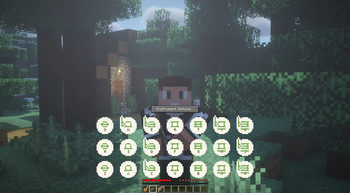

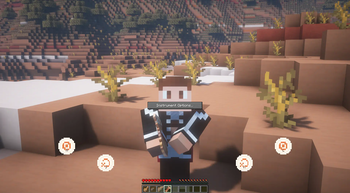
About this Mod

Add Genshin Impact's set of instruments to your own Minecraft experience, and play your favorite songs with the familiar keybindings!
Looking for even more instruments? 👀
(New to playing? Check out this neat tutorial)
Full MIDI Support!
This mod adds the following instruments to the game:
- Windsong Lyre [Stereo support]
- Floral Zither [Old & New]
- Vintage Lyre [Normalization support]
- Arataki's Great and Glorious Drum
- Nightwind Horn [Sustainable]
Instrument re-textures done by the awesome Gen (#9)! Check out their stuff, and show your support 😋
Modrinth | PlanetMinecraft | Patreon | Twitter
Support for:
- Custom pitch on each instrument
- Adjustable transposition with Left/Right shift (as set by your keybinds)
- Several sets of note labels (Keyboard labels match your language & layout)
- Multiplayer and shared instrument screens!
⚠️ IMPORTANT ⚠️: The Mod Author has Retired the project
Watch the video below to learn more:
Content Spotlight
(The video above was made possible through the M2KB project) Are you a content creator? Lyre player?
Reach out to me in CurseForge PMs to have your video showcased here!
Recipes
Windsong Lyre

Vintage Lyre

Floral Zither

Arataki's Great and Glorious Drum

Nightwind Horn

THIS PROJECT IS NOT AFFILIATED WITH NEITHER HOYOVERSE NOR GENSHIN IMPACT.
All audio assets and design elements belong to said company.
What started as a small, learning test project, has made its way to be my first ever published creation. I'm very thrilled and excited to be able to share something with the community, as both an average Minecraft and Genshin enjoyer :^)
Available Versions
How to Install Genshin Instruments on Your Server
Order Server
Order a Minecraft Java server with at least 3 GB RAM (4 GB recommended).
Set fabric Loader
In the panel under "Egg", select the fabric loader and matching Minecraft version (1.21.1).
Install Mod
Open the mod browser in the dashboard and search for "Genshin Instruments". Click "Install" – done! Alternatively, upload the .jar via SFTP to the /mods folder.
Compatibility
Mod Loaders
Minecraft Versions
1.21.1, 1.21, 1.20.6 (+9 more)
Server-side
✓ RequiredRecommended RAM
4 GB(min. 3 GB)Frequently Asked Questions
Genshin Instruments server crashes on startup – what to do?
Most common cause: wrong fabric version or insufficient RAM. Check the server log (latest.log) for "OutOfMemoryError" or "Mixin" errors. With Mado Hosting: ensure at least 3 GB RAM is allocated and the loader matches the mod version (1.21.1). You can switch loaders with one click in the panel.
Is Genshin Instruments compatible with fabric and forge and neoforge?
Genshin Instruments officially supports fabric, forge, neoforge for Minecraft 1.21.1, 1.21, 1.20.6. Note: Forge and Fabric mods are NOT cross-compatible – pick one loader and stick with it. The Mado dashboard automatically detects incompatible loader combinations.
Server lagging with Genshin Instruments – how to optimize performance?
Recommended RAM: 4 GB (per 8 players). Use /spark profiler to check if Genshin Instruments consumes the most tick time. Common fixes: reduce server view-distance to 8-10, install "performant" or "starlight" as supplementary mods on Forge. With Mado Hosting, your server runs on NVMe SSDs with dedicated CPU cores for minimal latency.
Similar Mods



![[TaCZ] Timeless and Classics Zero](https://cdn.modrinth.com/data/SzzJttH8/fd27766d2bb8390d284696b1dbd358f87e081439_96.webp)


Rent Modded Server
Install Genshin Instruments with just one click on your server.
Details
- License
- Creative Commons Attribution Non Commercial 4.0 International
- Server-side
- Required