Modrinth · Fabric, Forge, NeoForge · Client-Mod
Gnetum
Gnetum ist eine clientseitige Mod. Du installierst sie auf deinem Rechner, auf dem Server ist sie nicht nötig.
Distribute HUD updates over multiple frames to improve performance
- Downloads
- 5.7M
- Autor
- decce6
- Loader
- Fabric, Forge, NeoForge
- Minecraft
- 1.12.2 – 26.3
- Aktualisiert
- –
Screenshots
So sieht Gnetum aus
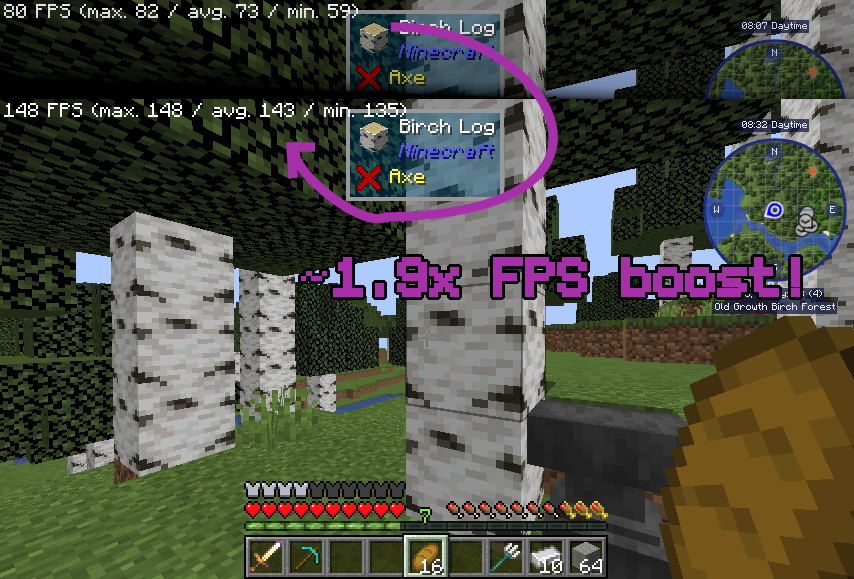
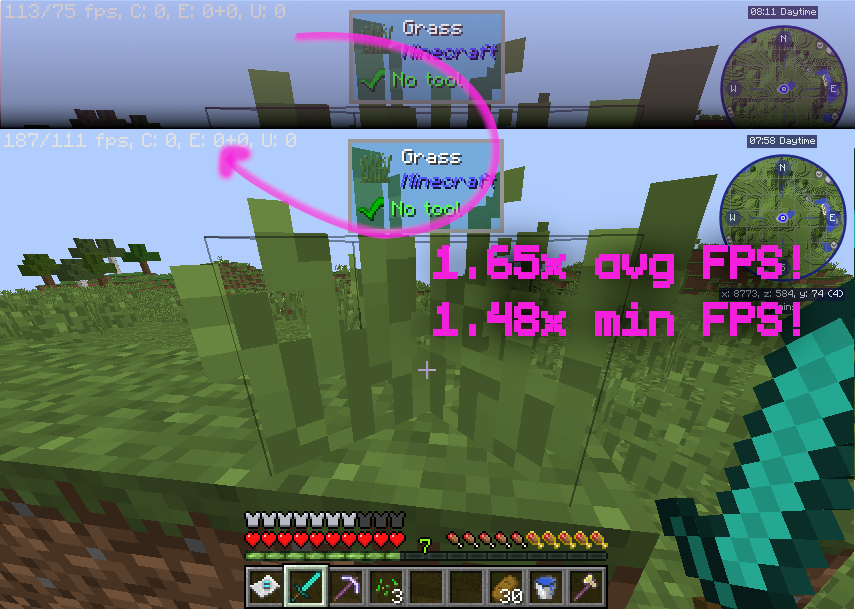
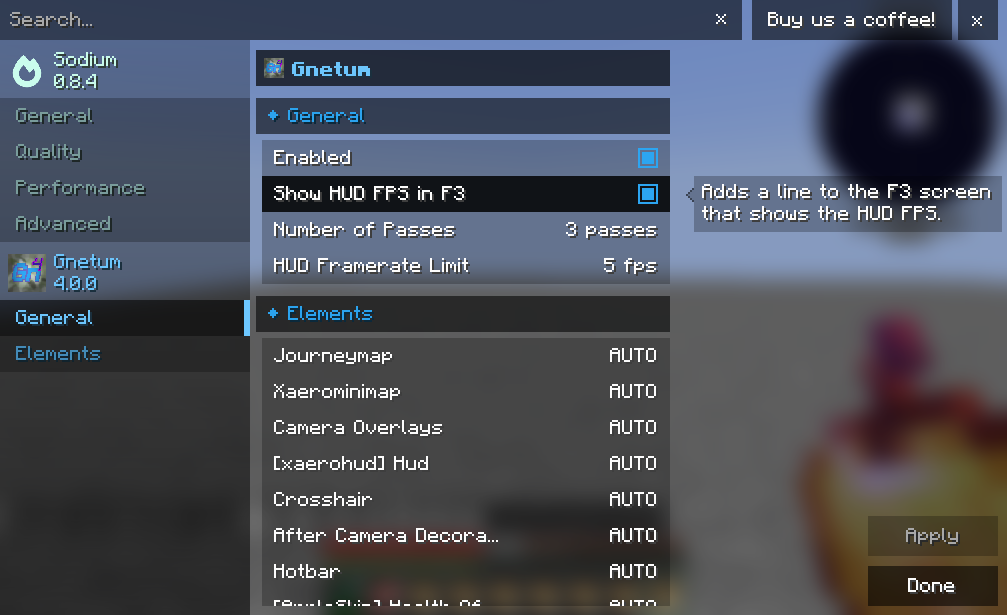
Bilder: Gnetum auf Modrinth, vom Projektteam veröffentlicht.
Einrichtung
Gnetum auf deinem Client installieren
Clientseitige Mods laufen nur auf deinem Rechner. Mehr Server-RAM ändert an ihrer Leistung nichts.
- 01
Loader lokal installieren
Installiere Fabric oder Forge oder NeoForge für deine Minecraft-Version in deinem Launcher.
- 02
Datei herunterladen
Lade die Gnetum-Datei für deinen Loader und exakt deine Minecraft-Version herunter, zum Beispiel 26.3.
- 03
In den Mods-Ordner legen
Lege die .jar-Datei in den lokalen Ordner .minecraft/mods und entferne ältere Duplikate.
- 04
Starten
Starte Minecraft mit dem Loader-Profil. Auf dem Server musst du nichts ändern.
- Auf dem Server
- Nicht nötig
- Auf dem Client
- Erforderlich
- Loader
- Fabric, Forge, NeoForge
- Minecraft
- 26.3, 26.2-snapshot-8, 26.2-rc-1 +16 weitere
- Lizenz
- GNU Lesser General Public License v3.0 only
Versionen
Veröffentlichte Versionen
Nimm die Datei, die zu Loader und Minecraft-Version deines Servers passt. Server und Spieler brauchen dieselbe Version.
Gnetum · Modrinth- Gnetum 3.3.716. November 2026Minecraft 1.21.1 · NeoForge
- Gnetum 2.5.2+1.18.2-forge16. November 2026Minecraft 1.18.2 · Forge
- Gnetum 2.5.2+1.20.1-forge16. November 2026Minecraft 1.20.1 · Forge
- Gnetum 4.6.5+26.3-neoforge16. November 2026Minecraft 26.3 · NeoForge
- Gnetum 4.6.5+26.3-fabric16. November 2026Minecraft 26.3 · Fabric
Originalbeschreibung des Projektautors
Gnetum
A Minecraft mod that improves performance by distributing HUD updates over multiple frames.
Overview
Gnetum divides a full HUD update into multiple "passes." Only one pass is rendered each frame, reducing the time taken on HUD updates and improving FPS.
Based on the rendering time of each element, Gnetum automatically distributes their updates over multiple frames, improving both the average FPS and the minimum.
Technical explanations
The idea behind Gnetum is to reduce the framerate of the HUD, which is not cheap to render and does not really change often, to improve the overall performance of the game, in a way that improves both the average and the minimum FPS. To achieve this:
- Gnetum employs two framebuffers, called a back framebuffer and a front framebuffer, respectively
- Each frame will render a "pass", that is, a (customizable) portion of the complete HUD, to the back framebuffer
- If the number of passes is set to 4, for example, a full HUD update is distributed over 4 frames, saving a lot of draw calls every frame and improving FPS
- After all passes finish rendering, the back framebuffer is "swapped" with the front framebuffer
- Each frame also renders the front framebuffer, which contains a texture of the full HUD
There is also an HUD FPS limiter that defines the maximum FPS of the HUD.
Configuration
Starting from 4.0.0, integration is implemented with Sodium Config API. The configuration can be accessed from the Video Screen, allowing for adjustment of:
- the number of passes
- maximum HUD FPS
- enabling/disabling caching for each element
Compatibility
1.20.1, 1.21.1 & 1.21.11
✔️ ImmediatelyFast: fully compatible and recommended.
1.12.2
⚠️ OptiFine: make sure "Fast Render" is disabled (this mod would do nothing otherwise.)
⚠️ StellarCore: make sure their HUD Caching feature is disabled (if you are unsure how to disable it you can ignore this: it's disabled by default.)
Credits
This mod is inspired by the HUDCaching mod by Moulberry.
Muss Gnetum auf dem Minecraft Server installiert werden?
Nein. Modrinth kennzeichnet Gnetum serverseitig als nicht unterstützt. Installiere die Mod nur im lokalen Mods-Ordner. Dein Server kann unverändert bleiben, sofern die Projektseite keine zusätzliche Abhängigkeit nennt.
Welche Version und welchen Loader braucht Gnetum?
Nutze eine Datei für Fabric, Forge, NeoForge und exakt deine Minecraft-Version. Unterstützt werden unter anderem 26.3, 26.2-snapshot-8, 26.2-rc-1. Dateien für verschiedene Loader sind nicht austauschbar.
Gnetum funktioniert nicht – was kann ich prüfen?
Prüfe zuerst Minecraft-Version, Loader-Version und erforderliche Abhängigkeiten. Da die Mod clientseitig ist, löst mehr Server-RAM das Problem nicht.
Ähnliche Mods
Beliebte Mods aus derselben Kategorie
 Nur Client

Sodium
von jellysquid3
A high-performance rendering engine replacement for Minecraft, which greatly improves frame rates and reduces micro-stutter.
 Nur Client

Iris Shaders
von coderbot
A modern shader pack loader for Minecraft intended to be compatible with existing OptiFine shader packs
 Nur Client

Entity Culling
von tr7zw
Using async path-tracing to hide Block-/Entities that are not visible
 Server-fähig

FerriteCore
von malte0811
Memory usage optimizations
Mods für deinen eigenen Server gesucht?
Im Katalog findest du Mods, die auf Minecraft Servern laufen.