
Player Health Indicators (ANIMATED)
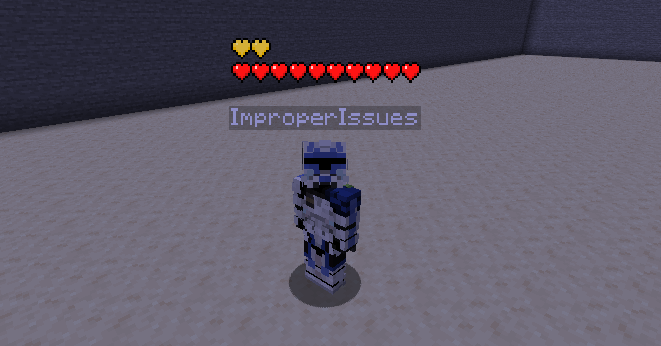
Renders a player health indicator HP bar with dynamic animations above players' heads.
Screenshots
Über diese Mod
Health Indicators
Renders player health above their heads
Health bar is also animated responsively just like a player's client-side status bar!
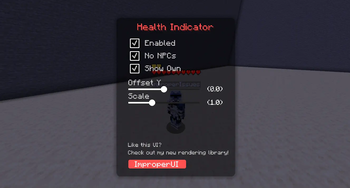
Has smooth-looking in-game config menu! THE KEYBIND IS MINUS - !!
This mod requires ImproperUI to run.
Like your vanilla health bar, the display flashes upon being updated.
The hearts also shake when the player are below 4 health points.
Supported heart types include:
- withered
- poisened
- frozen
- hardcoare
- abosorption
- normal
Also like vanilla, the hearts would stack up high
if the player has more than 1 row of hearts.
Vanilla animation and effects were added as much as possible:
- update blinking
- last damage flashing
- heart regeneration wave animation
- heart texture types
- heart stacking
- absorption
DISCLAIMERS (2):
- Health Indicators may be banned on some servers, please check their rules first!
- Most servers have anti-hp-indicator plugins, meaning that this mod would not work properly on those servers!
Settings:
- Enabled: toggles the rendering
- No NPC: disallows NPC players from rendering their health bar
- Show Own: shows your own health bar
- Scale: scale of the health bar
- Offset Y: the y-position of the health bar


Verfügbare Versionen
Player Health Indicators (ANIMATED) auf deinem Client installieren
Mod-Loader lokal installieren
Installiere fabric für deine lokale Minecraft-Version.
Passende Datei herunterladen
Wähle die Player Health Indicators (ANIMATED)-Datei für fabric und Minecraft 26.1.2.
Mod installieren
Lege die .jar-Datei in deinem lokalen .minecraft/mods-Ordner ab und starte Minecraft neu. Eine Installation auf dem Server ist nicht nötig.
Kompatibilität
Mod-Loader
Minecraft-Versionen
26.1.2, 26.1.1, 26.1 (+2 weitere)
Server-seitig
✗ Nicht unterstütztEmpfohlener RAM
4 GB(min. 3 GB)Häufige Fragen
Muss Player Health Indicators (ANIMATED) auf dem Minecraft Server installiert werden?
Nein. Modrinth kennzeichnet Player Health Indicators (ANIMATED) serverseitig als nicht unterstützt. Installiere die Mod nur im lokalen Minecraft-Mods-Ordner. Dein Server kann unverändert bleiben, sofern die Mod-Seite keine zusätzliche Abhängigkeit nennt.
Welche Version und welchen Loader braucht Player Health Indicators (ANIMATED)?
Nutze eine Datei für fabric und exakt deine Minecraft-Version. Unterstützte Versionen sind unter anderem 26.1.2, 26.1.1, 26.1. Loader-Dateien sind nicht untereinander austauschbar.
Player Health Indicators (ANIMATED) funktioniert nicht – was kann ich prüfen?
Prüfe zuerst Minecraft-Version, Loader-Version und erforderliche Abhängigkeiten. Lege die .jar-Datei im lokalen .minecraft/mods-Ordner ab und entferne ältere Duplikate. Da die Mod clientseitig ist, löst mehr Server-RAM dieses Problem nicht.
Ähnliche Mods



![[TaCZ] Timeless and Classics Zero](https://cdn.modrinth.com/data/SzzJttH8/fd27766d2bb8390d284696b1dbd358f87e081439_96.webp)


Minecraft Server für deine Gruppe
Player Health Indicators (ANIMATED) bleibt auf deinem Client. Hoste dazu eine kompatible Welt für deine Mitspieler.