
Player Health Indicators (ANIMATED)
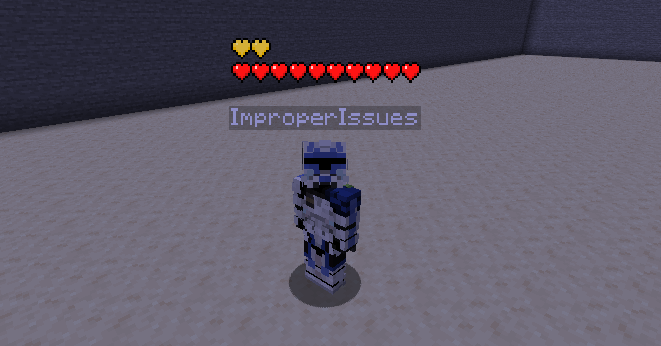
Renders a player health indicator HP bar with dynamic animations above players' heads.
Screenshots
About this Mod
Health Indicators
Renders player health above their heads
Health bar is also animated responsively just like a player's client-side status bar!
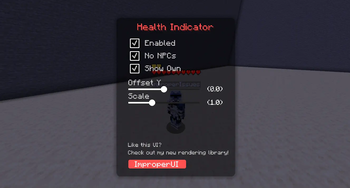
Has smooth-looking in-game config menu! THE KEYBIND IS MINUS - !!
This mod requires ImproperUI to run.
Like your vanilla health bar, the display flashes upon being updated.
The hearts also shake when the player are below 4 health points.
Supported heart types include:
- withered
- poisened
- frozen
- hardcoare
- abosorption
- normal
Also like vanilla, the hearts would stack up high
if the player has more than 1 row of hearts.
Vanilla animation and effects were added as much as possible:
- update blinking
- last damage flashing
- heart regeneration wave animation
- heart texture types
- heart stacking
- absorption
DISCLAIMERS (2):
- Health Indicators may be banned on some servers, please check their rules first!
- Most servers have anti-hp-indicator plugins, meaning that this mod would not work properly on those servers!
Settings:
- Enabled: toggles the rendering
- No NPC: disallows NPC players from rendering their health bar
- Show Own: shows your own health bar
- Scale: scale of the health bar
- Offset Y: the y-position of the health bar


Available Versions
How to Install Player Health Indicators (ANIMATED) on Your Client
Install the Mod Loader Locally
Install fabric for your local Minecraft version.
Download the Matching File
Choose the Player Health Indicators (ANIMATED) file for fabric and Minecraft 26.1.2.
Install Mod
Place the .jar file in your local .minecraft/mods folder and restart Minecraft. No server-side installation is required.
Compatibility
Mod Loaders
Minecraft Versions
26.1.2, 26.1.1, 26.1 (+2 more)
Server-side
✗ UnsupportedRecommended RAM
4 GB(min. 3 GB)Frequently Asked Questions
Does Player Health Indicators (ANIMATED) need to be installed on the Minecraft server?
No. Modrinth marks Player Health Indicators (ANIMATED) as unsupported on the server side. Install it only in your local Minecraft mods folder. Your server can remain unchanged unless the mod page lists an additional dependency.
Which version and loader does Player Health Indicators (ANIMATED) require?
Use a file for fabric and your exact Minecraft version. Supported versions include 26.1.2, 26.1.1, 26.1. Files for different loaders are not interchangeable.
Player Health Indicators (ANIMATED) is not working – what should I check?
First check the Minecraft version, loader version and required dependencies. Put the .jar file in your local .minecraft/mods folder and remove older duplicates. Because this mod is client-side, adding server RAM will not fix it.
Similar Mods



![[TaCZ] Timeless and Classics Zero](https://cdn.modrinth.com/data/SzzJttH8/fd27766d2bb8390d284696b1dbd358f87e081439_96.webp)


Minecraft Server for Your Group
Player Health Indicators (ANIMATED) stays on your client. Host a compatible world for your group.