
InventoryCleaner
A mod that automatically throws away junk items usefull for pvp and normal use
Screenshots

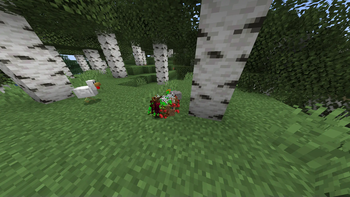


Über diese Mod
☕ Support My Work
If you would like to support me and my projects, feel free to buy me a coffee!


Gui for versions above 1.1.3
- First u will need to set a keybind in the settings for the gui then open it
- Note that the gui was added in 1.1.3 versions below still use command system
How to set up
- Open Minecraft and navigate to Settings > Controls > Key Bindings or open the gui and toggle it from there.
- Search for InventoryCleaner and set a keybind to toggle the mod on and off.
- Use the assigned keybind to toggle the mod on it will only throw if the mod is on
Inventory Cleaner
Inventory Cleaner is a useful mod that automates the task of throwing away junk and useless items from your inventory. It provides a convenient solution for keeping your inventory clean and organized.
- You can turn the mod on and off by going in options/controls/keybinds.
Features
Toggleable Cleaning: Enable or disable the InventoryCleaner to clean your inventory.
Inventory open Will automatically open the inventory when throwing items better for multiplayer servers. version above 1.1.3
Add Items to Throw List: Use commands to add items to the list of items that will be thrown when the InventoryCleaner is active.
Remove Items from Throw List Remove items from the throw list using commands.
Commands
- /ic additem
- (for adding an item to throw list) for items with spaces like Iron sword
you should use _ (iron_sword). - /ic delitem
- (for deleting items from throw list)
- /ic lockslot
(to lock a slot so it wont throw the item from that slot) - /ic unlockslot
(to unlock the locked slot) - /ic list (lists all items in the throw list and all locked slots)
- /ic config save
(saves the current throw list and locked slots as a configuration with the given name) - /ic config load
(loads a saved configuration with the given name) - /ic delay seconds < (the delay betwen items to throw)
- /ic mode WHITELIST: it wont throw the items in the list.
- /ic mode BLACKLSIT: it will throw the items in the list.
Configuration
- The mod uses a configuration file (inventorycleaner.properties) to store the list of items to throw which can be found in the config folder.
Contributing
Feel free to open issues or pull requests for bug fixes or improvements.
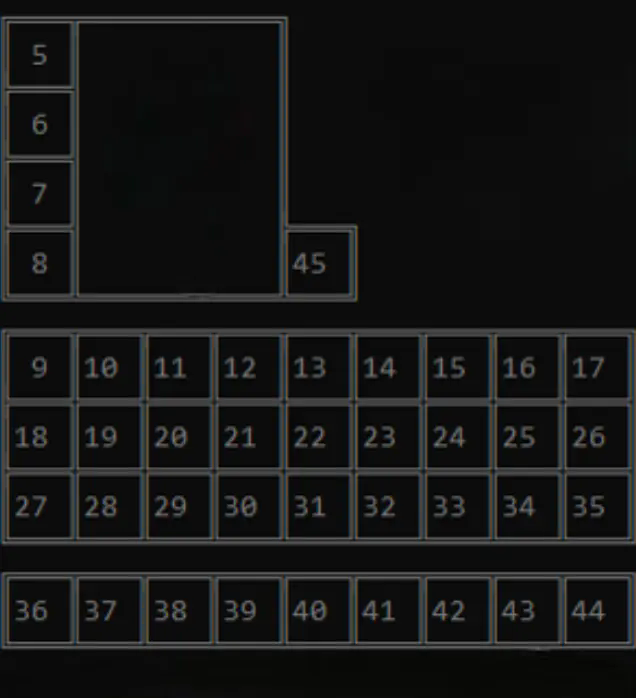
Here are the slot ids
Verfügbare Versionen
InventoryCleaner auf deinem Client installieren
Mod-Loader lokal installieren
Installiere fabric für deine lokale Minecraft-Version.
Passende Datei herunterladen
Wähle die InventoryCleaner-Datei für fabric und Minecraft 26.3.
Mod installieren
Lege die .jar-Datei in deinem lokalen .minecraft/mods-Ordner ab und starte Minecraft neu. Eine Installation auf dem Server ist nicht nötig.
Kompatibilität
Mod-Loader
Minecraft-Versionen
26.3, 26.2, 26.1.2 (+19 weitere)
Server-seitig
✗ Nicht unterstütztEmpfohlener RAM
4 GB(min. 3 GB)Häufige Fragen
Muss InventoryCleaner auf dem Minecraft Server installiert werden?
Nein. Modrinth kennzeichnet InventoryCleaner serverseitig als nicht unterstützt. Installiere die Mod nur im lokalen Minecraft-Mods-Ordner. Dein Server kann unverändert bleiben, sofern die Mod-Seite keine zusätzliche Abhängigkeit nennt.
Welche Version und welchen Loader braucht InventoryCleaner?
Nutze eine Datei für fabric, quilt und exakt deine Minecraft-Version. Unterstützte Versionen sind unter anderem 26.3, 26.2, 26.1.2. Loader-Dateien sind nicht untereinander austauschbar.
InventoryCleaner funktioniert nicht – was kann ich prüfen?
Prüfe zuerst Minecraft-Version, Loader-Version und erforderliche Abhängigkeiten. Lege die .jar-Datei im lokalen .minecraft/mods-Ordner ab und entferne ältere Duplikate. Da die Mod clientseitig ist, löst mehr Server-RAM dieses Problem nicht.
Ähnliche Mods




Minecraft Server für deine Gruppe
InventoryCleaner bleibt auf deinem Client. Hoste dazu eine kompatible Welt für deine Mitspieler.