
InventoryCleaner
A mod that automatically throws away junk items usefull for pvp and normal use
Screenshots

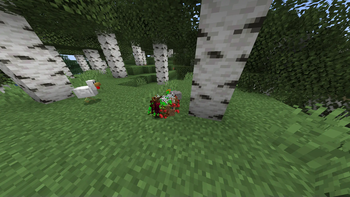


About this Mod
☕ Support My Work
If you would like to support me and my projects, feel free to buy me a coffee!


Gui for versions above 1.1.3
- First u will need to set a keybind in the settings for the gui then open it
- Note that the gui was added in 1.1.3 versions below still use command system
How to set up
- Open Minecraft and navigate to Settings > Controls > Key Bindings or open the gui and toggle it from there.
- Search for InventoryCleaner and set a keybind to toggle the mod on and off.
- Use the assigned keybind to toggle the mod on it will only throw if the mod is on
Inventory Cleaner
Inventory Cleaner is a useful mod that automates the task of throwing away junk and useless items from your inventory. It provides a convenient solution for keeping your inventory clean and organized.
- You can turn the mod on and off by going in options/controls/keybinds.
Features
Toggleable Cleaning: Enable or disable the InventoryCleaner to clean your inventory.
Inventory open Will automatically open the inventory when throwing items better for multiplayer servers. version above 1.1.3
Add Items to Throw List: Use commands to add items to the list of items that will be thrown when the InventoryCleaner is active.
Remove Items from Throw List Remove items from the throw list using commands.
Commands
- /ic additem
- (for adding an item to throw list) for items with spaces like Iron sword
you should use _ (iron_sword). - /ic delitem
- (for deleting items from throw list)
- /ic lockslot
(to lock a slot so it wont throw the item from that slot) - /ic unlockslot
(to unlock the locked slot) - /ic list (lists all items in the throw list and all locked slots)
- /ic config save
(saves the current throw list and locked slots as a configuration with the given name) - /ic config load
(loads a saved configuration with the given name) - /ic delay seconds < (the delay betwen items to throw)
- /ic mode WHITELIST: it wont throw the items in the list.
- /ic mode BLACKLSIT: it will throw the items in the list.
Configuration
- The mod uses a configuration file (inventorycleaner.properties) to store the list of items to throw which can be found in the config folder.
Contributing
Feel free to open issues or pull requests for bug fixes or improvements.
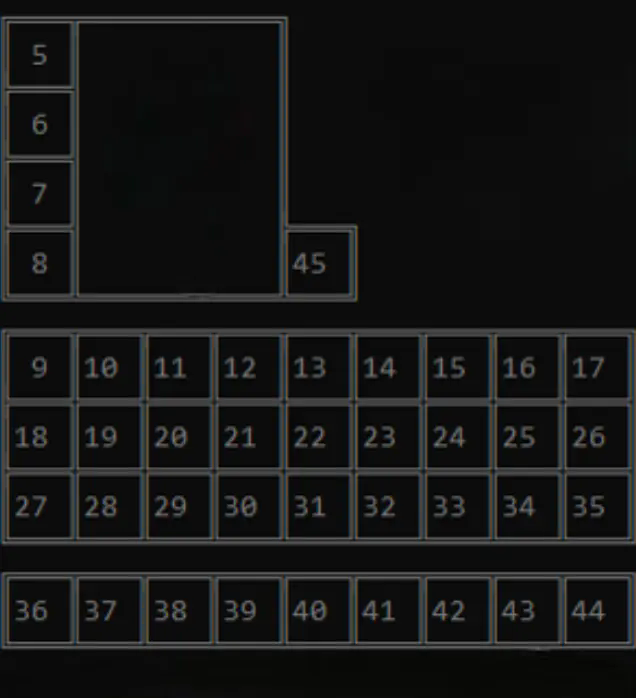
Here are the slot ids
Available Versions
How to Install InventoryCleaner on Your Client
Install the Mod Loader Locally
Install fabric for your local Minecraft version.
Download the Matching File
Choose the InventoryCleaner file for fabric and Minecraft 26.3.
Install Mod
Place the .jar file in your local .minecraft/mods folder and restart Minecraft. No server-side installation is required.
Compatibility
Mod Loaders
Minecraft Versions
26.3, 26.2, 26.1.2 (+19 more)
Server-side
✗ UnsupportedRecommended RAM
4 GB(min. 3 GB)Frequently Asked Questions
Does InventoryCleaner need to be installed on the Minecraft server?
No. Modrinth marks InventoryCleaner as unsupported on the server side. Install it only in your local Minecraft mods folder. Your server can remain unchanged unless the mod page lists an additional dependency.
Which version and loader does InventoryCleaner require?
Use a file for fabric, quilt and your exact Minecraft version. Supported versions include 26.3, 26.2, 26.1.2. Files for different loaders are not interchangeable.
InventoryCleaner is not working – what should I check?
First check the Minecraft version, loader version and required dependencies. Put the .jar file in your local .minecraft/mods folder and remove older duplicates. Because this mod is client-side, adding server RAM will not fix it.
Similar Mods




Minecraft Server for Your Group
InventoryCleaner stays on your client. Host a compatible world for your group.