
InventoryHUD+
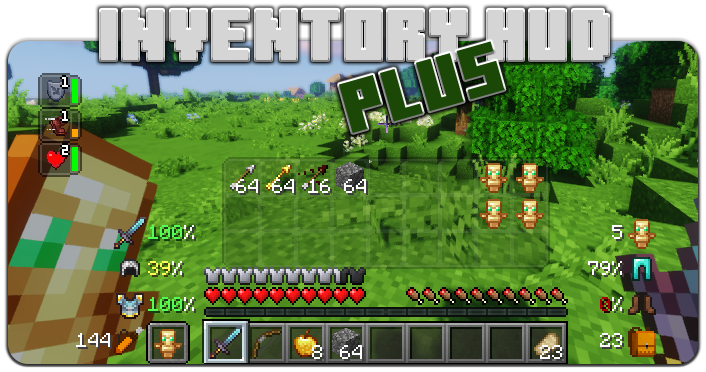
Adds your main inventory, potion effects and your equipments to your HUD. And few other features.
Über diese Mod

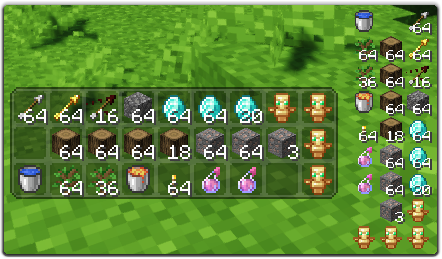
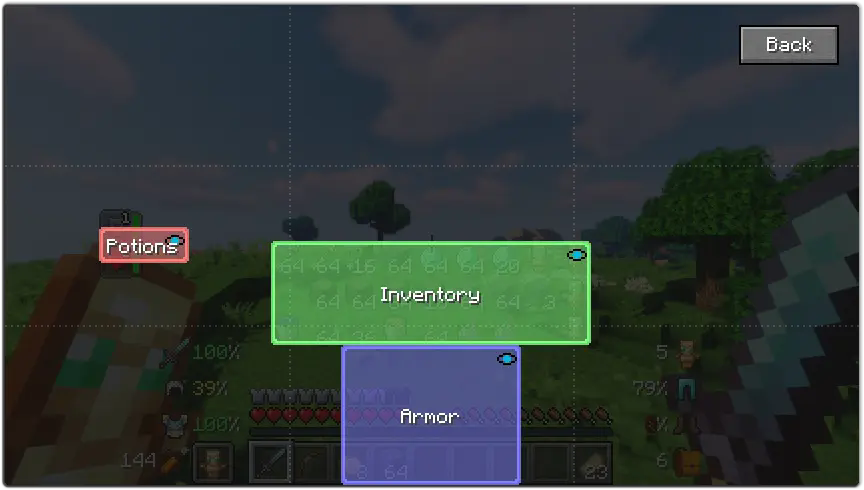
This mod contains a few features, first of all - Inventory HUD, it shows your inventory while you are playing, you can switch between mods (mini/normal and horizontal/vertical), also you can change background transparency and toggle animation on/off
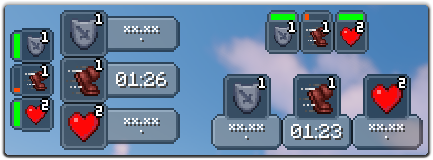
Next feature is PotionHUD, it shows your potion effects with timer or duration bar if you are using mini mode, you can change gap between effects and background transparency in config, and you can enable horizontal mode as well
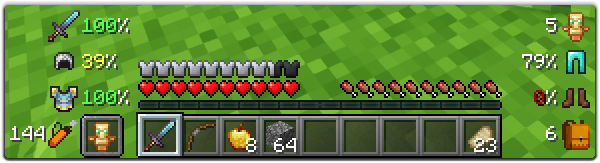
And last but not least feature is ArmorHUD, it shows durability of your armor and equipment, also shows how many free slots do you have in your inventory and how many arrows do you have. This HUD is fully customizable, you can change scale, type of damage indicator or turn on/off each part of your equipment
You can change a lot of options in config ("Mod" button in Main Menu, then "Config"), also you can change the position for each HUD by simply dragging and dropping them. To open ingame config screen you can use keybind ("O" by default)
If you want to help me to make this mod better, you can translate it to your language and send json file to me.
You can find original lang file here: en_us.json
Supported languages
- Chinese Simplified (Mainland China) (zh_cn) (thanks to Satxm)
- Chinese Traditional (Taiwan) (zh_tw) (thanks to yichifauzi)
- Czech (cs_cz) (thanks to Janys159)
- English (en_us)
- French (fr_fr) (thanks to Peperehobbits01)
- German (de_de) (thanks to arrowlevel)
- Hungarian (hu_hu) (thanks to Kalmix88)
- Italian (it_it) (thanks to cranos96)
- Japanese (ja_jp) (thanks to co_91)
- Korean (ko_kr) (thanks to gueso-gato1355)
- Portuguese - Brasil (pt_br) (thanks to VitorLeonardo)
- Russian (ru_ru)
- Spanish (es_es) (thanks to Zeedif)
- Turkish (tr_tr) (thanks to MefeBey)
- Ukrainian (uk_ua) (thanks to Elvis_Danger)
Verfügbare Versionen
InventoryHUD+ auf deinem Client installieren
Mod-Loader lokal installieren
Installiere fabric für deine lokale Minecraft-Version.
Passende Datei herunterladen
Wähle die InventoryHUD+-Datei für fabric und Minecraft 26.3.
Mod installieren
Lege die .jar-Datei in deinem lokalen .minecraft/mods-Ordner ab und starte Minecraft neu. Eine Installation auf dem Server ist nicht nötig.
Kompatibilität
Mod-Loader
Minecraft-Versionen
26.3, 26.2, 26.1.2 (+23 weitere)
Server-seitig
✗ Nicht unterstütztEmpfohlener RAM
4 GB(min. 3 GB)Häufige Fragen
Muss InventoryHUD+ auf dem Minecraft Server installiert werden?
Nein. Modrinth kennzeichnet InventoryHUD+ serverseitig als nicht unterstützt. Installiere die Mod nur im lokalen Minecraft-Mods-Ordner. Dein Server kann unverändert bleiben, sofern die Mod-Seite keine zusätzliche Abhängigkeit nennt.
Welche Version und welchen Loader braucht InventoryHUD+?
Nutze eine Datei für fabric, forge, neoforge und exakt deine Minecraft-Version. Unterstützte Versionen sind unter anderem 26.3, 26.2, 26.1.2. Loader-Dateien sind nicht untereinander austauschbar.
InventoryHUD+ funktioniert nicht – was kann ich prüfen?
Prüfe zuerst Minecraft-Version, Loader-Version und erforderliche Abhängigkeiten. Lege die .jar-Datei im lokalen .minecraft/mods-Ordner ab und entferne ältere Duplikate. Da die Mod clientseitig ist, löst mehr Server-RAM dieses Problem nicht.
Ähnliche Mods




Minecraft Server für deine Gruppe
InventoryHUD+ bleibt auf deinem Client. Hoste dazu eine kompatible Welt für deine Mitspieler.